Managarr
- Platform
- Linux macOS Windows Docker
- Licence
- Managarr License 1.0 (non-commercial, source-available) Freeware
- Source code
- github.com/Dark-Alex-17/managarr
Overview
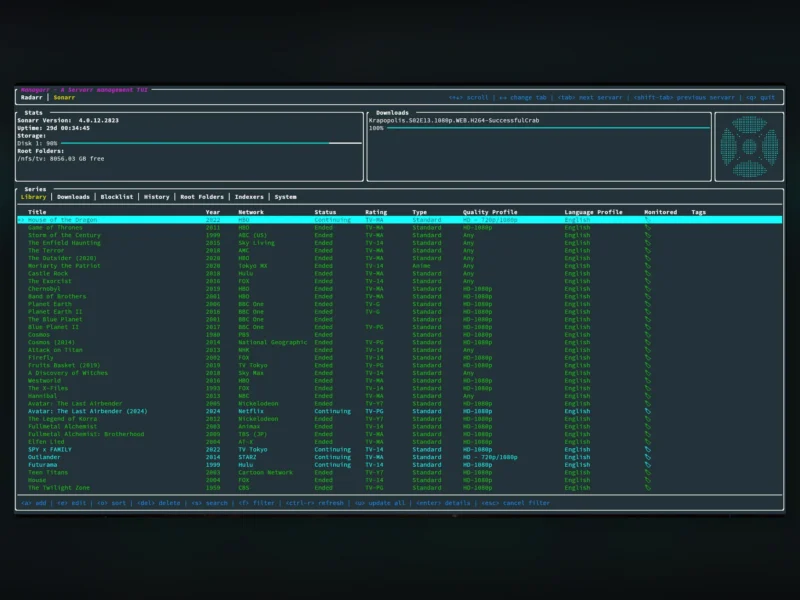
Managarr is a terminal user interface and matching command-line tool for the Servarr family of media servers — Radarr for films, Sonarr for TV, Lidarr for music and Readarr for books. Instead of opening four separate web UIs, you get one keyboard-driven interface that talks to each server’s API and exposes the parts you actually touch every day: the library, the download queue, the blocklist, indexers, root folders, tags and per-episode or per-season management.
It is written in Rust on top of ratatui, so it starts instantly and runs over SSH on a headless box or in a container next to your download stack. Every action available in the interface also exists as a CLI subcommand, which makes it scriptable — the same reason people reach for it on a seedbox where a browser window is not always an option. Whisparr, Bazarr, Prowlarr and Tautulli support is not implemented yet.
Key Features
- One interface for four Servarrs: Radarr, Sonarr, Lidarr and Readarr are supported today, each with its own library, downloads and blocklist views.
- Library browsing and detail views: browse films, series, artists or authors, then open a single item for its description, history, downloaded file information and credits.
- Full management from the terminal: add and delete media, edit entries, manage tags and root folders, and clear items out of the blocklist without leaving the keyboard.
- Manual and automatic searches: trigger an automatic search for a film, a season or a whole artist discography, or run a manual search when the automatic grab picked the wrong release.
- Refresh and disk scans: re-scan media, downloads and collections from the TUI or from a script when something on disk changed underneath the server.
- Logs, tasks and event queues: read the server log, browse the task list and inspect the event queues in place, which is usually the fastest way to find out why a grab failed.
- Scheduled task control: view and manually trigger the servers’ scheduled tasks instead of waiting for the next cron tick.
- Scriptable CLI: every TUI action has a CLI equivalent, so queue checks and bulk edits can go into shell scripts or monitoring jobs.
- Themes and multi-instance config: ships with Default, Dracula and Watermelon Dark themes, supports custom themes, and a single config file can hold several instances of the same Servarr (for example two Radarr servers).
Why Use Managarr
Running a Servarr stack usually means a browser tab per server, and each one reloads a fairly heavy web UI before it tells you anything. Managarr puts the same data behind a text interface that opens in under a second, renders over a slow SSH connection, and can be driven from the shell when you want the answer inside a script rather than on a screen. For a headless seedbox or a server you only reach over SSH, that is the difference between checking the queue in two seconds and spinning up a tunnel to a browser.
Typical Uses
- Checking the download queue across Radarr, Sonarr and Lidarr from a single SSH session.
- Adding a film or a series from the terminal right after reading about it, without opening a web UI.
- Wiring queue and library checks into shell scripts through the CLI.
- Managing a media server that has no desktop environment at all — a NAS, a VPS or a Docker host.
Getting Started
Managarr is distributed as a crate (cargo install managarr), a Docker image, Homebrew and Nix packages, a Chocolatey package for Windows and prebuilt release binaries. It needs a config.yml holding the host, port and API token of each Servarr instance; the Docker image expects that file mounted at /root/.config/managarr/config.yml and will not start without it. A demo container and a hosted demo site are published if you want to try the interface before pointing it at your own servers.
Licence
Not OSI open source. Managarr is released under the Managarr License 1.0, a source-available licence: the code can be read, modified and redistributed, and personal, educational and research use is free, but commercial use is prohibited without written permission and forks distributed separately must credit the original author. The repository badge still reads MIT, but the LICENSE file in the tree is the custom non-commercial one, which is what applies. There is no paid tier and no feature gating — the restriction is on commercial use, not on features.