SuggestArr
- Platform
- Docker Web Self-hosted
- Licence
- MIT Open source
- Source code
- github.com/giuseppe99barchetta/SuggestArr
Overview
SuggestArr watches what the people on your media server actually watch and turns that into requests, so the library keeps growing without anyone browsing for titles. It reads recent watch history from Jellyfin, Plex or Emby, asks TMDb (or an AI model) for similar titles, and pushes the picks to Seer – Jellyseerr or Overseerr – as requests you can approve automatically or by hand.
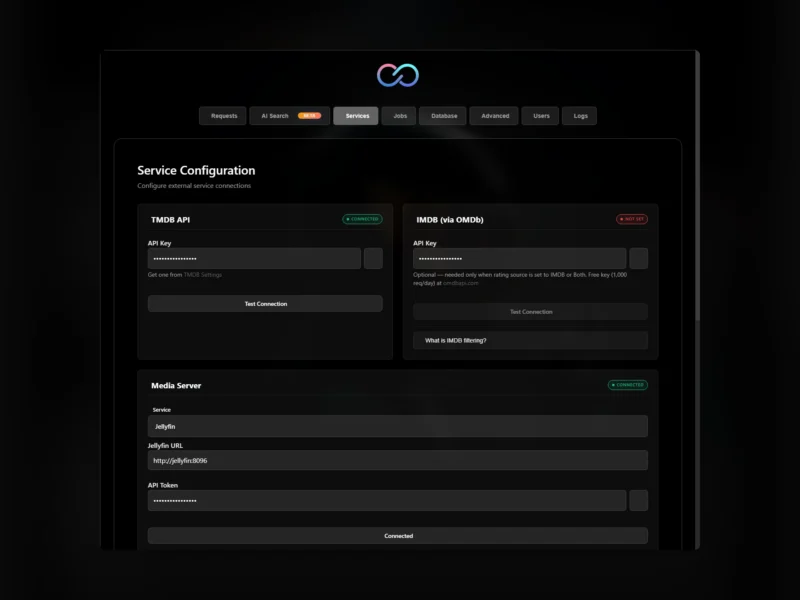
It is a Python application with a React web interface, shipped as a Docker image, and it stores its data in SQLite, PostgreSQL or MySQL. Setup happens in a browser wizard with connection tests per service, scheduling is managed from the same UI, and live logs are visible while jobs run. Everything about it is built for unattended operation: jobs can pause themselves while requests are still pending, and requests that nobody watched can be cleaned up again.
Key Features
- Three media servers as sources – Jellyfin, Plex and Emby watch history, plus optional per-user Trakt and Simkl history and imported watch history from CSV or manual TMDb titles with ratings.
- TMDb or AI recommendations – find similar titles through TMDb, or ask any OpenAI-compatible model (OpenAI, Ollama, OpenRouter, LiteLLM and friends) to suggest titles with a short reason for each pick.
- AI Search – describe what you want to watch in plain language and request the results in one click.
- Public list import – pull MDBList or Trakt lists as a scheduled job or as a one-off import.
- Request control – optionally approve every suggestion before it reaches Seer, pause jobs while Seer requests are still pending or while previous suggestions remain unwatched, and auto-decline stale Seer requests.
- Cleanup automation – remove old SuggestArr requests that nobody added to favourites, with a dry run by default.
- Filters that respect your subscriptions – skip titles already available on the streaming services in your country, plus quality and per-user filters.
- Web interface – setup, scheduling, users, requests and live logs in one place, with connection tests while you configure.
- Recaps and milestones – shareable summaries of what the server watched and what was added.
- Database choice – SQLite by default, or PostgreSQL/MySQL for a larger setup.
- Public REST API – a stable
/api/v1API with Swagger UI and an OpenAPI document for wiring SuggestArr into other tools.
Why Use SuggestArr
A media server only stays interesting if new things keep arriving, and the manual loop – notice a title, search for it, request it – is exactly the work people stop doing. SuggestArr automates the loop from evidence rather than from a wish list: it looks at what was actually watched, so the suggestions match the household’s taste instead of whoever set the server up. Because the requests still land in Seer, the usual approval and quality rules keep applying, and because of the pause and cleanup options it does not flood your download queue or leave a trail of unwatched requests behind.
Use Cases
- Keeping a family server fresh – each user’s own watch history drives their own suggestions, so the library grows along several tastes at once.
- Hands-off library growth – schedule a job and let it run weekly, with approval or automatic requests depending on how much you trust the filter.
- Avoiding double requests – skip titles already available on your streaming subscriptions, and pause while Seer still has work pending.
- Curated imports – turn an MDBList or Trakt list into Seer requests on a schedule.
- Shared servers – keep requests tied to the user who watched the source title, with cleanup for the ones nobody follows up on.
Requirements and Installation
Docker is the recommended route, and the container runs on linux/amd64 and linux/arm64. You need a TMDb API key, one of Jellyfin, Plex or Emby for watch history, and Seer (Jellyseerr or Overseerr) as the request target; an OpenAI-compatible LLM, Trakt and Simkl keys are optional extras. The compose file is short: the ciuse99/suggestarr:latest image (also published on GHCR), port 5000, and a single bind mount at ./config_files that holds the configuration. Start it with docker compose up -d, open port 5000 and follow the setup wizard, which tests each connection as you enter it. Reverse proxy, authentication, backups and source installs are covered in the project’s installation guide.
Related: Jellyfin is the media server whose watch history SuggestArr reads, Sonarr handles the series side once a request is approved, and Prowlarr keeps the indexers for that same download stack.