Jellyswarrm
- Platform
- Docker Web
- Licence
- GPL-2.0 Open source
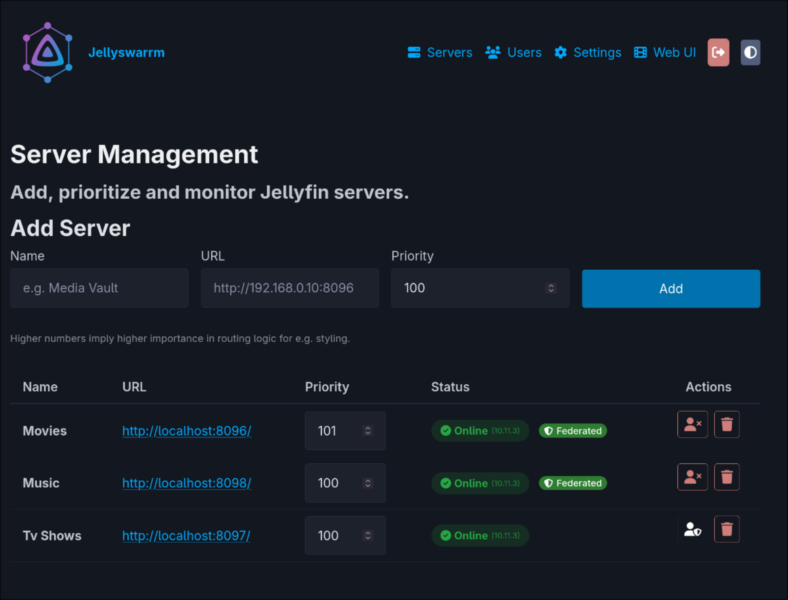
Overview
Jellyswarrm is a reverse proxy that presents several Jellyfin servers to you as if they were one. Instead of switching server entries in the Jellyfin client, you point the client at Jellyswarrm and it routes each request to the right backend server, merging libraries, Next Up and Recently Added into a single view. It is written in Rust with a React management UI, released under the GNU GPL v2, and ships as a Docker image.
The important design choice is transparency: Jellyswarrm answers the standard Jellyfin API, so existing Jellyfin clients and companion tools treat it as an ordinary server. Nothing needs patching to work through it, which also means apps built for Jellyfin keep working unchanged when the servers behind it move.
Key Features
- Unified library access — browse media from multiple Jellyfin servers in one interface, with results merged rather than listed separately.
- Direct playback — streams come from the original server, so Jellyswarrm does not re-encode or add a transcoding hop.
- User mapping — link accounts across servers so the same person keeps a consistent identity and history wherever the media lives.
- API compatibility — the proxy presents itself as a normal Jellyfin server, so official and third-party clients, plus tools like request managers, keep working.
- Server federation — users are synchronised automatically across the connected servers.
- Priority-based routing — assign each server a priority number and control which backend wins when several could serve a request.
- User page and management UI — a personal dashboard for credentials and libraries, plus an admin UI for servers, users and settings.
- Health endpoints —
/healthand/readyare exposed for container health checks and monitoring.
Why Use Jellyswarrm
Splitting a media collection across machines is common — an old box for films, a NAS for series, a friend’s server for the rest — but living with that split in the client is tedious. Jellyswarrm removes the switching cost while keeping the servers independent, so one machine can be upgraded, taken offline or shared without disturbing the others. Because it proxies rather than merges databases, each server keeps its own users, libraries and settings.
Use Cases
- Multi-host media setups — combine libraries from a home server, a NAS and a seedbox into one catalogue for the household.
- Shared or federated servers — give friends a single address that fronts several Jellyfin instances, with user mapping keeping accounts straight.
- Progressive migration — run the new server alongside the old one and move libraries gradually, without asking users to reconnect to a different server.
- Request-manager compatibility — keep existing Overseerr or Jellyseerr style request workflows pointed at one entry point while the storage behind it changes.
Requirements and Deployment
The documented path is a single Docker container from ghcr.io/llukas22/jellyswarrm:latest, listening on port 3000 with a persistent /app/data volume. Authentication to the management UI is set with JELLYSWARRM_USERNAME and JELLYSWARRM_PASSWORD environment variables, and you configure servers and user mappings at the /ui path. The same port serves a bundled Jellyfin web client at the root, so a browser can be pointed straight at it. Building from source needs Rust and Node.js: cargo build --release compiles the UI and embeds it into a self-contained binary. The project also ships a development environment that boots six local Jellyfin instances for testing.
Be aware that the project describes itself as early development. Unified browsing, playback, user mapping and federation work, but QuickConnect, websocket-dependent features such as SyncPlay, HLS audio and automatic bitrate adjustment are incomplete, and library management through the proxy is not implemented. Run it in front of servers you can still reach directly while it matures.
Related: Jellyfin for the media server itself.