Feishin
- Platform
- Linux macOS Windows Docker Web
- Licence
- GPL-3.0 Open source
- Website
- feishin.vercel.app
- Source code
- github.com/jeffvli/feishin
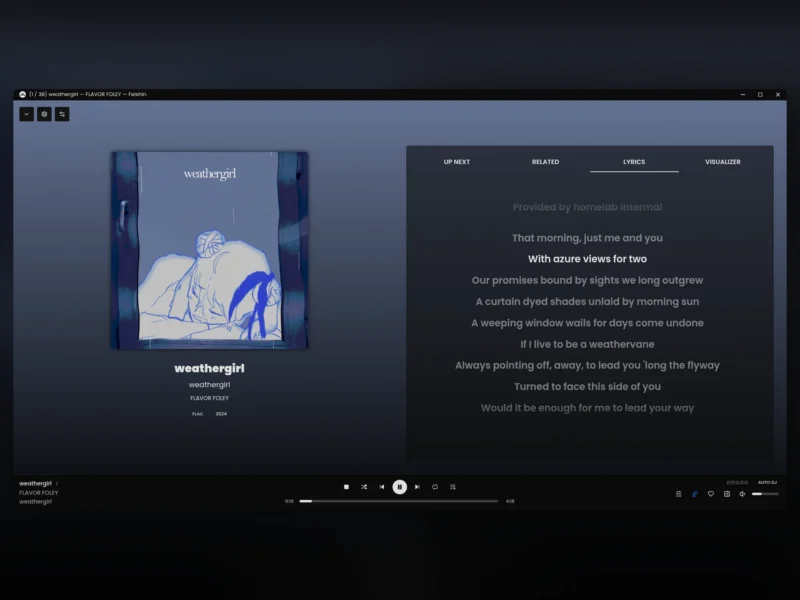
Feishin is a desktop client for a music server you already run, rather than a player that owns your library. Point it at Navidrome, Jellyfin or any OpenSubsonic-compatible server and you get the album, artist and playlist browsing those servers only half deliver in a browser, with a player bar, a queue and a full-screen now-playing view. It is an Electron application written in TypeScript and React, with either an embedded MPV process or a browser audio engine behind the play button, licensed GPL-3.0, and it is the maintained rewrite of the older Sonixd client.
What it does
- Two playback backends – the desktop build can play through MPV, which covers almost any codec, or through the web player engine that the browser build is limited to. You choose in Settings, and MPV has to be installed separately.
- Server browsing – album, artist, genre, folder and playlist views built from the server’s own metadata, with grid, table and compact card layouts.
- Smart playlists – a rule-based smart playlist editor for Navidrome, with the same drag-and-drop positioning as ordinary playlists.
- Lyrics – synchronised and unsynchronised lyrics in a panel beside the player, fetched by the desktop client or pulled from the server.
- Scrobbling – plays are scrobbled back to your server, so the listening history lives in one place.
- Themes and language – built-in light and dark themes including a glassy dark variant, custom themes loaded as JSON files from the Themes folder, and a translated interface.
- Desktop integration – minimise to tray, media-key handling and a setting to keep playback running in the background.
Requirements and deployment
Feishin is a client, so a server comes first: Navidrome, Jellyfin, or anything speaking the OpenSubsonic API, which covers Airsonic-Advanced, Ampache, Funkwhale, Gonic, Nextcloud Music and Supysonic. The desktop build ships for Windows as an installer, macOS as Apple Silicon and Intel disk images, and Linux as AppImage or .deb, with a Flathub package as the easy route. A first run asks for the path to your MPV binary and then for the server URL, including protocol and port. There is a server-side option too: a ghcr.io/jeffvli/feishin container serves the same interface on port 9180 and can be preconfigured with SERVER_TYPE, SERVER_URL, SERVER_LOCK, a REMOTE_URL for share links and PUBLIC_PATH for subpath hosting; the web build carries optional Umami analytics that ANALYTICS_DISABLED=true switches off. The current release is 1.17.0, published in September 2026.
Where it fits
The alternative to Feishin is usually the web interface your server already has, and it is worth saying plainly that Navidrome’s and Jellyfin’s own UIs are perfectly usable and need nothing installed. Feishin earns its place on a desktop or laptop: a native window, MPV’s codec coverage, a real now-playing screen and a tray icon, while the server stays where it is. If you have no server yet, start there – Navidrome is the lightest way in, and Ampache or Funkwhale are the other listed options with a Subsonic-compatible API to point at. If your music is a local folder rather than a server, a library player such as Strawberry Music Player or Clementine fits the model better; if you would rather search and stream than browse a library, Nuclear is the streaming-first counterpart.