Audacious
- Platform
- Linux Windows macOS
- Licence
- BSD-2-Clause Open source
- Website
- audacious-media-player.org/
- Source code
- github.com/audacious-media-player/audacious
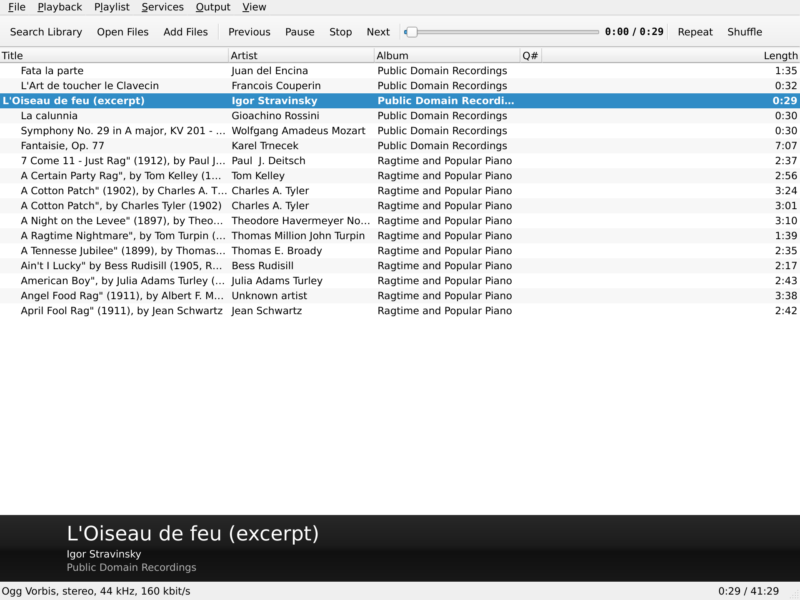
Overview
Audacious is a lightweight audio player for people who want their music to play without the player itself becoming the centre of attention. It is a direct descendant of XMMS, which in turn carried on the Winamp 2 tradition on Linux, and that lineage shows in the way it works: open a folder, drag files onto a playlist, press play. The project describes its goal plainly — it plays your music how you want it, without stealing away your computer’s resources from other tasks.
The current release is 4.6.2, published on 19 October 2026. Audacious builds on Qt 6 by default and carries a GTK 3 interface as a fallback, so you choose the toolkit you prefer at build time; the source can be compiled in a pure-Qt mode, a pure-GTK mode, or with neither toolkit as a headless player driven by its command-line tool. The application is split into two source packages, audacious and audacious-plugins, and it is free software under the BSD 2-Clause licence. The licence file notes that many of the bundled plugins are under different licences of their own.
It runs on Linux, BSD derivatives, macOS and Windows. Since version 4.4 the Windows build requires 64-bit Windows 10 or later; Audacious 4.3.1 remains the choice for 32-bit Windows and Windows 7, and 3.10.1 was the last release to support Windows XP.
Key Features
- Playlists first — drag and drop folders or individual files, build and edit playlists by hand, queue tracks, and search by artist or album across the whole collection.
- Three interfaces, including Winamp skins — the modern Qt interface, the GTK interface, and a Winamp Classic interface that loads Winamp 2 skins. Version 4.6.2 brought the Qt Winamp interface up to feature parity with the GTK one, adding an advanced skin selector in the settings window and support for installing a skin by dropping its file onto the main window.
- A plugin for almost everything — album art, lyrics lookup, song information, playback history, playlist manager, search tool, file browser, status icon, global hotkeys, desktop notifications and MPRIS 2 media controls are all plugins, and the source tree holds more than seventy of them.
- Wide format coverage — MP3 through mpg123, Ogg Vorbis, Opus, FLAC, WavPack, AAC, WAV and other formats through libsndfile or FFmpeg, plus trackers and game-audio formats such as MOD, OpenMPT, SID, PSF, XSF, VTX and AdLib through dedicated input plugins.
- Graphical equalizer and audio effects — a ten-band equalizer, the Crystalizer, crossfade, silence removal, voice removal, stereo tools, a compressor, LADSPA effect hosting, echo and speed or pitch adjustment.
- ReplayGain and gapless playback — loudness normalisation and gapless album playback, with resampling handled by libsamplerate or SoX.
- Visualisations — VU meter and several spectrum analysers, including Blur Scope, a Cairo spectrum and OpenGL spectrum views.
- Discs, streams and scrobbling — audio CD playback, internet radio through StreamTuner, Ampache streaming, and scrobbling to Last.fm and Libre.fm through the Scrobbler 2 plugin.
- Scriptable control — the
audtoolcommand-line utility can query and drive a running instance, and MPRIS 2 exposes it to desktop media widgets, media keys and phone remotes.
Interfaces and Skins
The choice of interface is not cosmetic. The Qt interface is the default and looks native on a KDE or Qt desktop; the GTK interface fits GNOME and other GTK environments; the Winamp Classic interface reproduces the familiar Winamp 2 layout and its skin format, which is the reason a generation of users stayed with the player in the first place. Users can switch interface at runtime without losing the playlist, and the 4.6 series added native Wayland support to both the GTK and Qt interface builds. A headless build is possible as well, controlled entirely through audtool — useful on a machine that only needs to feed an audio output.
Why Use Audacious?
Because it is small, fast and predictable. Audacious starts in a moment, idles at a fraction of the memory of a library-centric player, and keeps playing while the rest of the machine does heavy work. There is no music library database to build before the first track plays, no background indexing service, and no dependency on a browser engine or a desktop runtime. A folder of files is a valid playlist.
It is also unusually broad: the same player that handles MP3 and FLAC also opens SID tunes, PlayStation sound formats and Amiga modules, which is why it is a common recommendation for retro-computing and chiptune collections. The Winamp skin support is a practical advantage rather than nostalgia — thousands of skins exist, and the player can look however you want it to look.
If you want an integrated media library with cover-flow art, podcasts and device sync, a library-based player such as Rhythmbox or Strawberry will suit you better. If you want a fast, configurable player that plays nearly any audio file and stays out of the way, Audacious is one of the best answers on Linux and BSD.
Use Cases
- Older and low-powered hardware — a player that runs comfortably on machines where larger media applications struggle.
- Winamp refugees — the Winamp Classic interface and its skins bring back the exact workflow, with modern codecs underneath.
- Chiptune and game-audio collections — SID, PSF, XSF, VGM-adjacent and tracker formats play alongside ordinary music files.
- Bit-perfect and ReplayGain listening — configurable output plugins, gapless playback and loudness normalisation without a server stack.
- Headless or remote control — drive playback through
audtoolor MPRIS from a script, a media key or a desktop widget. - Desktop-agnostic setups — a Qt build on KDE, a GTK build on GNOME, or a Winamp-styled window anywhere else.
Getting Started
On most Linux distributions the player is packaged as audacious with the plugins as audacious-plugins; on Debian and its derivatives, apt install audacious audacious-plugins is enough. Windows users can take the official installer or the portable ZIP from the download page, macOS users can install it with Homebrew, and BSD users will find it in ports. Flatpak and Snap packages exist, but the project states that it neither provides nor supports them, so bugs should be reproduced with an ordinary installation first.
Once it starts, open the Playlist menu and add a folder, or drag files onto the window. Sound settings live under Output in the settings window: choose the output plugin that matches your system — PipeWire, PulseAudio, ALSA, JACK, SDL, sndio or OSS — and the equalizer and effects are enabled from the same place. The Qt interface is the default; switch interface under Appearance, and load a Winamp skin from there or by dropping the skin file onto the window. audtool --help lists the commands available for scripting.
Alternatives
Audacious sits between bare-bones command-line players and full music library managers. Strawberry Music Player is the closest match for people who want a library, cover art and a Qt interface with a similar heritage. Rhythmbox is the GNOME alternative, with podcasts, internet radio and DAAP sharing built in, and Elisa is the KDE take on a clean, library-based player. For video as well as audio, mpv is a minimal keyboard-driven option. All of them are free software and all of them are catalogued in this directory.