Elisa
- Platform
- Linux Windows Android
- Licence
- LGPL-3.0-or-later Open source
- Website
- apps.kde.org/elisa/
- Source code
- invent.kde.org/multimedia/elisa
Overview
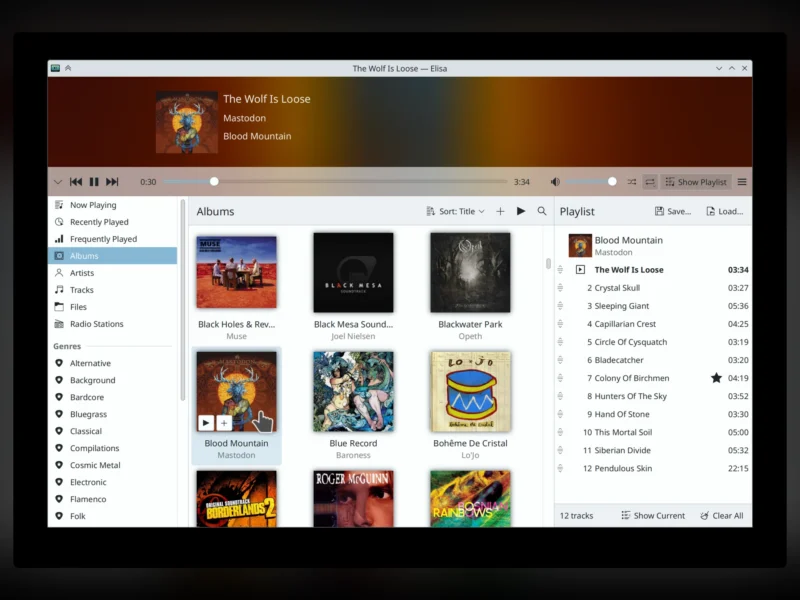
Elisa is a music player from the KDE community, built around a deliberately modest promise: play the music you already own, simply and pleasantly. It began in 2017 as Matthieu Gallien’s project and is now part of KDE’s regular release service, shipping on the same cadence as Plasma and the rest of KDE Gear — version 26.08.3 arrived on 5 November 2026. The application is C++ with a QML front end and is licensed LGPL-3.0-or-later. On Linux it comes from the distribution’s own repositories or as a Flatpak, and KDE also publishes builds for Windows and Android, so one library follows you between a desktop, a laptop and a phone. Where audiophile players expose every knob, Elisa hides them: open it and it shows what you have — by genre, artist, album or track — with album art carrying most of the weight, and internet radio and playlists one click away.
Key Features
- Four library views — browse the collection by genre, artist, album or track, with a persistent play queue and a Now Playing panel that keeps the current album visible.
- A local index, not a rescan — folders are scanned into a private SQLite database, so browsing stays immediate on large libraries and newly added files are picked up by the background indexer instead of by re-reading the disk.
- Swappable playback engine — audio goes out through either VLC or Qt Multimedia depending on what the platform provides, so codec coverage follows the multimedia stack the system already has.
- Broad format support — FLAC, MP3, Ogg Vorbis, Opus, AAC/M4A, WAV, WMA, Musepack, Speex and RealAudio, plus M3U and PLS playlist files in the Flatpak build.
- Internet radio — online stations sit in the same interface as local music, so a stream and an album are one search apart.
- Saved playlists — build playlists by dragging tracks in, reorder them, and keep them between sessions.
- Lyrics display — embedded or sidecar lyrics appear for the current track, instead of needing a separate window or a browser tab.
- Party Mode — collapses the interface down to album art and transport controls, which is what you want on a TV, a projector or a second monitor at a gathering.
- Desktop integration — MPRIS2 support means media keys, the Plasma media applet and other desktop controls drive playback; on Plasma it follows the full KDE colour scheme and elsewhere falls back to standard light and dark modes.
- UPnP/DLNA browsing — builds compiled with UPnP support list music from a DLNA server such as a NAS alongside the local library.
- Cross-platform builds — the same application ships for Linux, Windows and Android, with the phone build also used on Plasma Mobile.
Why Use Elisa?
Most desktop music players grew up around a file-tree metaphor: you manage the folders, then you manage the player. Elisa starts from the other end — the library is already indexed, the views are already there, and the interface mostly gets out of the way. That suits someone who wants their own collection playable in two clicks, rather than someone who wants to tag, rip and transcode. It also behaves like a proper KDE application: it honours the colour scheme, exposes its playback over MPRIS2, installs from the same repositories as the rest of the desktop, and never asks for an account, a subscription or a network connection just to play a file. Being LGPL-3.0-or-later, it can be packaged freely by distributions and linked into other free-software projects. And because the same codebase ships for Windows and Android, a library organised once on Linux stays usable away from it.
Use Cases
- Playing a local FLAC or MP3 collection on a KDE Plasma desktop without adding a second indexing service.
- Keeping an identical player on a Linux laptop and a Windows machine, so shortcuts and layout do not change with the OS.
- Listening to internet radio in the same window as local music instead of a separate browser tab.
- Running Party Mode full screen on a TV or projector for background music with album art.
- Browsing a music library stored on a NAS over UPnP/DLNA when the files are not on the machine itself.
- Shipping a simple player on a low-maintenance desktop where a full media centre would be overkill.
Getting Started
On Debian and Ubuntu, sudo apt install elisa; on Fedora, sudo dnf install elisa; on Arch, sudo pacman -S elisa. The Flatpak build is published on Flathub as org.kde.elisa (flatpak install flathub org.kde.elisa), and KDE publishes Windows and Android builds from the application page at apps.kde.org/elisa. The first launch indexes the usual music folder; further folders are added in the settings dialogue, and Elisa scans them in the background so you can start playing as soon as the first tracks land. On KDE Plasma it inherits the desktop’s theme, icons and media controls with no configuration at all.
Alternatives
- Strawberry — a Clementine fork aimed at audiophiles, with tag editing, CD ripping and high-resolution output; the better choice when you want to manage the collection as well as play it.
- MPV — a keyboard-driven media player with no library at all; pair it with a file manager or a terminal when you want to play a folder rather than browse one.
- Rhythmbox — GNOME’s library player, adding podcasts and DAAP sharing on top of local music.
- Audacious — a Winamp-style player with a tiny footprint, built for playlists and folders rather than a managed library.