Mopidy
- Platform
- Linux macOS
- Licence
- Apache-2.0 Open source
- Website
- mopidy.com
- Source code
- github.com/mopidy/mopidy
Overview
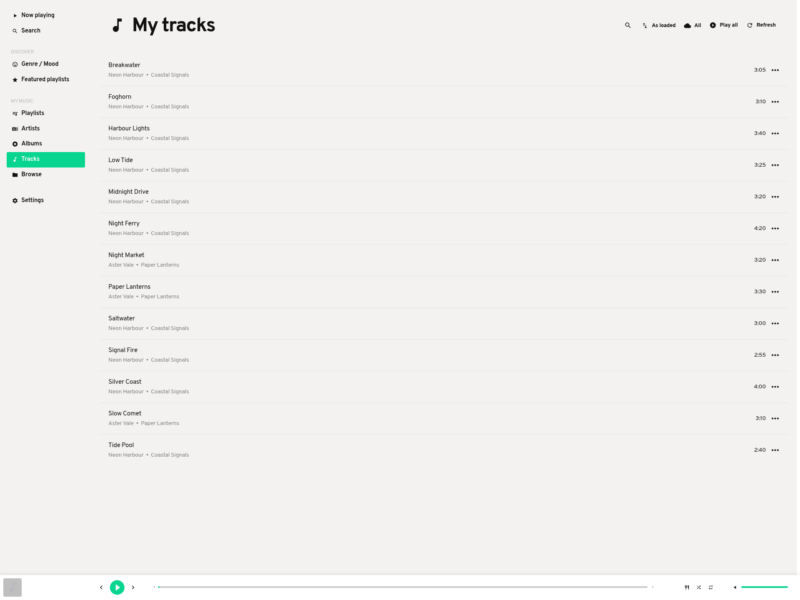
Mopidy is a music server written in Python: it owns the music library, the queue and the playback, and whatever you actually touch – a browser tab, a phone, a terminal, a desktop client – connects to it as a separate program. Stein Magnus Jodal started it in 2009 and it is now developed by the Mopidy organisation on GitHub; the current release is 4.0.5, published on 16 October 2026, under the Apache License 2.0.
Mopidy is deliberately just a server. Out of the box it plays music from the local disk and Internet radio, and it runs its own web server on port 6680; install the Mopidy-MPD extension and it also speaks the Music Player Daemon protocol on port 6600, so the population of existing MPD clients works against it. Everything else is an extension: music sources (Spotify, SoundCloud, TIDAL, YouTube, Bandcamp, the Internet Archive, Jellyfin, Subsonic-compatible servers, podcasts, radio directories) and front ends (Iris, the MusicBox web client, a mobile remote, an API explorer) are separately installed packages.
That split is the point. The server sits next to the speakers – a small home server, a NAS, a Raspberry Pi wired to a DAC – and several people can search, queue and skip at the same time from their own devices, because the state lives in the server rather than in one app. The project’s own summary is blunt about it: Mopidy is an extensible music server written in Python, and the extension index is the real product surface.
Key Features
- Server and clients are separate programs – the library, queue, playing track and volume belong to the server; web clients, MPD clients, phones and scripts all attach to the same session, so a household or an office can queue music from several devices at once.
- Backends are extensions – local files and Internet radio ship with the core; Spotify, SoundCloud, TIDAL, YouTube, Bandcamp, the Internet Archive, Jellyfin, Subsonic-compatible servers, podcasts and station directories arrive as installable backends, and each one is maintained on its own schedule.
- A searchable local library – the Mopidy-Local backend scans your archive ahead of time, so you can search it and browse by album, artist, composer, performer, genre and year instead of walking folder trees.
- MPD compatibility – Mopidy-MPD turns the server into an MPD server, which is what makes ncmpcpp, mpc and the long tail of phone and desktop MPD clients work without a Mopidy-specific build.
- JSON-RPC over HTTP – the built-in web server exposes Mopidy’s whole model over JSON-RPC, and the extension index includes an API explorer for calling it directly; Python and JavaScript APIs are the documented ways to write your own front end.
- Built for small hardware – a Python 3 application on top of GStreamer, packaged for Debian and derivatives, Arch (AUR), PyPI and Homebrew, and documented for Raspberry Pi boards with a HiFiBerry-class DAC or a Pimoroni Pirate Audio add-on.
- One configuration file –
mopidy.confholds the core settings plus a section per installed extension, so a headless server is configured as text that can be versioned and copied to a new machine.
Requirements and Installation
Mopidy 4 needs Python 3 and GStreamer 1.x with decoders for the formats you play; on Debian 12 that means python3-gi, gir1.2-gstreamer-1.0, gir1.2-gst-plugins-base-1.0 and the gstreamer1.0-plugins-* packages. Linux and macOS are the documented targets – the download page lists PyPI, the project’s own Debian/Ubuntu and Raspberry Pi apt repositories, and Homebrew – and there is no official Windows build.
There is no GUI to install: the server reads ~/.config/mopidy/mopidy.conf, starts with the mopidy command and is normally run as a systemd service. A minimal setup is the core package plus Mopidy-Local for a searchable library, Mopidy-MPD and/or Mopidy-Iris for control, and an audio output on the host; mopidy local scan builds the library index. Because it is a server, it is happiest on a machine that stays on and stays connected to the speakers.
Alternatives
- Music Player Daemon – the older C++ server/client design that Mopidy speaks to through Mopidy-MPD: leaner and without a Python or plugin layer.
- Navidrome – a self-hosted streaming server with a built-in web player and Subsonic API compatibility, aimed at browsing a large collection from phones.
- Jellyfin – a full media server whose music library is one part of it; heavier, but it brings video and native apps for every platform.
- ncmpcpp – a terminal MPD client, a natural pairing once Mopidy serves MPD on the local network.