cmus
- Platform
- Linux macOS
- Licence
- GPL-2.0 Open source
- Website
- cmus.github.io/
- Source code
- github.com/cmus/cmus
Overview
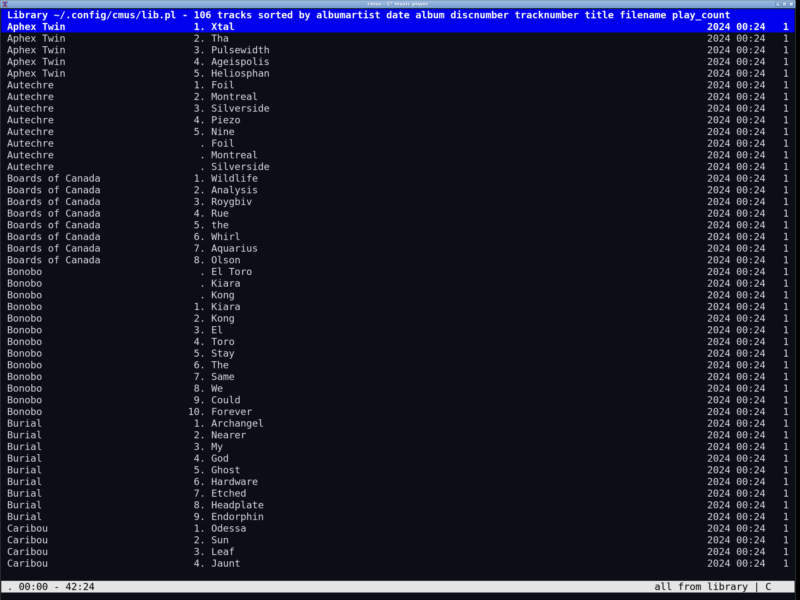
cmus (the C* Music Player) is a console music player for Unix-like systems: a full-featured player that lives entirely inside a terminal window and is driven from the keyboard. It was started by Timo Hirvonen in 2004 and is maintained today by a small group of contributors on GitHub. The design goal has not changed in twenty years – start instantly, use very little memory, and stay out of the way while you work.
The current release is 2.13.0, published on 28 October 2026. cmus is free software under the GNU General Public License version 2, written in C, and it draws its interface with ncurses. Everything it needs is in the terminal: no toolkit, no tray icon, no background daemon. Because the whole interface is text, it behaves the same over SSH, inside a tmux session or on a plain virtual console.
Key Features
- Views for how you think about a library – a browsable tree of artist and album, a sorted list of every track, hand-built playlists, a play queue and saved filters, each one keystroke apart.
- Live filtering and search – type a filter against any tag, for example
album="Spaces", and the current view narrows as you type; search follows the vi and less conventions, including/andn. - Instant startup at scale – the library, playlists and filters are stored on disk, so a collection of thousands of tracks opens immediately instead of rescanning at launch.
- Gapless playback and ReplayGain – albums play without a gap between tracks, and ReplayGain tags are applied with configurable preamp and limiter settings.
- Wide format coverage – Ogg Vorbis, MP3, FLAC, Opus, Musepack, WavPack, WAV, AAC, MP4 and audio CDs natively, plus everything ffmpeg can decode (WMA, APE, MKA, TTA, SHN), tracker formats through libmodplug, and BASS for the rest.
- Choose your sound server – output plugins cover PulseAudio, ALSA, OSS, JACK, RoarAudio, sndio, CoreAudio, libao, aRts, Sun and WaveOut, so the same player fits a headless server and a desktop alike.
- Scriptable and remote-controllable –
cmus-remotetalks to the running player over a UNIX socket, which makes it easy to bind media keys or drive playback from a script. Any command can be bound to a key, and external commands can run against the selected files. - CUE sheets and compilations – single-file albums with a CUE sheet split into tracks, and multi-artist compilations stay grouped the way they were authored.
- Stays in its corner – modest memory use, no notification popups, and a status line that can be handed to a status bar program or a scrobbler such as Last.fm or Libre.fm.
Requirements and Installation
cmus needs a terminal with ncurses and one supported audio output; there is no graphical session requirement, so it runs on a server over SSH as happily as on a laptop. Packages exist for Debian and Ubuntu (apt install cmus), Fedora and RHEL through RPMFusion (dnf install cmus), Arch (pacman -S cmus), macOS through Homebrew (brew install cmus) and Android through Termux. The project also supports FreeBSD, NetBSD, OpenBSD and Cygwin, and building from source needs pkg-config, a C compiler and the ncurses development headers.
The first run creates a library file under ~/.config/cmus. Add music with :add /path/to/music and the player remembers it next time; the bundled manuals (man cmus-tutorial and man cmus) document the key bindings in full.
Alternatives
- Audacious – a lightweight graphical player that still loads Winamp 2 skins, for when you want a window rather than a terminal.
- Clementine – a full graphical library manager with playlists, internet radio and device sync.
If the music lives on a server and you want a client on each machine, cmus pairs naturally with a client/server daemon such as Music Player Daemon, driven from a separate terminal client.