ncmpcpp
- Platform
- Linux macOS
- Licence
- GPL-2.0 Open source
- Website
- rybczak.net/ncmpcpp/
- Source code
- github.com/ncmpcpp/ncmpcpp
Overview
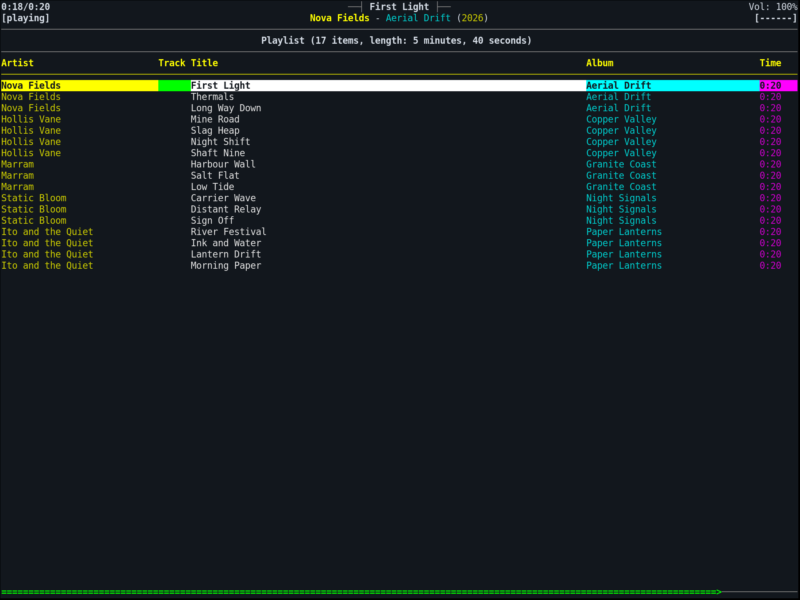
ncmpcpp – the NCurses Music Player Client (Plus Plus) – is a full-screen terminal front end for Music Player Daemon. Where the daemon owns the library and the audio device, ncmpcpp is the part you actually sit in front of: a browser, a queue, a search engine and a tag editor drawn in the terminal, driven from the keyboard and readable over SSH or in a tmux pane.
It was written by Andrzej Rybczak as a feature-rich answer to ncmpc, the minimal client that ships with MPD, and it is free software under the GNU General Public License version 2. The latest release is 0.10.1. The project is explicitly in maintenance mode: the author still uses it daily and fixes serious bugs and build breakage, but no substantial new features are planned, so what you get is a stable tool rather than a moving target.
Because it is a client, ncmpcpp needs nothing but a reachable MPD server – a daemon on the same machine, on a NAS in the next room or on a home server across the network. Several clients can be attached at once, and they all see the same queue.
Key Features
- Every view in one program – playlist, file browser, media library, search engine, playlist editor, lyrics, artist info, server info, a clock and a visualizer, each one keystroke away, with the last screen remembered between launches.
- Search engine with real expressions – search across the library by artist, album, title or any tag, combine terms, and save the useful ones as filters rather than retyping them.
- Tag editor – edit tags on the files themselves from inside the client when ncmpcpp is built with taglib, including a MusicBrainz lookup to fill in the blanks.
- Media library browser – a three-pane artist, album and song view over MPD’s database for collections that are too large to scroll through as a plain file listing.
- Music visualizer – a frequency spectrum display in the terminal when compiled with fftw and fed from an MPD FIFO output, with several spectrum and waveform styles.
- Lyrics and artist info – fetch lyrics and artist biographies over HTTP with curl, and read them without leaving the player.
- Alternative interface – two layouts: the classic column-based look, and an “alternative” mode with a centred now-playing header, progress indicators and per-column colours.
- Configurable down to the key – every binding, colour pair, column set, sort order and startup screen is set in
~/.ncmpcpp/config, so it fits a tiny SSH session as well as a 4K terminal. - Works outside the music directory – browse and add files from anywhere the daemon can reach, rather than only from inside MPD’s configured music directory.
Requirements and Installation
You need a running MPD server plus ncurses, readline and Boost to build it; curl adds lyrics and Last.fm data, fftw the visualizer and taglib the tag editor. Packages are widely available – apt install ncmpcpp on Debian and Ubuntu, pacman -S ncmpcpp on Arch, brew install ncmpcpp on macOS – and the source builds with the usual autotools sequence (autoreconf -fiv, ./configure, make, make install).
Configuration lives in ~/.ncmpcpp/config: point mpd_host and mpd_port at the daemon, set mpd_music_dir for local tag editing, and pick a layout. It needs no display server and no daemon of its own, so it runs identically on a laptop, a headless server over SSH, or inside a terminal multiplexer next to your work.
Alternatives
- cmus – a self-contained terminal player: the same keyboard-driven feel with its own playback engine, so no server daemon is needed.
- Strawberry – a Qt desktop player with a graphical library manager, for people who would rather use a mouse than a key map.
Among MPD clients, ncmpc is the deliberately minimal sibling and Sonata or Ymuse the graphical options; ncmpcpp sits in the middle, offering far more views than ncmpc without a toolkit. All of them drive the same daemon, so a client can be swapped without touching the server or the library.