AirPipe
- Platform
- Linux macOS Windows Docker Web
- Licence
- MIT Open source
- Website
- airpipe.sanyamgarg.com
- Source code
- github.com/Sanyam-G/Airpipe
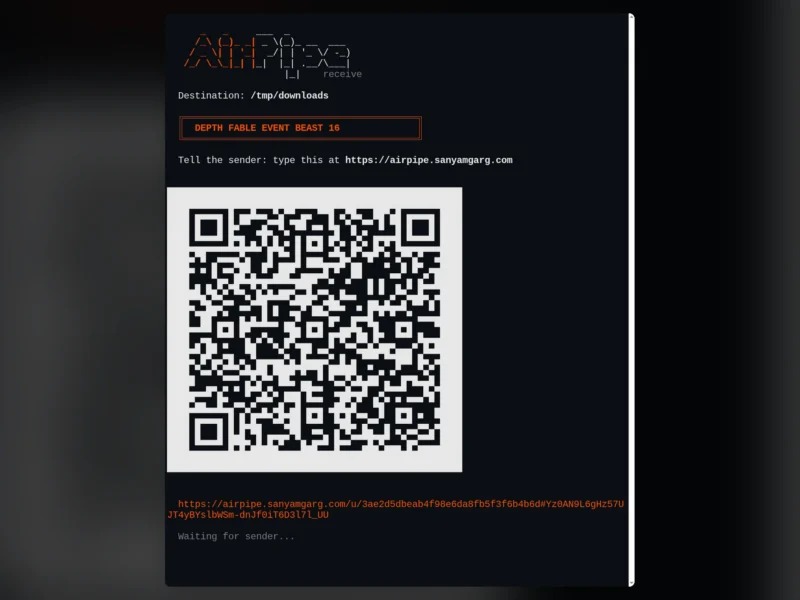
AirPipe moves a file between any two devices with one passphrase instead of an account, a cloud drive or an upload link. You run airpipe send report.pdf on the machine holding the file, it prints four words and a number such as DUSK PINE ECHO GUST 42, and the receiver types that into the website, scans the QR code or runs airpipe download DUSK PINE ECHO GUST 42. The file is encrypted before it leaves the sender and streams directly to the receiver, so nothing in the middle is readable.
Peer-to-peer first, relay only as a fallback
Both devices open an outbound connection to a relay, which introduces them; the two ends then trade public addresses and candidate routes until they find a path that punches through both NATs. Once that path is open, the bytes flow device to device and the relay steps out. If the network is too strict for that, the transfer falls back to forwarding through the relay — still encrypted with the key derived from the passphrase, so the relay only ever handles ciphertext.
- Direct transfer — WebRTC data channel, no intermediate storage at all.
- Mailbox mode — if the receiver is offline, the relay holds the encrypted file for 10 minutes and they collect it with the same passphrase.
- Multiple files and folders —
airpipe send file1.txt photos/zips folders and sends them as one payload. - Receive mode —
airpipe receive ./downloadswaits for an incoming send and prints a QR code to show the other device. - Browser to browser — the
/livepage on a relay gives a passphrase and QR with nothing to install on either side.
Command line and browser, either side
The CLI installs from a one-line script, Homebrew, or go install, and ships for Linux, macOS and Windows on amd64 and arm64. It self-updates with airpipe update. Either end of a transfer can be the terminal or the browser, so a headless server can hand a file to a phone without either side sharing a storage service.
Self-hosting
The relay is a single Go binary of roughly 15 MB with the web UI and install script bundled, published as docker run -p 8080:8080 ghcr.io/sanyam-g/airpipe-relay. Point clients at it with AIRPIPE_RELAY or --relay. Optional settings cover allowed origins, per-minute rate limits, a maximum mailbox upload size, mailbox expiry, a minimal UI, public statistics and trust of proxy headers when it runs behind a tunnel.
Encryption and what the relay sees
Files use NaCl secretbox (XSalsa20-Poly1305, 256-bit key), and the direct path also runs inside WebRTC’s DTLS. A passphrase is four words from a 1024-word list plus a number from 10 to 99 — around 10^14 possibilities — run through PBKDF2-HMAC-SHA256 with 600,000 iterations and split with HKDF into the encryption key and room tokens. The relay sees room tokens, both IP addresses, file sizes and timing, and never the key; whoever runs a relay could in principle guess passphrases offline against a token, which is why a relay you run yourself is the strongest option.
Licence
MIT. Written in Go, with a pion/webrtc and gorilla/websocket relay and a tweetnacl.js browser client. Version 5 changed how a passphrase becomes a key, so v5 and v4 clients cannot exchange files — update both ends.