Cloud Commander
- Platform
- Linux macOS Windows Docker Android
- Licence
- MIT Open source
- Website
- cloudcmd.io
- Source code
- github.com/coderaiser/cloudcmd
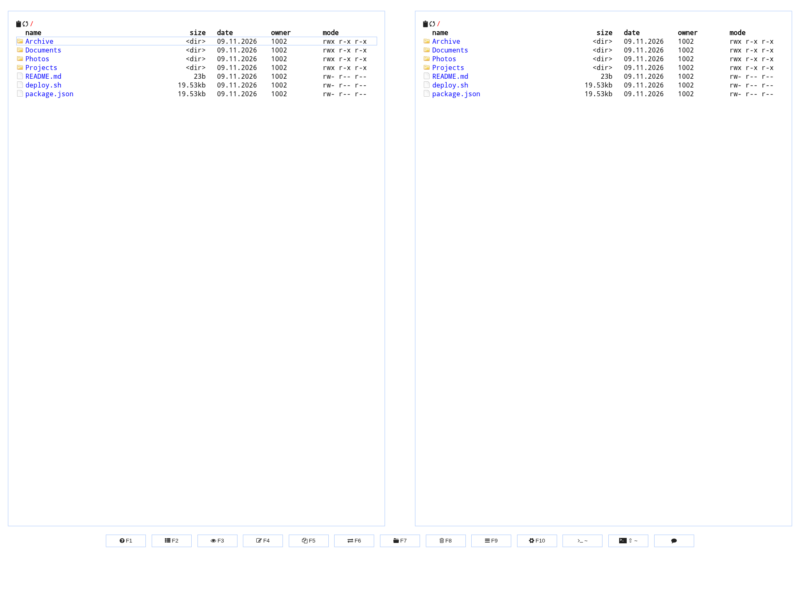
Cloud Commander is a file manager for the web written in JavaScript on Node.js: two classic commander-style panels, a built-in text editor and a shell console, served to any browser. Run one command on a server and you can browse directories, edit files and run commands from a laptop, phone or tablet without installing a client. It is published under the MIT licence and works on Windows, Linux, macOS and Android through Termux.
Key Features
- Two classic panels — a left/right view of the same storage, so copying and moving files between directories is a two-panel operation rather than a modal dialogue; a single-panel mode is available when screen space is tight, and the layout adapts to the screen size.
- Built-in editors — text editing with syntax highlighting in the browser, so a config change or a quick patch does not need a separate IDE or an SSH session.
- Console — a terminal wired to the host’s default command line, which lets you run programs on the server from the same interface you use to browse it.
- Archive handling — pack folders into
ziportar.gzand extractzip,tar,gz,bz2,tar.gzandtar.bz2in place. - Optional authorisation — off by default; switch it on with a username and password (
--auth --username --password) to keep a server exposed to the internet private. - Configurable on the command line — the root directory, URL prefix, port, editor, menu style, packer, console visibility and whether dot files are shown are all start-up flags, and the chosen configuration can be saved with
--save. - Keyboard-driven — function-key shortcuts across the bottom of the screen (F1–F10) for copying, moving, creating, deleting, editing and opening the console, plus a config dialogue on F10.
- Runs nearly anywhere — an npm package for any Node.js host, and multi-architecture Docker images for amd64 and arm64 (glibc and Alpine flavours).
Running it
Install Node.js, then npm i cloudcmd -g and start it with cloudcmd; the interface comes up on port 8000 and the served directory can be fixed with --root. The Docker route is a single command, for example docker run -it --rm -v ~:/root -v /:/mnt/fs -w=/root -p 8000:8000 coderaiser/cloudcmd, which is also how it is often deployed: as a lightweight browser front end for a home server or a container host. It can additionally be mounted as Express/Socket.IO middleware inside a larger Node.js application.
Where it fits
Cloud Commander is for people who administer a machine and want file access plus a shell in one browser tab — a NAS, a VPS, a Raspberry Pi or a Docker host. It is deliberately not a collaborative file-sharing service: there are no share links, per-user quotas or storage backends. If you want a multi-user web file manager with links and granular roles, FileBrowser Quantum or a similar tool is the better fit; if you want a fast two-panel view of a server you already run, Cloud Commander is the smaller and older option.