FileBrowser Quantum
- Platform
- Linux macOS Windows Docker
- Licence
- Apache-2.0 Open source
- Website
- filebrowserquantum.com
- Source code
- github.com/gtsteffaniak/filebrowser
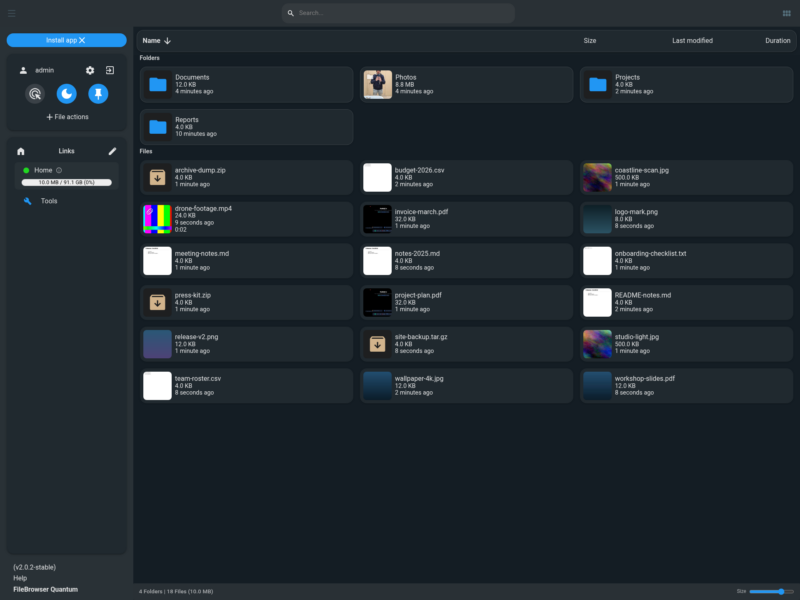
FileBrowser Quantum is a self-hosted web file manager: a single Go binary that turns folders on your server into a fast, searchable browser interface for viewing, uploading, editing and sharing files. It is a heavily rewritten fork of the original File Browser project that keeps the small footprint while adding multiple sources, an indexed search, single sign-on and a modern responsive interface.
Key Features
- Multiple sources — expose several directories or mounts at once, each with its own display name, quota and include/exclude rules, instead of being limited to one root folder.
- Indexed search — results update as you type and can be filtered by name, size and file type, while the listing refreshes live as files change on disk.
- Thumbnails and previews — cover art for audio, frame previews for video, document thumbnails, 3D model previews and full-screen media viewing, plus a built-in editor for text and code files.
- Flexible sign-in — password authentication with 2FA and passkeys, and OIDC, LDAP, JWT or reverse-proxy header methods for an existing identity provider.
- Share links — publish a file or folder with an expiry date, optional password, anonymous or per-user access and separate view, edit and upload permissions.
- Path-scoped permissions — grant users or groups rights on specific sources and sub-paths rather than all-or-nothing access to the whole library.
- WebDAV access — mount the same files as a network drive from Windows, macOS, Linux, rclone or a mobile WebDAV client.
- Administration tools — activity log, storage quotas, duplicate-file finder, file-size analyser, file watcher, and archive creation and extraction.
- API and Swagger — long-lived API tokens and a browsable API reference at
/swaggerfor scripting and integrations. - Branding — themes, custom CSS, a custom name and logo, and a translated interface.
Why Use FileBrowser Quantum?
Self-hosted file access usually means choosing between a minimal browser that shows one directory and a full collaboration platform that wants its own database cluster and a maintenance window. FileBrowser Quantum stays in the middle: it ships as one binary or a container image, keeps its state in a single SQLite file, and still provides single sign-on, expiring share links, indexed search and previews that work on a phone. Because it also speaks WebDAV, it can sit alongside desktop sync tools rather than replacing them.
The project is also the one that is still moving. The upstream File Browser repository was archived in 2026 and no longer receives releases, while Quantum is actively developed, with a stable 2.0 line, a 2.1 beta track and security advisories published with each release.
Use Cases
- Reaching files on a home server or NAS from any browser without exposing SMB or NFS to the internet.
- Giving family members or teammates their own account with access limited to particular folders.
- Sending a large file to someone outside the network through a link that expires on its own.
- Checking photos, videos and documents from a phone while away from the desk.
- Mounting a server folder as a drive over WebDAV for everyday desktop work.
- Replacing a discontinued File Browser deployment without changing the workflow.
Getting Started
The quickest install is the container image, published both on Docker Hub as gtstef/filebrowser and on the GitHub Container Registry:
docker run -d --name filebrowser
  -p 8080:80
  -v /srv/files:/folder
  -v ./data:/home/filebrowser/data
  ghcr.io/gtsteffaniak/filebrowser:stable
The mounted data directory holds config.yaml, the SQLite database and the preview cache, and the sources block in that file names each folder you want to expose. On first start the container prints a one-time admin password to its log, and the interface asks for a new password at the first sign-in. The stable-slim tag drops FFmpeg and document preview to shrink the image, while the beta tags carry the 2.1 preview.
Prebuilt binaries are attached to every GitHub release for Linux (amd64, arm64, armv6, armv7 and riscv64), macOS on Intel and Apple silicon, Windows and FreeBSD. Upgrading from 1.x is a one-off migration: version 2 replaced the old BoltDB store with SQLite and moved configuration into config.yaml, so the old database has to be imported once at first start. The fork also removes the original’s shell command feature, so the web interface cannot run commands on the host.