FileRun
- Platform
- Docker Web
- Licence
- Proprietary Commercial
- Website
- filerun.com/
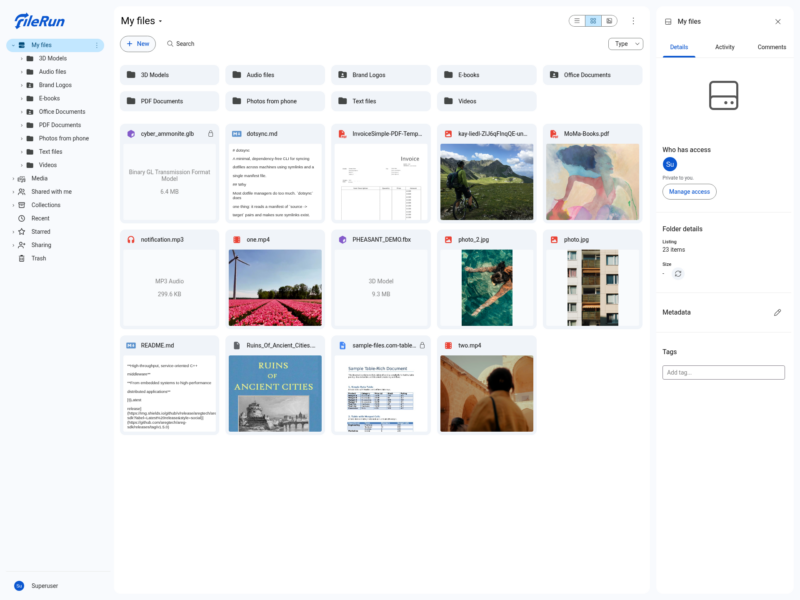
FileRun is a self-hosted file manager and sharing server for teams — the vendor’s own framing is “like Google Drive, but on your own server”. You install it on your own hardware and it works directly on the folders that are already there: point it at a directory and the contents appear, with no import step and no copy into a proprietary store. Sharing rules, versions and metadata live in FileRun’s database, while the files themselves stay ordinary files in ordinary folders, so rsync, Samba or a backup agent can still read them with FileRun switched off.
Your existing folders, not a migration
Because FileRun indexes a directory tree instead of taking ownership of the files, putting it in front of a server that already holds a NAS share or an FTP root does not mean moving data. The vendor has been shipping the product since 2003 and aims it at small and medium teams that want their files on their own disk rather than billed per gigabyte in somebody else’s cloud. The interface is a browser file manager: a folder tree on the left, a thumbnail grid with a type filter and search in the middle, and a details panel with tags, size, permissions and an activity feed on the right.
Sharing, roles and guests
- Share with individual users or with a group; seven roles run from view-only up to full control of the contents, and shared items appear under “Shared with me” without being copied or moved.
- Lock a file while you work on it so nobody overwrites your changes, and follow a folder to get an e-mail when somebody changes something in it.
- Share with people outside the organisation by e-mail address — FileRun creates a guest account for them and removes it when their last share is gone.
- Share links open the full interface rather than a stripped-down public page, and can be protected with a password, an expiry date or a limit on the number of downloads.
- Give a link the Uploader role and it becomes a file request: it accepts files but shows nothing that is already stored.
Working in the browser
- Word, Excel and PowerPoint documents open for editing in the browser without downloading them first.
- Photo viewer with arrow-key navigation between images in a folder.
- File versions, metadata and tags, a per-item activity log, and an audit trail covering sign-ins and permissions.
- Desktop sync and mobile apps connect to your instance through the “Connect app” option inside FileRun.
- Built around concrete jobs: a client portal with one private area per client, digital asset management, document management, and replacing FTP with a browser.
Running it
FileRun is a PHP web application running on your own web server, with a Docker image published by the vendor for the container route. The licence is tied to a fully qualified domain name — the address you serve it from is part of what you buy — and the vendor allows moving that licence to a new domain if the company changes name. There is no source repository to clone: the vendor ships packaged releases and container images, and support scales with the plan, from installation help and a client forum on the entry tier to e-mail support and a Docker installation service on the larger ones.
Not open source
FileRun is proprietary, closed-source software, and the vendor offers no free edition — only a time-limited trial. Every plan includes all features and is licensed per user, not per gigabyte: €9.9 per user per year on an annual subscription (10-user minimum on the entry plan, 30–90 users on the medium tier, 100+ on the large one), or €99 once for the Home plan, which covers 5 user accounts and is restricted to non-business domains. Non-profit and public-benefit organisations can ask for a free or heavily reduced licence. Third-party container images of the last freely distributed build (version 20220519) are still passed around, but they are years old and receive no updates. Assess it against the self-hosted alternatives below, which cost nothing in licence fees and, unlike FileRun, can be audited and forked.
Alternatives
- Nextcloud — AGPL file sync and share with a comparable browser interface, desktop and mobile clients, and a large app ecosystem.
- Seafile — open-source sync server built for large libraries, with a similar library and sharing model.
- FileRise — a self-hosted PHP web file manager that, like FileRun, works on folders already on the server, and is open source.
- ownCloud — the other long-running open-source enterprise file platform.
Browse more file and storage tools in the full directory.