FileRise
- Platform
- Docker Web Self-hosted
- Licence
- MIT Open source
- Website
- filerise.net
- Source code
- github.com/error311/FileRise
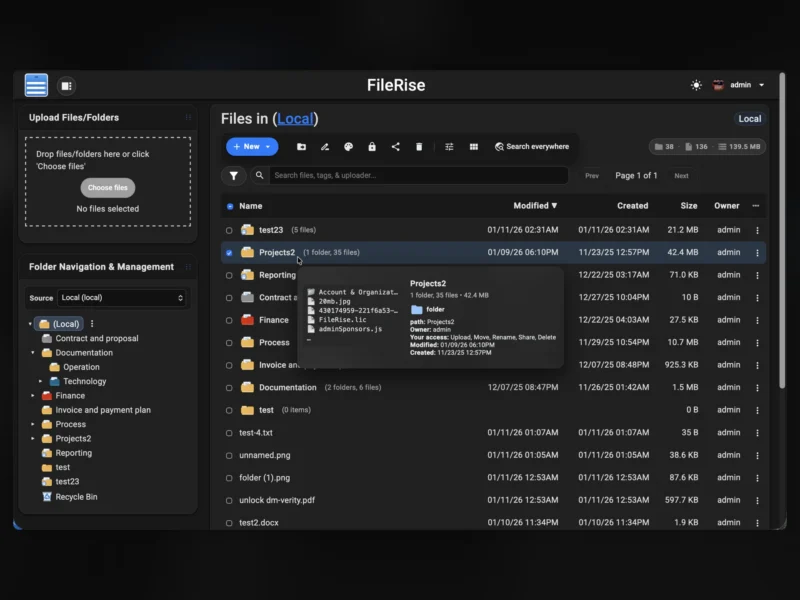
FileRise is a self-hosted web file manager and storage hub written in PHP. It gives you a browser interface for the files sitting on your own server — upload, browse, share, tag, search, preview and edit — with per-folder permissions enforced in one place rather than bolted on per feature.
Permissions that hold everywhere
The core of the design is the per-folder access-control list. Each folder can carry its own rules for viewing (all files or only your own), uploading, creating, editing, renaming, moving, copying, deleting, extracting archives and sharing. The same rules are applied by the web interface, the HTTP API and WebDAV, so mounting FileRise as a drive from macOS, Windows or Linux does not become a way around what the browser enforces. “Link file” generates authenticated deep links that require a login plus an ACL check before opening the target.
Sharing without exposing the tree
- Share a folder for browsing, or as an upload-only file request so outsiders can submit files without seeing what is already there.
- Protect share links with a password and an expiry date.
- Share individual files through generated links rather than by moving them into a public directory.
Uploads, previews and search
- Drag-and-drop uploads are chunked and resumable, with pause, resume and progress tracking; a dropped connection picks up where it left off.
- An optional dual-pane browser with keyboard shortcuts (F3 preview, F4 edit, F5 copy, F6 move, F7 new folder,
/to search) for people who would rather not click. - Hover “peek” cards show thumbnails, size, timestamps, tags and the effective permissions for the current user.
- PDFs render inline, with optional first-page thumbnails in gallery view if
pdftoppmis installed. - Search covers filenames, tags, uploader and content; a Trash with time-based retention gives deleted files somewhere to wait.
- Folders can be colour-coded in the tree, and files tagged with colour-coded labels.
- The folder tree is built to stay usable at scale — the project reports testing with more than 100,000 folders.
Encryption and external editors
Folders can optionally be encrypted at rest, with the protection inherited by everything beneath them. Files are stored encrypted on disk and decrypted transparently on download; the master key is either generated by FileRise or supplied through an environment variable. Because the rest of the application cannot read those files, WebDAV, sharing, ZIP operations and OnlyOffice are automatically switched off for encrypted folders. For unencrypted folders, OnlyOffice can be connected to your own Document Server so DOCX, XLSX, PPTX, ODT, ODS and ODP files can be edited in the browser.
Accounts, storage and housekeeping
- Local accounts plus TOTP two-factor authentication and OIDC single sign-on (Auth0, Authentik, Keycloak and similar), with optional auto-provisioning.
- Optional ClamAV scanning of uploads.
- Multiple local roots and WebDAV sources in the open-source core, switchable from the interface.
- A storage summary — total usage and per-volume breakdown — from a CLI scanner with snapshots.
- An OpenAPI spec published by the app itself, with a Redoc browser for the API.
- Dark and light themes, a CodeMirror-based editor for text files, and translations for English, Spanish, French, German, Polish, Russian, Japanese and Simplified Chinese.
- Aware of reverse proxies and subpaths, so it can live at
https://example.com/filesbehind Nginx, Traefik, Caddy or Apache.
Core and Pro
The open-source core is complete on its own: ACLs, sharing, uploads, tags and search, previews, WebDAV and multiple storage roots. FileRise Pro is a paid add-on from the same author that layers on user groups, brandable client upload portals, an ACL-aware global search, a storage explorer, audit logs, webhooks and scheduled jobs, extra source adapters (S3-compatible, SMB/CIFS, SFTP, FTP, Google Drive, OneDrive, Dropbox), SFTP/S3/MCP gateways, and an AI workspace for extraction and file organisation. If you only need a file manager with real permissions, the MIT core is the whole product; the Pro features are the part that costs money.
Running your own
The recommended path is the official Docker image, error311/filerise-docker, which needs a data volume for files and metadata and a handful of environment variables (timezone, upload size limit, whether to scan on start). It also installs on any ordinary Linux PHP web server without an external database — state lives in flat files and SQLite-style metadata under the application directory — and community packaging exists for Unraid, YunoHost and Kubernetes via an unofficial Helm chart. A public demo at demo.filerise.net (user demo, password demo) shows the interface without an install. Note that encrypted folders deliberately lose WebDAV and sharing, so plan which roots need which.