CTFreak
- Platform
- Docker Linux
- Licence
- Proprietary Freemium
- Website
- ctfreak.com/
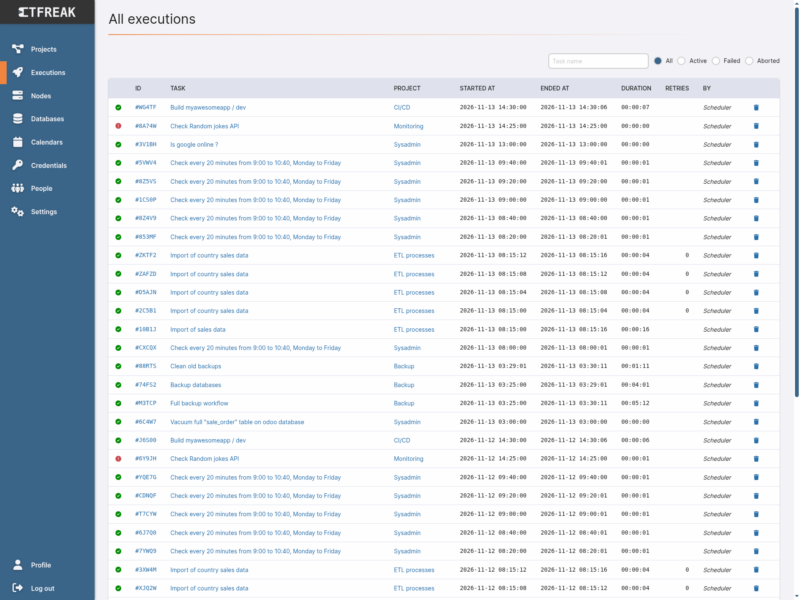
CTFreak is a self-hosted, on-premise task scheduler for system administrators, DevOps and data engineers who have outgrown scattered cron jobs and ad-hoc scripts. Instead of a crontab on every box, you run one small Docker container or snap package, declare your tasks in a web UI, and let it execute commands locally, across many remote nodes over SSH or WinRM, or against your databases — with a central history of every run.
What it does
- Central scheduling — cron-style calendars, time windows, “off-hours only” rules, retries and dependencies, all visible in one place instead of spread across machines.
- Remote execution without agents — runs commands and scripts on Linux, macOS and BSD nodes over SSH, and on Windows nodes over WinRM. Nothing needs to be installed on the target hosts.
- Execution history — every run is logged with start/end time, duration, exit status and output, so a failure at 03:00 is something you can read about in the morning rather than guess about.
- Notifications — alerting notifiers for Slack, Microsoft Teams and other channels, plus issue-tracking notifiers, so a failed job opens a ticket instead of waiting to be noticed.
- Automation-friendly — a documented REST API for creating tasks in bulk and triggering them on demand, incoming webhooks to start a task from an external event, and an Ansible playbook task type.
- Enterprise plumbing where needed — SSO through OpenID Connect (plus SCIM provisioning on the higher editions), teams, project-scoped access and parameterised tasks.
- Light footprint — the project advertises low memory and CPU usage and a single-container deployment, which is what makes it viable on a homelab NAS as well as on a managed-service-provider install.
Task types
A task is one of nine kinds, which is where most of the tool’s range comes from: local command, command on remote nodes, Bash script, PowerShell script, Ansible playbook, SQL script, SQL report (charts and tables generated from queries), HTTP request, and workflow — a task whose job is to run other tasks, sequentially or concurrently, and which can be nested.
Deployment and requirements
CTFreak ships as a Docker image (jypsoftware/ctfreak) and as a snap package, and it is designed to run on your own infrastructure with no vendor cloud involved. The web UI is a single-page application served by the same instance; the free edition uses an SQLite backend. Managed nodes do not need an agent — only SSH or WinRM reachability.
Databases it can drive directly: PostgreSQL, MySQL and MariaDB on every edition; Oracle and Microsoft SQL Server from the Business edition upwards.
Editions and limits
CTFreak is not open source. It is a proprietary product from JYP Software, distributed under its own EULA, with a permanently free edition and paid Pro, Business and Sovereign editions (paid plans are listed from €309 per instance). The free edition is genuinely usable for a homelab but is capped:
- Maximum 8 tasks, 1 parameter per task, 3 users, 1 calendar, 1 alerting notifier and 1 issue-tracking notifier.
- No concurrency — one task execution runs at a time, so everything is sequential regardless of schedule.
- SSH terminal sessions are closed after one minute.
- Only PostgreSQL, MySQL and MariaDB databases; SQLite backend; no secret encryption.
- Workflow child tasks cannot have their parameters overridden.
The paid editions lift those caps (unlimited tasks, concurrent execution, unlimited users and notifiers, Oracle and SQL Server support, unlimited calendars) and add manufacturer support.
Licence
NOT open source. Proprietary software licensed under the CTFreak EULA; the free edition is free of charge but time-unlimited rather than freedom-granting. Source code is not published. Check the edition comparison before assuming a feature is available in the free tier.
Alternatives
- Apache Airflow — open source (Apache-2.0) workflow orchestration for Python-defined data pipelines.
- Kestra — open source declarative orchestration with a YAML workflow model and a similar “everything is a task” approach.
- Healthchecks — open source cron monitoring: not a scheduler, but the natural counterpart if what you mainly want is to know when a scheduled job fails.
For a lighter open-source replacement of the scheduler itself, Rundeck and Cronicle are the usual names to look at; neither is in this directory yet.