Automatisch
- Platform
- Docker Self-hosted
- Licence
- AGPL-3.0 Open source
- Website
- automatisch.io
- Source code
- github.com/automatisch/automatisch
Overview
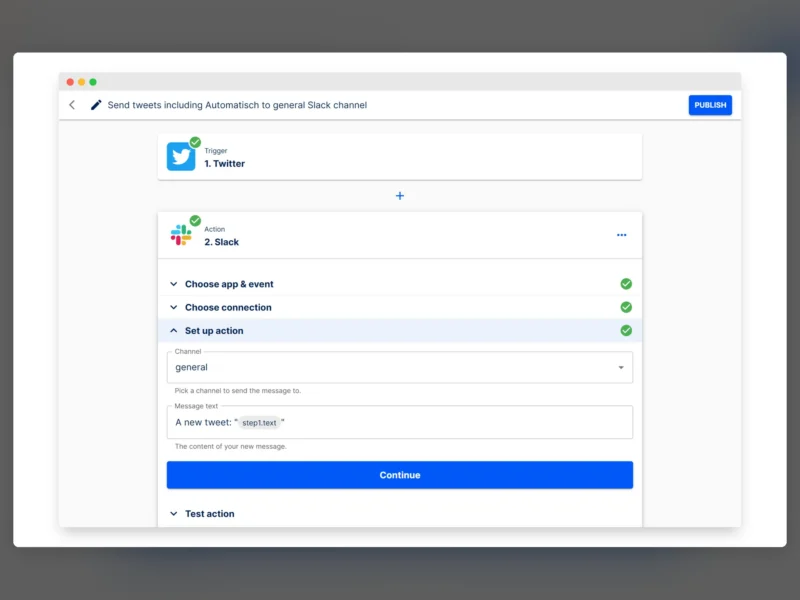
Automatisch is a self-hosted business automation tool in the shape of Zapier: you build a workflow from a trigger and a chain of actions, connect the accounts each step uses, and the server runs it when the trigger fires. The README’s own example is a two-step flow — a Twitter trigger that looks for a phrase, then a Slack action that posts the tweet into a channel — configured entirely by clicking, without code.
It is a Node.js and React application, distributed as a Docker Compose stack. Running it yourself keeps the data the workflows move — messages, customer records, whatever the connectors touch — on your own server instead of inside a third-party automation service.
Features
- Visual workflow editor built from trigger and action steps, each step configured in place and testable before the flow is published
- Connectors for services such as Twitter and Slack, with authentication handled per connection rather than per step
- Connections stored once and reused across flows, so a credential change is made in one place
- Per-step test action, so a misconfigured Slack channel or message template fails before the workflow goes live
- Publish control per workflow, and an editor that shows the state of every step at a glance
- Web-based interface with no local client to install; the whole team works in the browser
- Self-hosted data, which is the point for anyone bound by GDPR or handling records they cannot send to a cloud automation vendor
Setup
Clone the repository and run docker compose up from its directory; the interface comes up with a built-in sample login (user@automatisch.io with the password sample) which the documentation tells you to change from the settings page immediately. Other installation routes — including running the components outside Compose — are covered in the project’s installation guide at automatisch.io/docs.
Before putting it on a network, note that this is an automation server with stored third-party credentials: it wants a reverse proxy, TLS and a private entry point, not an open port.
Who it is for
Small teams that already self-host their mail, chat or issue tracker and want the glue between those services to live on the same box, and anyone who needs the audit trail of automations to stay in-house. n8n is the obvious alternative for a wider connector catalogue, and Node-RED when the logic needs to be written as a flow of JavaScript.
The licence needs one sentence of care. The repository holds both AGPL-licensed and Enterprise-licensed files — anything with .ee. in its name falls under the enterprise licence, everything else is AGPL-3.0, and it is the AGPL part that is published as the Community Edition. It is a self-hosted product with an open core rather than a wholly AGPL project, and the README is explicit about it.