OBS Studio vs SimpleScreenRecorder — Screen Recording Tools Compared
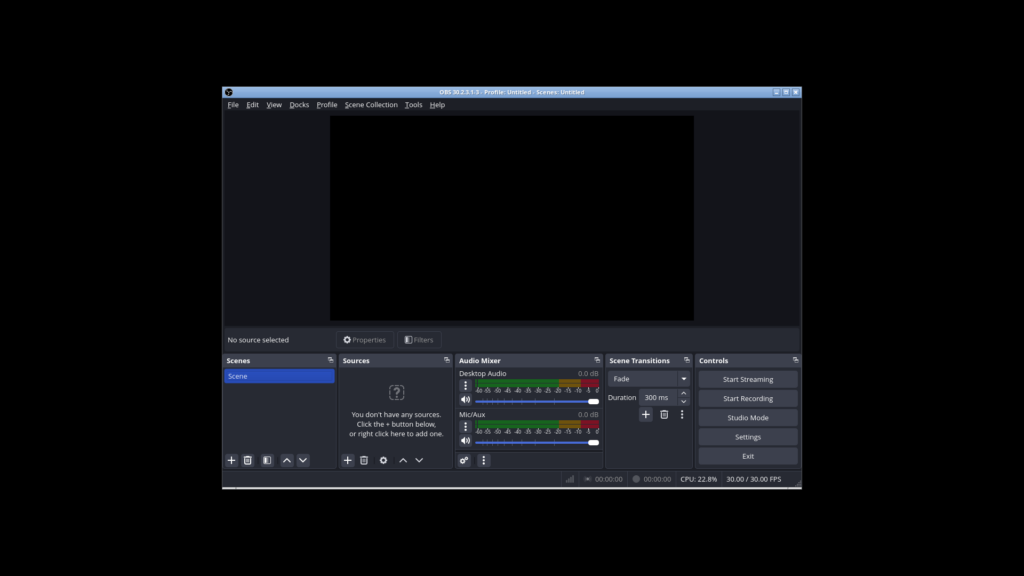
If you are looking for a free and open-source screen recorder on Linux, two names stand out: OBS Studio and SimpleScreenRecorder. Both are capable tools that produce high-quality recordings without spending a penny — but they were built with very different philosophies in mind.
OBS Studio is a full production studio: live streaming, scene composition, filters, virtual cameras, and support for every platform under the sun. SimpleScreenRecorder takes the other approach — a focused, lightweight tool that does one thing (screen recording) and does it with minimal fuss.
This comparison breaks down both tools to help you decide which one fits your workflow.
A Quick Overview
OBS Studio
OBS Studio (Open Broadcaster Software) is the gold standard for free and open-source live streaming and recording. Version 30.2 brings a polished Qt6 interface, WebSocket 5.5 for remote control, and rock-solid performance. It runs on Linux, Windows, and macOS, and supports a vast ecosystem of plugins, filters, and integrations.
SimpleScreenRecorder
SimpleScreenRecorder (SSR) is a Qt-based screen recording program created by Maarten Baert specifically for Linux. It was born from the frustration that existing tools (VLC, ffmpeg/avconv) were either too complex or too unreliable. SSR strips away the complexity and focuses on straightforward, high-quality screen recording with a minimal learning curve.
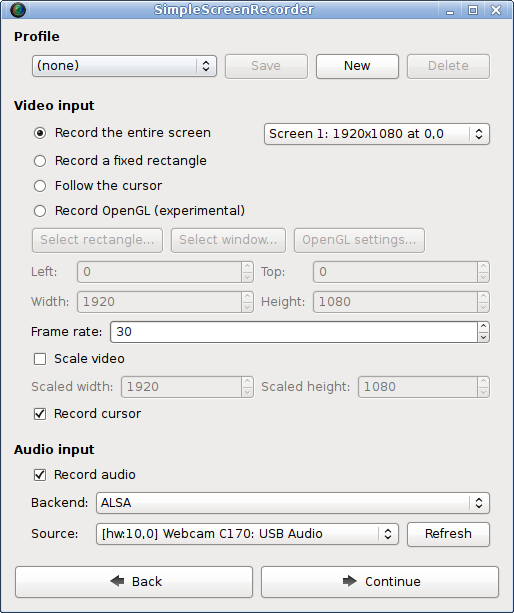
Screenshot from the official SimpleScreenRecorder website
Head-to-Head Comparison
| Feature | OBS Studio | SimpleScreenRecorder |
|---|---|---|
| Latest Version | 30.2.3 | 0.4.4 |
| Platforms | Linux, Windows, macOS | Linux only |
| License | GPL-2.0 | GPL-3.0 |
| Interface | Qt6, dockable panels, complex | Qt5, single-window, simple |
| Live Streaming | Full support (Twitch, YouTube, etc.) | Experimental only (RTMP) |
| Scene Composition | Multiple scenes with sources, transitions | Single recording area (full/region/OpenGL) |
| Filters & Effects | Extensive (chroma key, colour correction, audio filters, etc.) | None built-in |
| Virtual Camera | Yes (via v4l2loopback on Linux) | No |
| WebSocket Remote Control | Built-in (port 4455) | No |
| Plugin System | Extensive (50+ plugins available) | None |
| Audio Sources | Multiple, per-source volume & filters | Basic desktop audio + microphone |
| Pause/Resume | Supported | Supported (button or hotkey) |
| Encoding | x264, SVT-AV1, NVENC, VAAPI, etc. | FFmpeg/libav (configurable) |
| Output Formats | MP4, MKV, FLV, MOV, TS, custom FFmpeg | MKV, MP4 (via FFmpeg) |
| Hardware Encoding | Yes (NVENC, VAAPI, Apple VideoToolbox) | Via FFmpeg (if available) |
| Recording Preview | Always-on preview with Studio Mode | Optional preview window |
| Live Statistics | CPU, FPS, dropped frames, recording time | File size, bitrate, frame rate, recording time |
Ease of Use
SimpleScreenRecorder lives up to its name. The setup is a three-step wizard: select your recording area (full screen, fixed region, or follow the cursor), configure audio input, choose your output file and quality preset, and you are done. There are tooltips for every control, and the default settings produce good results without adjustment. From install to first recording, you can be done in under two minutes.
OBS Studio has a steeper learning curve. When you first open it, you are greeted with the main interface: scenes panel, sources panel, audio mixer, transitions, and controls. The default scene starts with nothing — you need to add a capture source, configure audio devices, and understand how scenes and sources work before you can record. The first-time setup wizard helps, but OBS is undeniably more intimidating for a beginner.
Winner: SimpleScreenRecorder — if you want to record your screen with no fuss.
Feature Depth
OBS Studio is in a different league here. Scene composition lets you layer multiple sources (screen capture, webcam, images, text, browser windows, game capture) and switch between different scene configurations seamlessly. Studio Mode lets you edit your next scene while the current one is live. Filters include chroma key (green screen), colour correction, noise suppression, compression, gain, and many more. The WebSocket remote control enables automation and integration with external tools. Virtual camera output lets you pipe your OBS output into any video call application.
SimpleScreenRecorder deliberately avoids feature creep. It records your screen, your audio, and nothing else. There are no scenes, no transitions, no overlays, no virtual camera. What it does, it does well — the multithreaded architecture keeps recording smooth even on modest hardware, and the pause/resume button is reliably instant.
Winner: OBS Studio — for anyone who needs more than just a basic recording.
Performance
Both tools are well-optimised, but they target different workloads.
OBS Studio keeps the preview renderer active at all times, which means it uses around 8–12% CPU idling even before you start recording. During recording (1080p30, x264 veryfast), expect about 20–25% CPU usage on a 2-core VM. With hardware encoding (NVENC, VAAPI), CPU load drops to near zero.
SimpleScreenRecorder is lighter. Its single-purpose design means less overhead. The preview is optional — you can disable it to save resources. SSR is designed to reliably handle recording on older or less powerful hardware, with automatic frame dropping if your system falls behind rather than recording corrupted timestamps.
Both tools handle AV sync properly — a common issue with command-line tools like ffmpeg/avconv and older versions of VLC.
Winner: SimpleScreenRecorder — marginally lighter, especially on low-end hardware.
Live Streaming
This is OBS Studio’s home turf. Streaming to Twitch, YouTube, Facebook, or any RTMP destination is built in and battle-tested. You can switch scenes mid-stream, overlay alerts, control everything via WebSocket, and monitor stream health in real-time.
SimpleScreenRecorder has experimental live streaming via RTMP, but it is nowhere near as polished or reliable as OBS. It is not a serious option for production streaming.
Winner: OBS Studio — hands down, for streaming.
Platform Support
OBS Studio runs on Linux, Windows, and macOS with native packages for all major distributions. The same project page offers the same interface on all three platforms.
SimpleScreenRecorder is Linux-only. The developer has stated there are no plans for Windows or macOS ports. If you use multiple operating systems, that is a significant limitation.
Winner: OBS Studio — cross-platform support matters.
Community and Development
OBS Studio has over 60,000 GitHub stars, hundreds of contributors, extensive documentation, and a massive community of users across forums, Discord, and Reddit. New releases come regularly with bug fixes and features.
SimpleScreenRecorder is maintained by a single developer (Maarten Baert). It has a smaller user base and slower release cadence (the current stable 0.4.4 has been the latest for several years). The feature set is mature and stable, but significant new development is slow.
Winner: OBS Studio — active community development means more features and faster fixes.
When to Choose SimpleScreenRecorder
- You only need to record your screen on Linux
- You have modest hardware (older CPU, limited RAM)
- You want a tool that works immediately with zero configuration
- You prefer a minimal interface with no clutter
- You record long sessions and need pause/resume without file splitting
When to Choose OBS Studio
- You need live streaming to Twitch, YouTube, or other platforms
- You want scenes, overlays, transitions, and a professional production
- You use multiple operating systems or collaborate with users on Windows/macOS
- You need virtual camera output for video calls
- You want hardware encoding for minimal CPU impact
- You plan to expand your recording setup with plugins and automation
Can You Use Both?
Absolutely. Many users keep both installed. SimpleScreenRecorder handles quick, lightweight captures — recording a bug reproduction, capturing a video call, or saving a clip for documentation. OBS Studio comes out for the bigger productions: tutorials with scene switching, live streams, or any recording that needs overlays and professional polish.
They coexist without conflict, and having both means you always reach for the right tool rather than making do with one.
Conclusion
OBS Studio and SimpleScreenRecorder are not direct competitors — they serve different needs. SimpleScreenRecorder is the specialist: focused, efficient, and effortless for basic screen recording on Linux. OBS Studio is the generalist: powerful, expandable, and capable of professional-grade production across all platforms.
If you value simplicity and your needs are straightforward, start with SimpleScreenRecorder. If you want the full toolkit — or plan to grow into it — OBS Studio is the industry standard for a reason. Running both gives you the best of both worlds.
Both tools are free and open-source. Browse our Creative & Multimedia directory for more recording and streaming software.