Silicon Notes
- Platform
- Linux Docker Web
- Licence
- Apache-2.0 Open source
- Website
- github.com/cu/silicon
- Source code
- github.com/cu/silicon
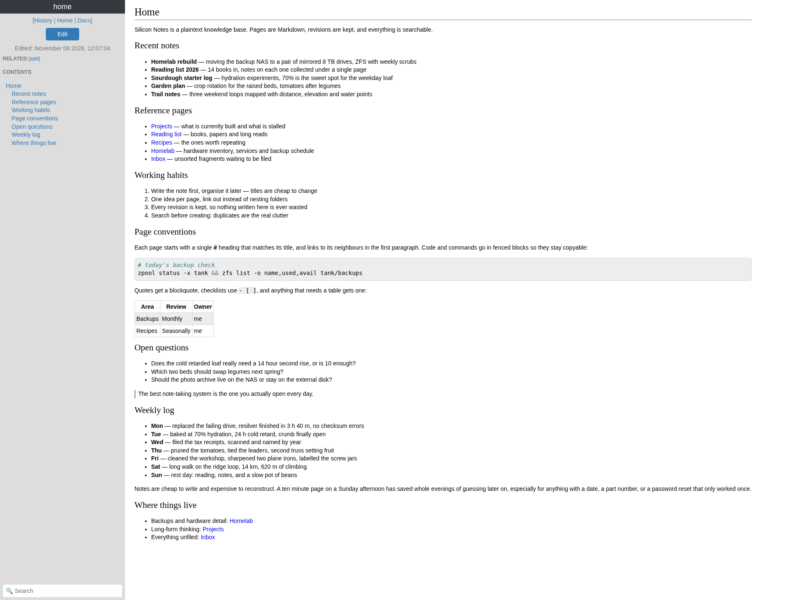
Silicon Notes is a deliberately small personal knowledge base you host yourself: pages are Markdown, rendered to HTML, stored in a single SQLite database on your own disk. It is built by Charles Ulrich and written in Python with Flask and Mistune rather than a large web framework, which is why the whole application is a handful of files and starts in a container in seconds. The project has been on GitHub since 2023 and is licensed Apache-2.0.
The design brief is “few frills”, and the interface reflects it. A page opens as rendered HTML with a left sidebar holding the table of contents, the edit button, page history and related pages, and a search box at the bottom. Editing switches to raw Markdown in a textarea, or to a CodeMirror editor with syntax highlighting if you leave the default configuration in place. There are no notebooks, no blocks, no plugins and no sync daemon to reason about — just pages, links between them, and revisions kept for every save.
Key Features
- Markdown in, HTML out — pages are written in plain Markdown and rendered with Mistune; code blocks are highlighted by Pygments, so fenced shell, Python or C snippets come out readable without any client-side JavaScript.
- Bi-directional page relationships — the sidebar lists the pages related to the one you are reading, and relationships can be added or removed per page, which gives you backlinks without a database of link syntax to maintain.
- Full-text search — SQLite FTS5 indexes both page titles and bodies, so search matches content inside notes and ranks title hits first, without an external search service.
- Page history — every save becomes a revision; the history view lists them and any revision can be opened as it was, which makes the database an append-only log of your writing rather than a single mutable blob.
- Table of contents where it belongs — headings are pulled from the rendered page and listed in the left sidebar, so long notes stay navigable while the reading column stays wide.
- Built-in documentation — a
/docssection ships with the app and covers Markdown syntax, configuration and the page conventions it follows. - Small dependency surface — Flask, Mistune, Pygments, python-slugify, python-dotenv and Gunicorn, with CodeMirror bundled for the optional rich editor. No React, no build pipeline at runtime.
- Usable mobile layout — the same sidebar collapses on narrow screens instead of turning into a separate mobile app.
How the data is stored
Everything lives under the INSTANCE_PATH directory, normally /home/silicon/instance in the official container: an SQLite database for pages, revisions, relationships and the search index, plus a generated secret key. Pages can be exported to one JSON file per page — with all their revisions — and imported back, which means the storage layer can be backed up, migrated or replaced without losing writing. A nightly copy of that directory is a complete backup.
Running it
The project publishes an official image, so a first run is one command: mount a volume for the instance directory, publish port 5000, and the entrypoint initialises the database before starting Gunicorn. Configuration is by environment variable — INSTANCE_PATH, SECRET_KEY, and SILICON_EDITOR=textarea to drop CodeMirror in favour of a plain textarea.
One honest caveat from the project’s own README: Silicon Notes ships with no authentication or authorisation at all. It is designed for a trusted private network or behind a reverse proxy that handles access control, and it is explicitly not meant to be exposed to the open internet as-is. Deploy it on a LAN, a VPN or behind an authenticating proxy.
Licence
Open source, Apache-2.0. Copyright 2023 Charles Ulrich; the full licence text ships in the repository root.