ZenNotes
- Platform
- Linux macOS Windows Docker
- Licence
- MIT Open source
- Website
- zennotes.org
- Source code
- github.com/ZenNotes/zennotes
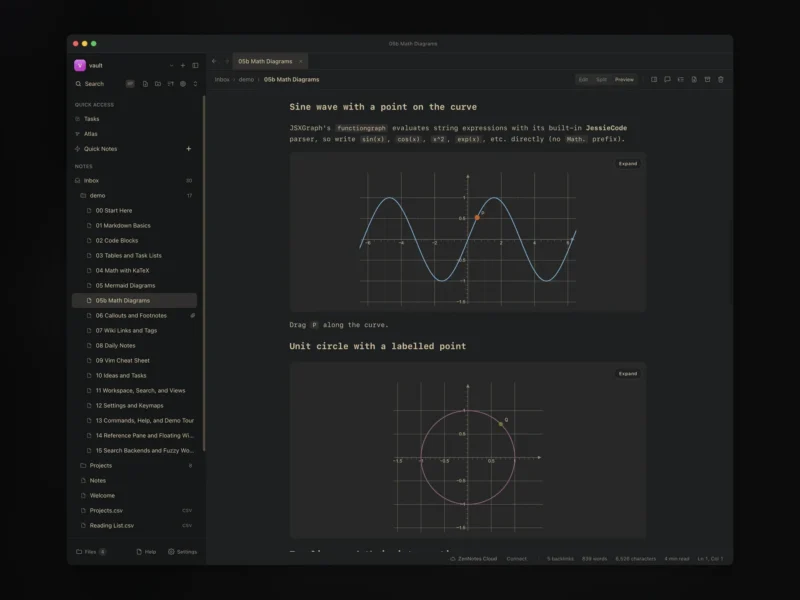
ZenNotes is an MIT-licensed, keyboard-first Markdown notes app that keeps every note as an ordinary .md file inside a vault you choose — no hidden database, no export step. It ships from one shared core in two runtimes: an Electron desktop app for macOS, Windows and Linux, and a self-hosted web app backed by a Go server that runs happily on a home server or in a container. On top of the plain files it adds Vim motions, a command palette, edit/split/preview workflows, tasks, tags, search, daily notes, math and diagram rendering, CSV-backed Notion-style tables, and a first-party MCP server so AI tooling works against the same vault you do.
Key Features
- Plain files first — notes live as Markdown files in a normal folder, so they stay readable and portable with or without the app; Obsidian-style wikilinks and embedded assets such as
![[image.png]]resolve from the same vault. - Keyboard-first editing — a real Vim mode, leader-key flows, a command palette, pane and tab motions, local ex commands and built-in help, with a documented Vim cheat sheet in the demo vault.
- Preview is part of the workflow — switch between edit, split and preview modes, pin reference panes beside the note you are writing, and detach notes into floating windows on the desktop build.
- Capture and organise — daily and weekly notes, a task system, tags, archive and trash, and search that includes fuzzy matching and selectable backends.
- Rich Markdown — KaTeX math, Mermaid diagrams, interactive JSXGraph plots, callouts, footnotes, code blocks and tables render in the preview pane.
- CSV databases — Notion-style Table and Board views over plain
.csvfiles, so structured data stays a spreadsheet rather than a proprietary format. - MCP integration — a first-party MCP server lets compatible clients read and write the same vault instead of a copy, and a macOS
zenCLI powers launcher workflows such as the Raycast extension. - Customisation — themes, fonts and per-vault appearance, plus a demo vault that tours the features from Markdown basics to keymaps.
Desktop and self-hosted
The desktop build is an Electron shell with native menus, an auto-updater and detached note windows. The self-hosted mode is a browser frontend served by the project’s own Go server, distributed as a Docker image with configurable host-folder mounts and a default security posture documented in the repository. A hosted multi-user deployment is planned on the same web and server stack; today the two supported modes are local desktop and self-hosting.
Getting started
Installers for all three desktop platforms are attached to each GitHub release and the app updates itself afterwards. Homebrew is the quickest route on macOS (brew install --cask zennotes/tap/zennotes), Windows gets signed MSI-style installers for x64 and ARM, and Linux is covered by AUR, a native pacman package, a Debian package, Nix packaging and an AppImage. On first launch you point the app at a folder and it treats that folder as the vault; there is nothing to import unless you already have notes to bring along.
Who it is for
People who want Obsidian-style local-first notes without handing their vault to a proprietary app, and who would rather type than click — the Vim layer is the point, not a garnish. Anyone who needs a mature mobile client today should look elsewhere; the shipped runtimes are desktop and self-hosted web.
Alternatives
- Obsidian — the proprietary local-first Markdown app ZenNotes deliberately imitates, if you are happy with closed source
- SilverBullet — self-hosted Markdown knowledge base with wikilinks and queries in the browser
- SiYuan — block-based self-hosted knowledge base with a WYSIWYG editor rather than Vim bindings
- Joplin — cross-platform note app with end-to-end encrypted sync across desktop and mobile