mdSilo
- Platform
- Linux Windows macOS Web
- Licence
- AGPL-3.0 Open source
- Website
- mdsilo.com
- Source code
- github.com/mdSilo/mdSilo-app
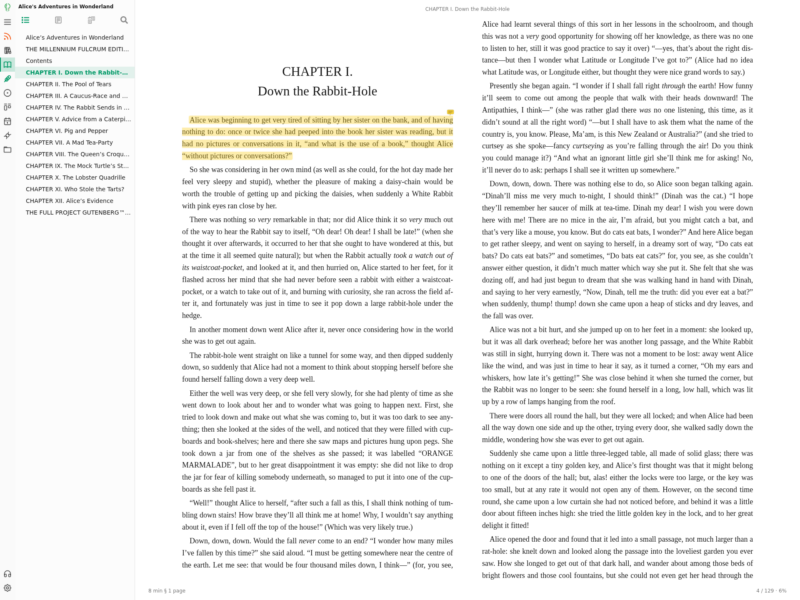
Overview
mdSilo is a free, open-source workspace for personal knowledge, built around a single observation: a thinking system has inputs and outputs. Reading is the input, writing is the output, and the work that sits between them — the questions a book raises, the tasks an article creates — deserves a place of its own rather than a forgotten browser tab. mdSilo puts all three in one application, on top of one folder of plain files.
The desktop app is written in React and wrapped with Tauri; a web build runs the same front end in the browser and keeps its files in IndexedDB, so it installs as a PWA. Everything it stores is a Markdown file, a JSON file or the book itself, in a folder you pick. There is no account, no server and no proprietary database. Version 0.8.0 shipped on 8 November 2026.
Reading: books, feeds and podcasts
The reader opens EPUB, PDF, MOBI/AZW3, FB2 and CBZ files and converts TXT, Markdown and HTML on import, with paging or scrolling, adjustable themes, fonts and margins, footnotes, and image and table viewers. Highlights and notes are saved as a Markdown file next to the book (Foo.epub.md), which makes an annotation an ordinary note: editable, searchable, linkable and publishable.
Dictionaries can be consulted while reading — Wiktionary, Wikipedia, Urban Dictionary, Merriam-Webster, any site you add, or local MDict (.mdx/.mdd) files — with pronunciation, translation and read-aloud. Words looked up are kept together with the sentence they came from and can be studied as flashcards, while a “word lens” shows their meaning underneath them in the text. Two books can be read side by side, each with its own notes.
An RSS/Atom/JSON Feed client pulls articles and podcasts into the same workspace, with starred items, clipping to notes, a podcast player, OPDS catalogue browsing, and the option to turn a channel into an EPUB so a month of news can be read as a book.
Processing: issues and projects
Reading raises questions, so mdSilo ships a GitHub-style issue tracker: labels, milestones, due dates, subtasks, comments, a timeline, and a filter language of the form is:open label:question sort:due. An issue can be created from a selected sentence in a book or a note, and the quote and a link back travel into the issue with it.
Projects show those issues as Kanban boards or tables with whatever statuses you define — To read → Reading → Digesting → Written up. Checkboxes and #todo#, #doing#, #done# tags written inside notes are collected into one list and can be promoted into issues that stay in sync with the note.
Writing: one file, three views
The editor offers a WYSIWYG view, a raw Markdown view and a mind-map view of the same document. Tables, task lists, ==highlight==, KaTeX maths and chemistry, notices, mermaid and ECharts diagrams, ABC music, SMILES chemical structures, code highlighting, embeds and attachments are supported. Slash commands, a hovering toolbar and hotkeys keep the keyboard in charge, and documents export to PDF and PNG.
Linking, graph and search
Notes link to other notes with [[wiki links]], to books and their highlights with {{book titles}}, to issues with [@12](issue:12), and to tags. Every link is two-way: backlinks and unlinked mentions sit under the note, and a graph view draws notes, books, issues and tags as one network. Full-text search covers notes, annotations and the text inside your books, Chinese included. A Chronicle view keeps daily journals plus an activity heat map of both writing and reading.
Sync and publishing
Sync is git: mdSilo talks to GitHub, Gitea, GitLab or any git host over HTTPS with a token, committing, pulling and pushing from the app every few minutes or when it closes. Books sync only if you opt in, and the token never leaves the device. If two machines edited the same lines, your version is kept beside the note as a conflict copy while the rest of the data merges field by field.
The same workspace can be published as a static site to GitHub Pages, or exported to a folder, with backlinks, graph, search, tag pages, book annotations and issues complete with milestones and boards. Maths, diagrams and chemical structures are rendered at publish time, and links to private notes degrade to plain text.
Install and platforms
mdSilo runs on Windows, macOS and Linux, plus a web version whose files live in the browser. Desktop builds come from the releases page or from a one-line installer script, which picks the .deb, .rpm or AppImage on Linux and installs into /Applications on macOS. Building from source needs Rust and Node with pnpm (pnpm install && pnpm tauri build); the web build needs only Node (pnpm build:web) and can be served from any static host or a sub-path.
How it compares
Against Logseq and Obsidian, the difference is scope: mdSilo is not only a notebook, it carries the reader and the issue tracker that surround note writing, and it treats a book annotation as a first-class note. Against Joplin, which manages synchronisation itself, mdSilo hands sync to git and leaves every artefact — annotation, issue, board — as a file in the same folder. If what you want is a wiki-first tool built around block references, SilverBullet is the closer fit; if you want your reading, your tasks and your writing in one place, mdSilo is that place.
Learn and get help
The user manual ships inside the app and lives in the repository under docs/manual, in English and Chinese. The project keeps a Discord server and a Bluesky account for questions, and the source, release notes and plugin examples are on GitHub. Custom fonts, colour themes and plugins are documented there too, so the app can be reshaped without forking it.