DumbPad
- Platform
- Web Docker Self-hosted
- Licence
- GPL-3.0 Open source
- Website
- dumbware.io/dumbpad
- Source code
- github.com/DumbWareio/DumbPad
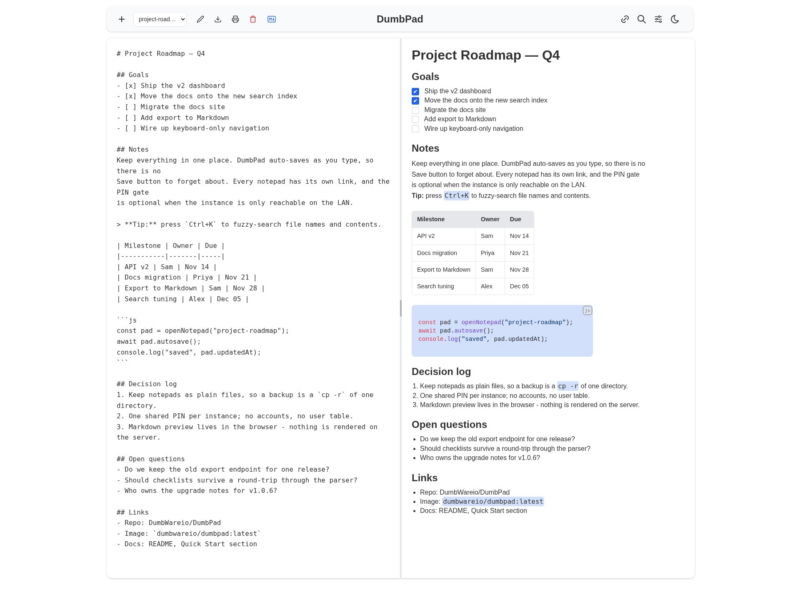
DumbPad is a self-hosted notepad for the web: open a page, start typing, and the text saves itself. There are no notebooks, no accounts and no database to look after — each note is a plain text file in a data directory, and the whole app is a single Node.js process you can run from a one-line Docker command. It is deliberately small in scope: a fast editor for quick notes, with an optional Markdown preview and an optional PIN in front of the whole instance.
What using it is like
- One clean editor that saves about 300 ms after you stop typing, with a periodic save every two seconds as a backstop. There is no Save button to forget.
- Multiple notepads, created with the
+button, a dropdown to switch between them, and automatic name de-duplication on the server so two notepads never collide. - Each notepad has a shareable URL, and the browser’s back and forward buttons work as you move between notes.
- Fuzzy search across notepad names and their contents (
Ctrl+K), which is how you navigate once you have more than a handful of notes. - Download a note as
.txtor.md, or print it with collapsible sections auto-expanded so the printout contains everything. - Light and dark themes that follow the system preference, a responsive mobile layout, and PWA support with a service worker that updates its cache automatically.
Markdown preview
The Markdown toggle cycles through three modes — editor only, split view with the source and the rendered page side by side, and full preview — and you can pick the default in settings. The renderer goes past stock Markdown: GitHub-style alert blocks (note, tip, important, warning, caution), extended tables, collapsible <details> blocks, and syntax highlighting for around 180 languages through highlight.js, which can be narrowed to a fixed list with the HIGHLIGHT_LANGUAGES variable if bundle size matters.
Real-time and storage
Notepads are kept in sync over WebSocket, so two browsers on the same notepad see each other’s edits as they happen. Storage is a directory of .txt files plus a notepads.json index — back it up with a copy, move it between machines, or drop your own .txt files in to import them on the next page refresh. Nothing is rendered or stored in a database, which is what keeps the footprint this small.
Access control
By default DumbPad has no login at all, which is fine on a trusted LAN and a bad idea on the open internet. Set DUMBPAD_PIN to a 4–10 digit PIN and the whole instance sits behind it, with constant-time comparison, five attempts before a 15-minute lockout tracked by client IP, and secure cookies. Behind a reverse proxy, either leave TRUST_PROXY off or set TRUSTED_PROXY_IPS explicitly — trusting X-Forwarded-For from anywhere lets a client spoof its address and sidestep the rate limiting.
Running it
The image is on Docker Hub as dumbwareio/dumbpad. Mount a data volume, publish port 3000, and set BASE_URL to the address you will browse it on. One gotcha is documented at length in the README: as of a recent release the container runs as a non-root user with UID 1000, so the host data directory must be owned by that UID or the app exits with EACCES: permission denied on startup. Configuration is a short list of environment variables — PIN, site title, allowed origins, lockout window, cookie ages.
Who it suits
DumbPad is for the note you want to jot down in three seconds and find again later: server notes, snippets, a scratch pad shared by everyone on the LAN. It is not a knowledge base — no wikilinks, no backlinks, no graph, no tags, and no per-user accounts. If you need structure or collaboration between people who should not see everything, a different tool is the better fit.
Alternatives to consider
- Flatnotes — also stores notes as plain Markdown files, with a searchable note list and a similar self-hosted footprint.
- Memos — a lightweight, timeline-style memo app for quick captures.
- HedgeDoc — collaborative real-time Markdown documents when a shared, multi-user pad is the point.
- Joplin — a full note-taking application with notebooks, attachments and sync, if you need a keeper rather than a pad.