Pinry
- Platform
- Self-hosted Docker Linux
- Licence
- BSD-2-Clause Open source
- Website
- pinry.github.io/pinry/
- Source code
- github.com/pinry/pinry
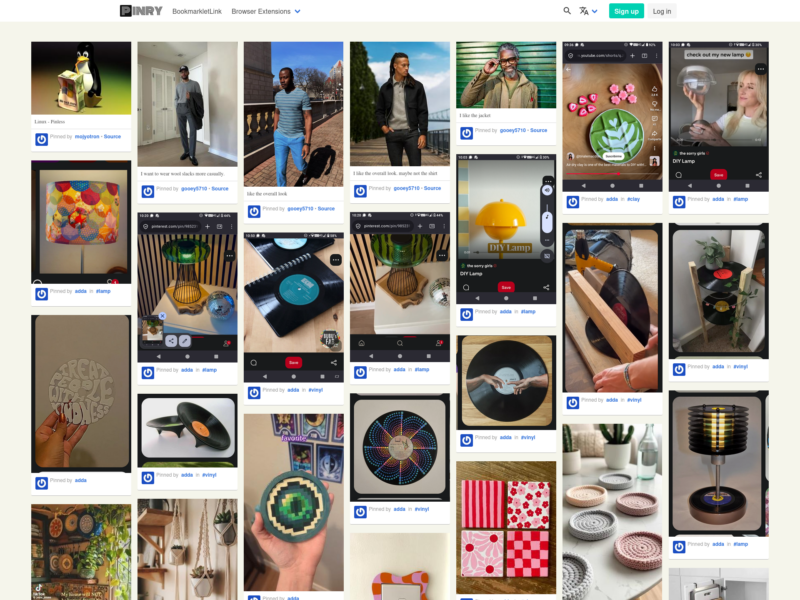
Pinry
Website: pinry.github.io/pinry
Pinry is a self-hosted tiling image board for saving, tagging and sharing images, videos and web pages in a grid you can skim at a glance. It is the open-source answer to Pinterest for people who would rather keep the collection on their own hardware: you run it with Docker, open it in a browser, and the pins live in your data directory rather than in someone else’s account. Each pin carries its source URL, an optional description and tags, and boards group pins by theme. Boards can be public or private, and one instance supports several user accounts, so a household or small team can share an install without sharing a login. The interface is image-heavy and deliberately board-like; tag search and search by board name are how you find things again later.
What separates Pinry from a general bookmark manager is the emphasis on the visual. It fetches an image from a URL and shows a preview, which makes the board useful for mood boards, reference collections and recipes as well as plain links. It also accepts video and web page pins, and there is a REST API and a command-line client for adding items without opening the web interface. The obvious alternative is Pinterest; the trade-off is that Pinry is software you run, so you supply the server, the storage and the backups. For a private visual archive you control, that is the point.
Key Features
- Tiling board: pins are arranged in a dense grid of variable-height tiles, so a board of mixed images, videos and links stays quick to scan.
- Image fetch and preview: give Pinry a URL and it pulls the image and shows it on the pin, with the source link kept alongside.
- Tagging and search: tags describe individual pins, and search covers tags as well as board names.
- Public and private boards: each board can be exposed or kept private, so one instance can hold a shared board and a personal one.
- Multiple users: accounts are separate, which makes Pinry usable by a family or a small team rather than a single person.
- Browser extensions: community extensions add pins from Chrome and Firefox without leaving the page you are on.
- REST API and CLI: the Django REST Framework API exposes the content model, and
pinry-cli-pyadds images or URLs from a terminal. - Docker deployment: the official
getpinry/pinryimage ships nginx and gunicorn in one container, with builds for ARMv7, ARMv8 and AMD64; SQLite is the default and PostgreSQL or MySQL can be configured.
Licence
Pinry is released under the BSD 2-Clause Licence. That is permissive: you can run it, modify it and redistribute it, including commercially, as long as the copyright notice and disclaimer stay with the source or binary. It does not oblige you to publish your changes, so a modified private instance stays private.