Hoodik
- Platform
- Web Docker Android iOS macOS
- Licence
- CC BY-NC 4.0 Source-available
- Website
- hoodik.io
- Source code
- github.com/hudikhq/hoodik
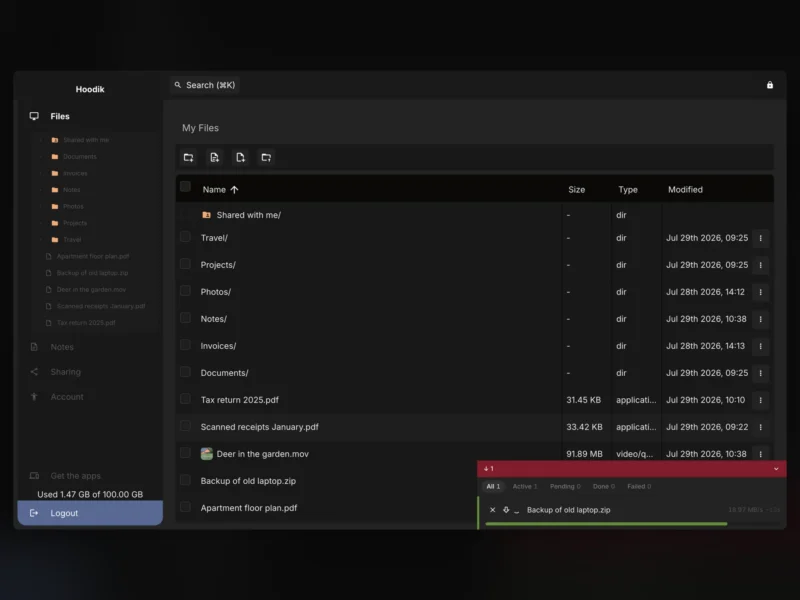
Hoodik is a self-hosted storage drive for people who want a Dropbox-style workflow without handing their files to a provider. What separates it from most “encrypted cloud” projects is where the encryption happens: everything is encrypted and decrypted in your browser, and the server — yours or someone else’s — only ever stores ciphertext. The project is at version 2.6.1 (November 2026), written in Rust with a Vue 3 front end, and ships as a single Docker container.
Encryption that stays in the browser
When you upload a file, the browser generates a random symmetric key and encrypts the file chunk by chunk with AEGIS-128L (accelerated through WASM SIMD), with AEGIS-256, Ascon-128a and ChaCha20-Poly1305 available as alternatives. Each file’s key is then wrapped under a hybrid X25519 + ML-KEM-768 scheme — elliptic curve plus post-quantum — so the wrapped key stays protected even if a future quantum computer breaks the classical half. The cipher identifier and the wrapped key are stored next to the file, which means old uploads stay readable after an administrator changes the default cipher.
Accounts rest on an Ed25519 identity key and an OPAQUE login (RFC 9807, ristretto255-SHA512 with Argon2id), so your password never crosses the wire and the server cannot read your private key: it is envelope-encrypted under a key derived from the OPAQUE export key, which only your password can produce. Accounts created before this scheme used RSA-2048 and migrate automatically at the next login.
The same design extends to search and sharing. File names and note contents are tokenized in the browser and tagged with an HMAC key the server never sees, so a query can be matched against the index without the index ever being readable. Public share links put the decryption key in the URL fragment — the part browsers never send to a server — so the recipient decrypts locally and the server keeps serving only encrypted bytes.
More than a file browser
- Encrypted notes: markdown notes with a WYSIWYG editor, auto-saved and searchable exactly like files.
- Public sharing links: no account needed on the recipient’s side.
- Two-factor authentication: optional TOTP per user.
- Admin dashboard: users, sessions, invitations and application settings.
- Storage backends: local disk out of the box, or any S3-compatible bucket (AWS, MinIO, Backblaze B2, Wasabi).
- Database: SQLite by default, PostgreSQL with a single environment variable.
- Clients: the web app, plus official Android and iOS/macOS apps.
Running it
A single container is the whole deployment: mount a data directory, set DATA_DIR and APP_URL, publish port 5443, and Hoodik generates a self-signed certificate on first boot — swap in your own certificate or put it behind a reverse proxy for production. Images are published for amd64, armv6, armv7 and arm64, so a Raspberry Pi or an ARM NAS works as well as a VPS. Set JWT_SECRET to a stable value so sessions survive restarts, and configure SMTP if you want email verification and share notifications. Moving chunks to object storage later is a built-in, re-runnable migrate-storage command.
Before you commit
CC BY-NC 4.0 — source-available, not open source. Hoodik’s code is public, but its licence is Creative Commons Attribution-NonCommercial 4.0: personal and other non-commercial use is permitted, and commercial use requires a separate agreement with the author (Tibor Hudik). It is not an OSI-approved licence, so it does not offer the same freedoms as Nextcloud or OpenCloud if licence terms matter to your organisation.
The encryption model also makes the private key the only recovery path — forget the password and the files stay unreadable, so keep the exported key somewhere safe. SQLite and PostgreSQL databases are not interchangeable once data has been written. The optional S3 direct-transfer mode needs a bucket that the browser can reach over HTTPS with a publicly trusted certificate and CORS for your app URL; Hoodik checks this at startup and quietly keeps relaying transfers if the check fails, which is safe but slower. Behind Cloudflare Tunnel, disable tar transfers (TAR_TRANSFER_DISABLED) because the 100 MB request cap breaks them. Beyond the web app there are Android, iOS and macOS clients, but no Linux or Windows desktop sync client.
How it compares
If you want a general-purpose, openly licensed file platform, Nextcloud and OpenCloud cover desktop sync, groupware and a large app ecosystem, and Filestash is a lighter web front end for storage you already run. Hoodik sits at the other end of the scale: a focused drive whose selling point is that the server can never read anything, at the cost of a non-commercial licence and a much smaller ecosystem.
The Bottom Line
Hoodik is one of the more carefully built end-to-end encrypted drives available for self-hosting — post-quantum key wrapping, an OPAQUE login and a genuinely blind search index are not features you usually find in a project this size. For personal or non-commercial use on a home server or a VPS it is a strong fit; if you need an open-source licence, commercial deployment or a mature desktop sync client, look at the alternatives first.