FolderHost
- Platform
- Docker Linux Windows macOS
- Licence
- GPL-3.0 Open source
- Website
- folderhost.org
- Source code
- github.com/MertJSX/folderhost
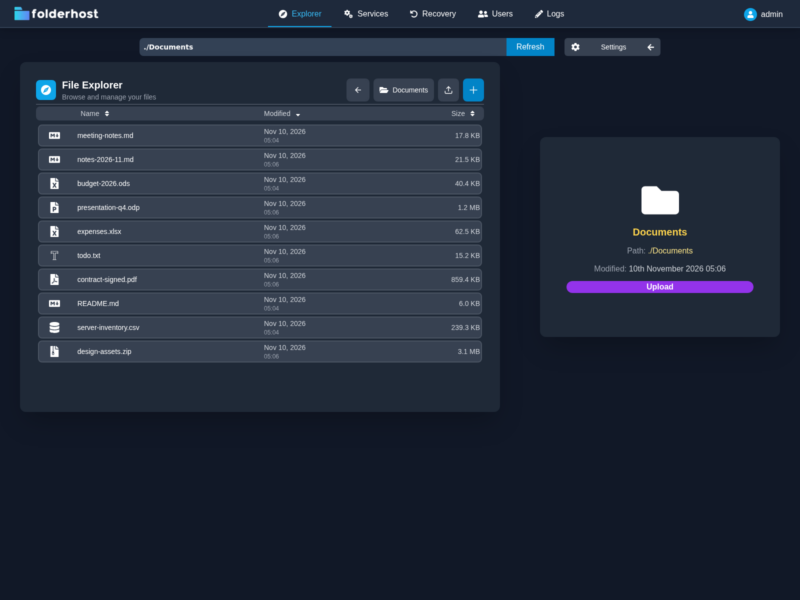
FolderHost is a self-hosted file sharing server that arrives as a single executable of roughly 19 MB. A Go backend serves a React front end, and between them they cover what a small team or a home lab usually reaches for Nextcloud to do: user accounts, folders, uploads and controlled access, without a database, a PHP runtime or a stack of services underneath. Download one file, run it in an empty directory, and it opens a web client on port 5000.
A server with nothing to install beside it
The whole application is one binary, published for Linux (amd64, arm64 and armv7), macOS on both Intel and Apple silicon, Windows and FreeBSD. A Docker image, mertjsx/folderhost, ships the same thing with the storage directory as a volume. On first start the binary writes a commented config.yml next to itself covering the port, the folder it serves, a storage quota such as 10 GB, the JWT secret, the admin account and its permissions, the recovery bin limits, log retention and TLS. Restart after an edit and the new values apply.
File management
The web client handles the ordinary operations in place: upload and download, move, copy, rename and delete, with zip and extract for archives. Large files go up in chunks so a dropped connection does not restart the upload. Deletions land in a recovery bin rather than disappearing, and the bin has its own storage limit and retention setting so it cannot quietly fill the disk.
Accounts and permissions
An instance serves several people, each with an account and a permission set granted flag by flag: reading directories and files, creating, changing, deleting, moving, uploading, renaming, downloading, extracting and archiving, plus access to the recovery bin, the user list and the activity log. A user can be confined to a single folder through a scope value, from which they cannot navigate out. Every action is written to an audit log that can be switched off, capped by age, and read from the admin panel.
Working on files in the browser
A Monaco editor is built into the client, so text and code files open in a full editor with syntax highlighting instead of a plain text box, and several people can work on the same file in real time. For a small team keeping configuration, scripts or notes on its own server, that removes the usual detour through a local editor and a re-upload.
Login and transport security
Authentication is JWT based, with tokens valid for 24 hours and bound to the IP address, user agent and browser that created them, so a copied token is not enough to sign in from elsewhere. The trade-off is that each account works on one device at a time. TLS is handled by the program itself: a self-signed certificate for a local network, or a Let’s Encrypt certificate when a real domain and open ports 80 and 443 are available.
Deployment
Docker is the shortest path: run mertjsx/folderhost:latest with port 5000 published and a volume on /app. The binary route is just as short and is what the author prefers: unpack the release into a directory of its own, because the server writes its files relative to where it runs, and start it. The shipped default login is admin with password 123, which must be changed in config.yml before the instance is reachable from anywhere else.
Where it fits
FolderHost aims at the space between a plain file browser and a full collaboration suite. Filestash puts a single interface in front of storage you already have and speaks many protocols; FolderHost instead owns its storage directory, adds accounts, permissions and an activity log, and keeps the install to one file. Against Nextcloud the argument is weight rather than features: no PHP, no database, and an upgrade that is a file swap. Teams that need calendars, contacts, mail and app plugins will want the larger suite; teams that want a private place to put files and hand out accounts will find this enough. Seafile and ownCloud are the other self-hosted file platforms in the directory, and Syncthing covers continuous device-to-device sync rather than a shared server. The project is released under the GPLv3 and developed in the open on GitHub.