GlitchTip
- Platform
- Docker Web
- Licence
- MIT Open source
- Website
- glitchtip.com
- Source code
- gitlab.com/glitchtip/glitchtip-backend
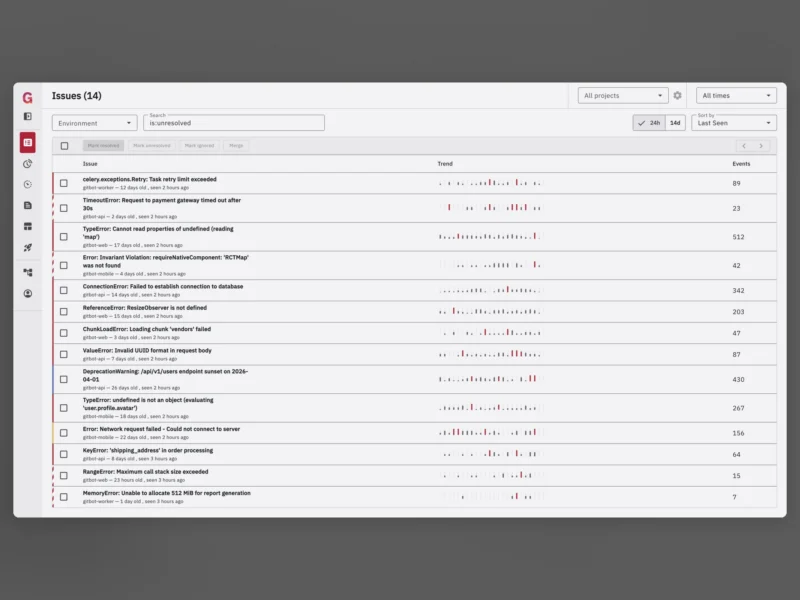
Overview
GlitchTip is an open source error-tracking platform that speaks Sentry’s API: point any Sentry client SDK at it and exceptions, log messages and Content Security Policy violations stream into an issue list you can triage, assign and resolve. It is a partial fork and mostly a re-implementation of Sentry’s open source codebase from before that project changed licence, written to stay small enough to read and to run on a modest server.
Practically that means a Django application with PostgreSQL behind it, keyword search over issues, release and deploy tracking, and a web UI for projects, teams, alerts and uptime checks. The project quotes 512 MB of RAM for a small installation; Valkey is optional and only bought in when the ingest rate justifies a cache.
What it does
- Sentry-compatible ingest – existing Sentry SDKs (JavaScript, Python, PHP, Ruby, Go, .NET, Java and the rest) work unchanged; you swap the DSN, not the client.
- Error grouping and triage – events collapse into issues with occurrence counts, trend histograms for the last day or week, first/last seen, stack traces and the surrounding breadcrumbs.
- Filtering and search – query syntax such as
is:unresolved, tags, environment and release filters narrow the list without leaving the page. - Performance monitoring – transaction tracing and span data give slow-page and slow-query views when the SDK sends traces as well as errors.
- Uptime monitoring – HTTP checks run from the instance and raise alerts for endpoints that stop answering.
- Alerts and integrations – notifications through email, webhooks, Discord, Slack-style webhooks and similar destinations when an issue is new or regresses.
- Organisations, teams and members – projects sit inside organisations with per-team access, which is the part most small trackers skip.
- Source maps and releases – upload source maps and release metadata so minified front-end stack traces resolve to real file names and line numbers.
Self-hosted or hosted
GlitchTip runs either way from the same code: the hosted service at app.glitchtip.com is sold in tiers (a free hobby tier of 1,000 events a month, then paid plans from around $15 a month for 100,000 events), while a self-hosted install is unlimited and free. A self-hosted instance never reports anything back to the project – no telemetry, no phone-home – which is the reason many teams pick it over the commercial error trackers.
Deployment
Docker images and a compose file cover the whole stack: web, worker, PostgreSQL and an optional Valkey cache, with migration and a one-off superuser step on first start. Behind a reverse proxy the only care is that the ingest endpoint keeps its full request size limits so large event payloads are not rejected.
Licence
Open source, MIT licensed – you can run it internally, modify it and even resell it. The hosted subscription buys the managed service and support, not the software.
Alternatives
- OneUptime – open source observability suite that also covers error tracking, uptime and status pages in one install