GLAuth
- Platform
- Linux Docker
- Licence
- MIT Open source
- Website
- glauth.github.io/
- Source code
- github.com/glauth/glauth
GLAuth is a lightweight LDAP authentication server written in Go: one binary that answers the same protocol queries as OpenLDAP and Active Directory while keeping the whole user directory in a configuration file you can read, diff and version. It is meant for the places where a full directory service is too much machine and too much ceremony – a developer workstation, a small company, a homelab, or a CI job that needs a directory to authenticate against for the length of a test run. The project ships precompiled binaries for Linux, macOS and Windows, plus an official container image, and the licence is MIT.
What it does
GLAuth serves a directory tree over LDAP and LDAPS, with users carrying a name, uid number, primary group and password hashed with either SHA-256 or bcrypt. SSH public keys can be stored on the account itself, so a fleet of Linux machines can resolve accounts, group membership and authorised keys from one place instead of from a copy of the password and authorised_keys files on every host. Applications that already speak LDAP – Jenkins, Apache and nginx auth modules, Grafana, Git servers, mail servers – bind against GLAuth without modification, which is what makes it a drop-in stand-in during development and a small but real directory in production for a homelab.
Backends and configuration
The default backend keeps everything in a TOML file. The same file backend can read its data from a local path or from an S3 bucket, and a second mode proxies queries to an existing LDAP or LDAPS infrastructure, which lets GLAuth sit in front of a directory you do not want to expose directly. Plugins add SQL database and PAM data stores, and several backends can be chained so that a local file supplies the handful of service accounts while the rest of the tree is answered by the directory behind it. A minimal configuration is a base DN, a list of users and a list of groups; the sample configuration in the repository gets a working server up in three steps.
Two-factor authentication
GLAuth can add a TOTP second factor on top of a password without the client application knowing: the check happens inside the bind flow rather than in the application, so a tool that authenticates with a plain username and password gets two-factor protection for free. That is the part most directory servers leave to a separate identity provider, and it is the reason GLAuth is often chosen over a plain file-backed LDAP server for remote access use.
Running it
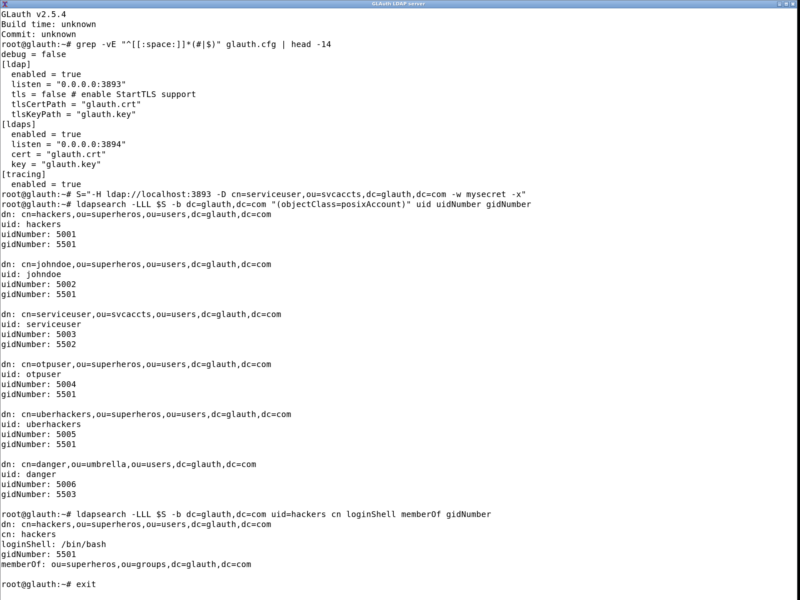
Start the server with the path to a configuration file, then test it with any LDAP client. The sample setup listens on port 3893 for LDAP and 3894 for LDAPS, with the service account that sample queries use defined in the same file. Because the whole state is a file, a throwaway instance for a test suite is a container with a config mounted into it, and tearing it down leaves nothing behind. For anything reachable from a network you should enable the LDAPS listener with a certificate rather than serve the directory in clear text.
Alternatives
- LLDAP – an LDAP server with a web interface for people who do not want to edit configuration files by hand
- Kanidm – a modern identity management server with its own client tooling and stronger opinion about how a directory should be run
- authentik – a full identity provider with single sign-on, when LDAP is only one of the protocols you need
GLAuth is the smallest thing that behaves like a directory server: one process, one file, no database to administer. For a homelab or a development environment that needs real LDAP semantics, that is usually exactly the right size.