Dockman
- Platform
- Docker Self-hosted
- Licence
- AGPL-3.0 Open source
- Website
- dockman.radn.dev/
- Source code
- github.com/RA341/dockman
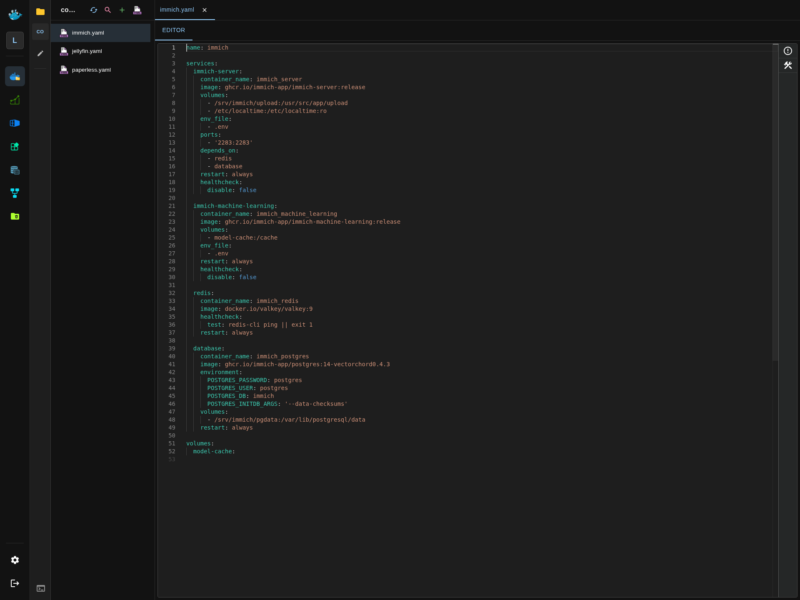
Dockman is a self-hosted web interface for people who manage their servers with Docker Compose files and would rather edit those files than click through a control panel. It watches a directory of compose stacks, lists them in a sidebar, and opens each one in a text editor in the browser — so a stack can be reviewed, changed and redeployed from any device without an SSH session. There are no nested menus and no feature tiers: the compose file stays the source of truth, and Dockman is the editor and the deploy button around it.
Key features
- Browse every compose file under a configured stack root in a file sidebar, with tabs for the ones you have open and a per-file view that remembers where you were
- Edit YAML directly in the browser with line numbers, syntax highlighting, collapsible sections and inline validation errors from the compose schema
- Bring a stack up or down with one action instead of
cd folder && docker compose up -d, and see the live state of the containers the stack created - A terminal panel inside the same page for quick checks on the host, plus keyboard shortcuts throughout (the file bar and the terminal each have their own accelerator)
- Supporting files next to the compose YAML — environment files, templates and per-directory settings — are editable from the same interface
- Aliases for files and folders, plus pinning and hiding rules, so a large stack directory stays navigable
- Splitting of oversized compose files and limits on open tabs and search results, so the UI stays responsive on big homelab directories
- Optional authentication for the web UI, and a documented path for talking to a remote Docker host through the Docker socket
How it works
Dockman is a single container. It is given the Docker socket and a directory of compose files, and it treats that directory as its workspace: everything it shows is a real file on the host, so edits made in the browser are the edits a docker compose command would see, and stacks deployed from Dockman behave exactly like stacks deployed from a shell. A small config volume keeps its own settings — aliases, pinned files, UI preferences — separate from the compose files themselves.
The most common mistake when installing it is the stack path. The absolute path must be identical in three places: the DOCKMAN_COMPOSE_ROOT environment variable, the host side of the volume mount, and the container side of that same mount. When those differ, Dockman starts but cannot find the compose files, so the sidebar comes up empty.
Installation
The quickest look at it is a throwaway container: docker run --rm -p 8866:8866 -v /var/run/docker.sock:/var/run/docker.sock ghcr.io/ra341/dockman:latest, then open http://localhost:8866. That form keeps its data inside the container, so it is for evaluation only. A permanent install mounts the stack directory and a config directory as well, for example DOCKMAN_COMPOSE_ROOT=/srv/stacks with /srv/stacks:/srv/stacks, /srv/dockman:/config and /var/run/docker.sock:/var/run/docker.sock on port 8866. There is no Debian package — the project ships the container image and documents the environment variables, authentication and remote-host setup on its own docs site.
Who it is for
Homelab owners whose whole setup is compose files, who want to fix a container while away from the desk and who find full container-management platforms heavier than the job. If you want a UI that builds containers for you, a broad platform such as Portainer or a template catalogue such as Yacht is a better fit; Dockman assumes you already write compose and just removes the SSH step.
Browse more free and open source tools in the directory, or submit a tool we have missed.