WUD (What's Up Docker?)
- Platform
- Docker Web
- Licence
- MIT Open source
- Website
- getwud.app/
- Source code
- github.com/getwud/wud
Overview
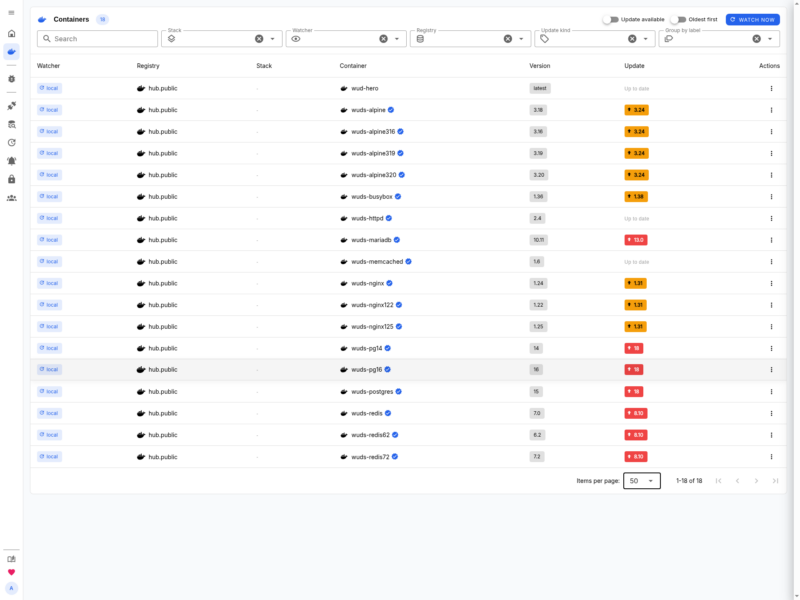
WUD (What’s Up Docker?) is a free, self-hosted container update monitor. It runs as a single Docker container, discovers the workloads on your host or cluster, asks the registries for their newest tags, and tells you – or acts for you – when a running image is behind. Instead of checking Docker Hub by hand or trusting a nightly docker pull, you get a dashboard that lists every container with its current version, the version available, and a one-click path to the update.
The project is written in TypeScript and has been developed since 2020 by its maintainer fmartinou. It works the same way whether your containers live on a single Docker host, a Docker Swarm cluster, a Kubernetes cluster or a Nomad cluster, which makes it one of the few update monitors that is not tied to the Docker socket alone.
What it does
- Watchers per orchestrator – reads local Docker through the socket, remote Docker over TCP with TLS, Docker Compose stacks, Swarm services, Kubernetes Deployments/StatefulSets/DaemonSets/CronJobs, and Nomad jobs and task groups.
- Registry comparison – inspects tags and manifests on Docker Hub, Docker Hardened Images, GHCR, AWS ECR, Google Artifact Registry, Azure ACR, GitLab, Quay and any self-hosted OCI registry such as Harbor, Nexus, Artifactory, Gitea or Forgejo.
- Semantic version analysis – classifies an available update as major, minor or patch, and can also compare image digests when a tag has been republished without a version bump.
- Notifications everywhere – Discord, Slack, Matrix, Mattermost, Rocket.Chat, Telegram, Signal, WhatsApp, Zulip and XMPP chat channels; Ntfy, Gotify, Pushover, Prowl, Bark, Apprise, Opsgenie, PagerDuty and IFTTT for alerting; SMTP mail, generic webhooks, MQTT with Home Assistant auto-discovery, Kafka, NATS and AMQP for automation.
- Automatic updates as triggers – updates a container through the Docker API, rewrites and redeploys a Compose stack, or re-submits a Nomad job, optionally gated by labels so only the containers you choose are touched.
- Per-container control with labels – the same options available as environment variables can be set per container with Docker labels or Kubernetes annotations: watch only, trigger only, ignore a tag, pin a version, enable digest watching.
- Web UI and RBAC – a browser dashboard with a containers table, per-container detail views, a registry list and trigger test buttons, backed by role-based access control (admin, read-write, read-only), personal API tokens and single sign-on through OpenID Connect (Keycloak, Authentik, Authelia and similar).
- Headless one-shot mode – the same image can run without the web server and database, print the scan result as NDJSON, and exit non-zero with
--fail-on-update, which makes it usable as a CI/CD gate or a cron job.
How it works
A watcher enumerates the containers of an environment, WUD keeps the last known image tag and digest, and a periodic scan asks each registry what that tag resolves to now. When a newer version exists the result is stored against the container and any configured triggers fire. Environment variables configure the server globally; labels and annotations override the behaviour for individual containers.
The container needs access to the Docker socket (mounted read-only is enough for watching, write access is required for the Docker update trigger), and only port 3000 has to be published for the dashboard. Docker Compose and Kubernetes users get the same feature set through the matching watcher, and a Compose or Nomad trigger is what performs the rollout when automatic updates are enabled.
Who it is for
Homelab and small-server operators who run a handful to a few hundred containers and want to know which ones are stale, without adopting a full platform like Portainer or Coolify. It is also a reasonable fit for a team that wants update checks in a pipeline rather than a dashboard, because the one-shot mode needs no persistent state.