Termix
- Platform
- Docker Web Linux macOS Windows Android iOS
- Licence
- Apache-2.0 Open source
- Website
- termix.site/
- Source code
- github.com/Termix-SSH/Termix
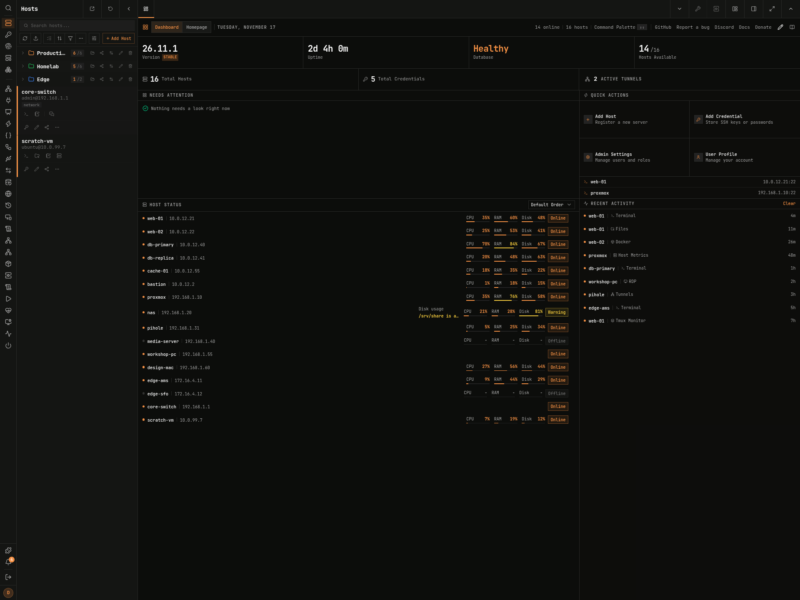
Overview
Termix is a free, open source, self-hosted server management platform built on plugins. The core keeps your hosts, credentials, users, sharing and sessions; everything else – the SSH terminal, remote desktop, file manager, Docker and host metrics – is a plugin you can turn on, off or remove without touching the core. It runs in the browser as a PWA, as a desktop app on Windows, macOS and Linux, and on iOS and Android, and its authors describe it as a free, self-hosted alternative to Termius.
Key Features
- Hosts kept in nested folders with tags, parent hosts, bulk editing and export, plus Quick Connect for one-off sessions
- Reusable credentials for passwords and SSH keys, with defaults you can set for a server, a user or a folder
- Sharing and roles at four levels – connect, view, edit and manage – for hosts, credentials and folders
- SSH terminal sessions with tabs, split screen, command history, macros and a local terminal in the desktop app
- Remote desktop to RDP, VNC, Apple Remote Desktop, RustDesk and Telnet sessions in the browser, with clipboard, file transfer and recording
- SFTP file manager, Docker and Podman management, and live CPU, memory, disk, network and GPU metrics as plugins
- Command palette on a double tap of left shift, rebindable shortcuts, themes, branding and around 30 languages
- SQLite by default with PostgreSQL and MySQL supported, per-user encryption of secrets and an optional encrypted database file
- Audit log, revocable sessions, trusted devices, API keys and passkey sign-in
Why Use It
The usual way to reach a fleet of servers is a pile of separate tools: one terminal client, one file transfer app, one remote desktop viewer, one Docker UI. Termix folds them into a single web application you host yourself, so the same host list, the same credentials and the same permissions follow you between the browser and the desktop client. Because the plugins are optional, a minimal install stays small, while an admin who wants Docker consoles and RDP sessions can enable them from the same interface.
Use Cases
- A homelab or small office where one dashboard should cover every box, VM and container
- Team access to shared servers with per-role permissions instead of a shared root password
- Managing a mixed fleet of Linux hosts, Windows desktops and network gear from a tablet or phone
- Keeping an offline copy of your host list on a laptop through the desktop sync
Requirements
The server runs as a Docker container – the image is published as ghcr.io/termix-ssh/termix and needs a single port, 8080 in the official compose example – with SQLite by default or PostgreSQL and MySQL if you prefer. Desktop and mobile clients are separate downloads. Install steps for every platform are in the project documentation at docs.termix.site.
Alternatives
- ShellHub – self-hosted SSH gateway that reaches devices behind NAT
- Apache Guacamole – clientless remote desktop gateway for RDP, VNC and SSH