OpenUEM
- Platform
- Linux Windows macOS Docker
- Licence
- Apache-2.0 Open source
- Website
- openuem.eu
- Source code
- github.com/open-uem
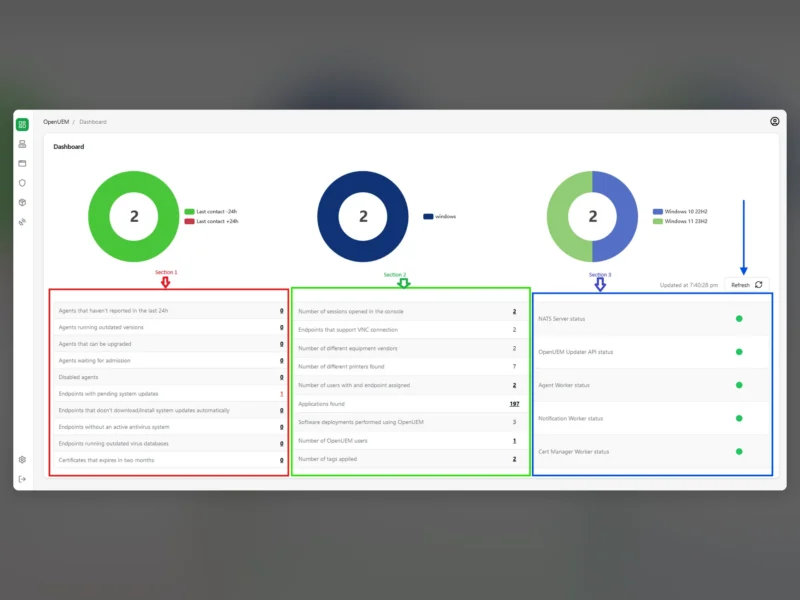
OpenUEM is an open-source, self-hosted unified endpoint manager for small and medium networks. Agents installed on Windows, Linux and macOS machines report hardware, installed software and configuration back to a central web console, so one place holds both an IT asset inventory and the tooling to act on it. The project positions itself in the same space as remote monitoring and management (RMM) suites and mobile device management tools, without the licence cost.
Inventory and endpoint details
Each endpoint reports in through an agent: Windows information is gathered with WMI, Linux information with hwinfo. The console lets you browse what an endpoint holds, including the files on its logical disks, and exposes the state of every OpenUEM component so a broken worker is visible rather than silent. New agents are admitted, enabled or disabled by an administrator, so nothing joins the inventory unreviewed.
Remote assistance and file transfer
Interactive sessions run over VNC or RDP straight from the console, and SFTP covers moving files to and from a machine. OpenUEM deliberately builds on established protocols instead of a proprietary relay, which also means existing clients and gateways interoperate with it.
Software deployment and profiles
Packages can be pushed to an endpoint with Winget on Windows, Flatpak on Linux and Homebrew on macOS, and packages deployed by OpenUEM can be removed again from the console. Profiles go further than a one-off install: they automate recurring tasks, software deployment and settings such as registry keys, local users and local groups. Day-to-day endpoint actions — Wake-on-LAN, power off, reboot — are buttons in the console.
Requirements and installation
The server side fits on modest hardware: the documentation names a desktop running Windows 10 Home, Debian/Ubuntu, RedHat/Fedora/AlmaLinux/RockyLinux, or any Docker-powered environment, and a docker compose recipe is published for the container route. Because the architecture is split into separate components — console, agent workers, a notification worker, a certificate manager and a NATS message broker — a larger network can spread the load over several hosts. The console listens on port 1323 by default and can sit behind a reverse proxy; login is by username and password, client certificate or OpenID Connect. The stack is young compared with commercial RMM platforms, so expect the occasional rough edge and read the release notes before upgrading a production install.
Related tools
- MeshCentral — remote device management with a browser-based remote desktop
- Apache Guacamole — clientless remote desktop gateway