Nexterm
- Platform
- Web Docker
- Licence
- MIT Open source
- Website
- nexterm.dev
- Source code
- github.com/gnmyt/Nexterm
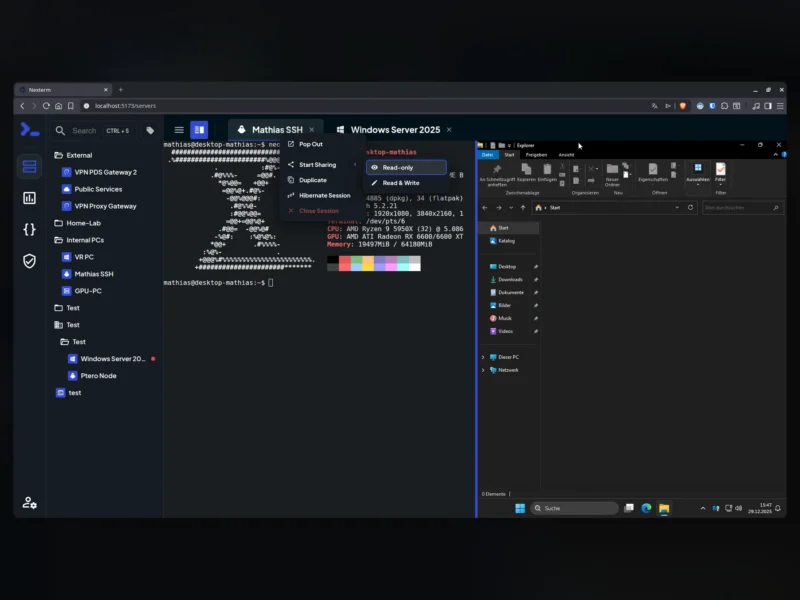
Nexterm is an open-source server management console that puts SSH, VNC and RDP sessions inside a web browser. Rather than keeping a terminal emulator, a VNC viewer and a Remote Desktop client on every laptop, you open one interface, pick a machine from the sidebar and get a working session in a tab — which makes it a practical front end for a homelab or a small team that administers a mixed set of Linux boxes, Windows servers and virtual machines.
What it does
- Sessions in the browser. SSH terminals, VNC and RDP desktops open side by side in tabs, so a Linux shell and a Windows Server desktop can be worked on in the same window.
- SFTP file manager. Browse, upload and download files on a remote host without a separate client.
- Docker. Deploy applications and manage containers from the console.
- Proxmox. Manage LXC and QEMU guests alongside the machines they run on.
- Access control. Two-factor authentication and OIDC single sign-on are built in, and organizations keep users and their servers separated.
- Snippets and monitoring. Store commands you run repeatedly, and watch CPU, memory and disk use per server.
- Session recordings. Replay what happened in a session instead of relying on a shell history that disappears with the container.
Deployment and requirements
The quickest route is the Docker image, documented at nexterm.dev/install; the full guide lives at docs.nexterm.dev. Running it from source needs Node.js 18 or newer, Yarn and the FlatBuffers compiler, because the schemas have to be generated before the development server starts. An ENCRYPTION_KEY must be present in the environment file — generate one with openssl rand -hex 32 — and the installation keeps a separate engine process that talks to the managed servers, so the web server is not the thing holding the connections. Desktop and mobile builds are offered for people who would rather use an app than a browser tab.
Who it suits
Nexterm fits the case where the machines are heterogeneous and access has to be shared: a homelab with a Proxmox host, a couple of VPS instances and one Windows box, or a small team where several people need the same servers without copying private keys around. It is MIT licensed and free to self-host, with no paid tier required for the features above. If you only need SSH access with per-person identity and policy, a purpose-built SSH gateway is a tighter fit; if the job is purely container management, a container-focused UI covers it.