Zen Browser
- Platform
- Windows macOS Linux
- Licence
- MPL-2.0 Open source
- Website
- zen-browser.app
- Source code
- github.com/zen-browser/desktop
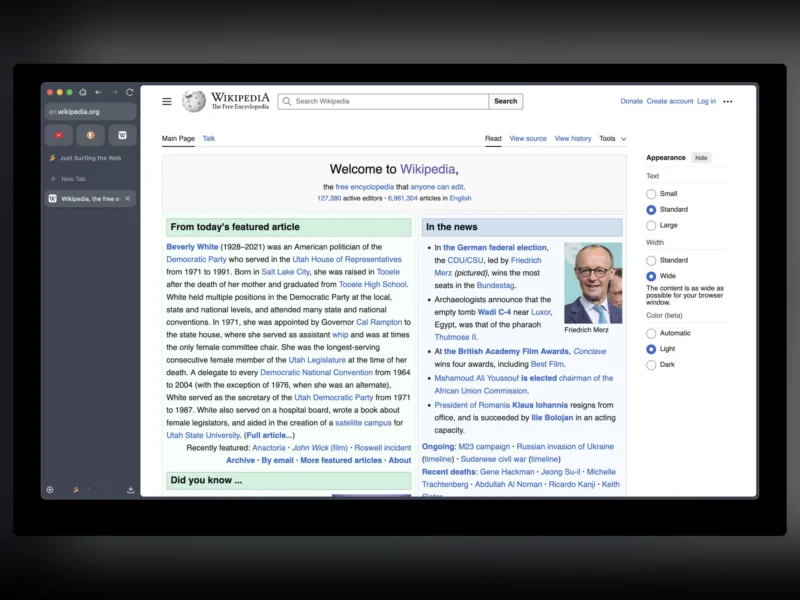
Zen Browser is a desktop browser built from Mozilla Firefox’s source and rearranged around a vertical tab sidebar instead of a tab strip. The pitch is a calmer, more keyboard-driven session: tabs live in a scrollable sidebar with pinned essentials at the top, and the project’s own additions — workspaces, split view, link previews and a CSS mod registry — sit on top of Firefox’s Gecko engine, so pages render and extensions behave as they do in Firefox.
What Zen adds to Firefox
- Vertical tabs — the sidebar replaces the horizontal tab strip entirely. The project states plainly that horizontal tabs will not be supported, because the whole interface is designed around the vertical layout.
- Workspaces — separate tab sets for work, study or personal browsing, each with its own icon and name and switchable by shortcut. A workspace can hold container tabs, so the same site can stay logged into different accounts without their cookies mixing.
- Glance — holding Alt while clicking a link (Ctrl or Shift are configurable alternatives) opens it in a floating preview over the current page rather than a new tab, with buttons to expand the preview into a tab or drop it into a split. In pinned and essential tabs, links that leave the current site open in a Glance preview automatically.
- Split View — up to four tabs side by side in one window, created by dragging a tab onto the edge of the current one or from a link’s context menu, with a drag handle for reordering panes and a single button to unsplit.
- Compact Mode — hides the toolbars and the tab sidebar so the page gets the whole window; the sidebar comes back when the pointer reaches the screen edge.
- Zen Mods — a registry of CSS-only modifications to the browser’s own interface: tab layout, colours, spacing. They are installed from inside the browser and, unlike extensions, can only restyle the browser chrome, never act on the websites you visit.
- Firefox add-ons still work — extensions install from addons.mozilla.org as normal. Firefox themes are the exception: Zen themes its interface differently, so Firefox lightweight themes are not supported.
- Window mirroring — windows on the same machine stay in step: a new window opens on the current workspace with the existing tab list, and a tab opened in several windows is still a single process rather than a duplicate.
Who it suits
Zen earns its keep for people who run dozens of tabs and want them grouped by project instead of stacked in one endless strip, and who are comfortable that the browser will look and feel different from Firefox while rendering pages identically. The trade-offs are stated by the project rather than hidden: there is no horizontal-tab mode, and no Android or iOS build is planned, so tab and bookmark continuity with a phone has to come from Firefox Sync or another service. Anyone who relies on a particular Firefox theme, or who wants the most conservative, unmodified browser, is better served by Firefox itself; anyone whose priority is hardening rather than organisation should look at LibreWolf or Tor Browser.
Releases and requirements
Zen ships for Windows (x86-64 and ARM64 installers), macOS (universal disk image) and Linux (AppImage, tarball or Flatpak from Flathub, on x86-64 and ARM64). The current release is 1.24.2b, published in November 2026; a nightly “Twilight” channel produces a fresh build each night for people who want to test features before they reach a release. The browser, its build scripts and its translations live in the GitHub repository under the Mozilla Public License 2.0.
Alternatives
- Mozilla Firefox — the upstream engine with a conventional horizontal tab strip and full Firefox theme support.
- LibreWolf — the same Firefox base hardened for privacy and fingerprinting resistance, without Zen’s interface changes.
- Min Browser — a stripped-back Electron browser for people who want fewer tabs and less chrome rather than more organisation.
- Brave Browser — Chromium-based, with its own ad and tracker blocking and a rewards programme.
- Tor Browser — hardened Firefox routed over the Tor network, for anonymity rather than workspace management.