Epiphany (GNOME Web)
- Platform
- Linux
- Licence
- GPL-3.0-or-later Open source
- Website
- apps.gnome.org/Epiphany/
- Source code
- gitlab.gnome.org/GNOME/epiphany
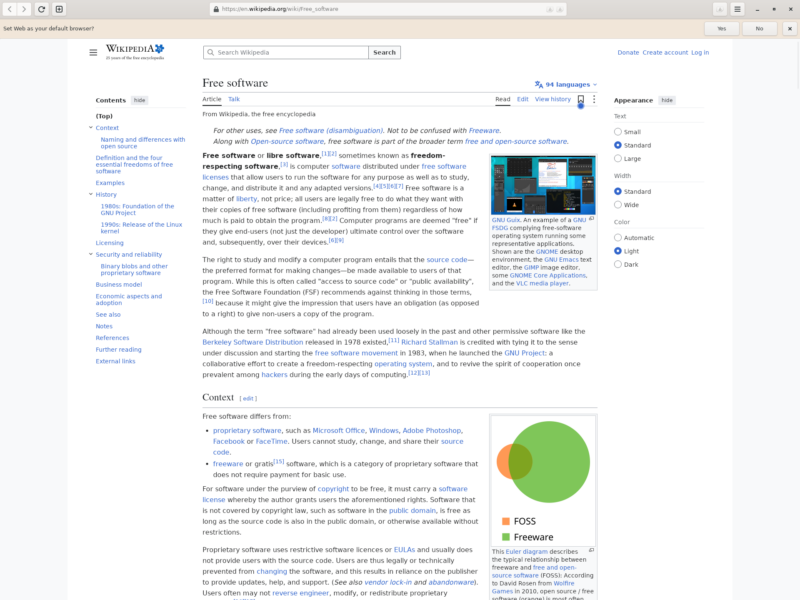
GNOME Web, better known by its code name Epiphany, is the browser that ships with the GNOME desktop: a WebKit-based browser built to match GNOME’s own interface instead of imitating Chrome or Firefox. It is deliberately opinionated about simplicity, which is either the whole point or the reason to look elsewhere, depending on what you want from a browser.
What it is
- A WebKitGTK browser, not another Chromium shell — pages are rendered by WebKit through WebKitGTK, the same engine family that powers Safari. On Linux that makes it one of the few genuinely independent engines available, which is exactly why it is useful for checking whether a site that misbehaves in Chrome is broken or merely Chrome-only.
- Native GNOME interface — built with GTK 4 and libadwaita, it follows the system light or dark theme, uses the GNOME header bar, and offers a tab overview for switching between pages.
- Web apps — any site can be installed as a standalone web app with its own launcher entry and window, without the address bar or tab strip around it.
- Reader mode — strips an article page down to the text and images, with an estimated reading time, for pages that are more clutter than content.
- Bookmarks and tagged history — bookmarks support tags, and the history view can be searched and filtered rather than only scrolled.
- Passwords in the system keyring — saved logins go through the desktop’s secret service, so there is no browser vendor account holding them.
- Session restore — reopening the browser brings back the previous windows and tabs.
- Experimental WebExtensions support — the feature exists but is off by default and incomplete. Treat Epiphany as a browser without an extension ecosystem rather than as a Chrome or Firefox replacement in that respect.
Where it fits
It is the natural default on a GNOME desktop, and a sensible second browser everywhere else: light on configuration, integrated with the system theme and keyring, and useful as a plain reading browser where the priority is the page rather than the tooling around it. It is also a convenient way to test a site in WebKit without owning a Mac.
What to expect before you switch
There is no built-in sync service, so bookmarks, history and passwords stay on the machine unless you move them yourself. The interface has far fewer knobs than Firefox or Vivaldi, the extension ecosystem is effectively empty, and heavy JavaScript applications can feel slower than they do under Chromium. The project also warns that distribution packages are often outdated and insecure, and recommends the Flatpak build as the supported way to install it. The current stable release is 51.2, published on 29 October 2026.