Listenarr
- Platform
- Linux Windows Docker
- Licence
- AGPL-3.0 Open source
- Website
- getlistenarr.com
- Source code
- github.com/Listenarrs/Listenarr
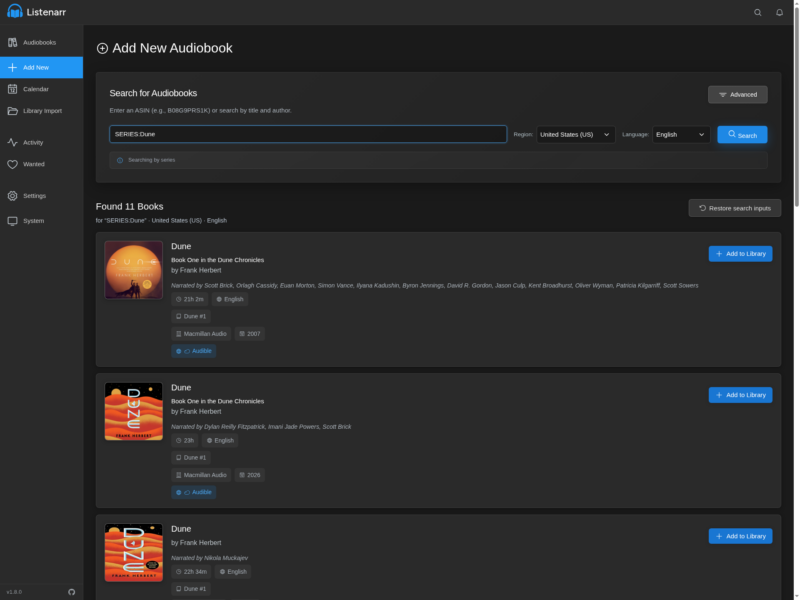
Listenarr is a self-hosted audiobook manager that automates the whole acquisition chain for an audio library. It searches your torrent and Usenet indexers for the authors and series you are following, hands the release you approve to the download client you already run, then files the finished book into a tidy folder structure. It is the same pattern Sonarr and Radarr brought to television and film, applied to audiobooks.
The service is a single web application; the recommended deployment is its container image, and prebuilt Linux and Windows executables are attached to each release.
What it does
- Indexer search — queries multiple torrent and NZB indexers at once for a book, and monitors wanted titles for new releases.
- Download hand-off — sends releases to qBittorrent, Transmission, SABnzbd or NZBGet and reports live progress and status in the web UI.
- Library filing — renames and moves finished downloads using customisable naming patterns, so books land in a predictable author/series layout.
- Metadata — enriches entries automatically from Audible and Amazon, with series and author groupings plus a release calendar and a wanted list.
- Formats — the web UI serves and organises MP3, M4A, M4B, FLAC, AAC, OGG and OPUS files, and the interface is responsive for phone, tablet and desktop use.
- Extras — an optional Discord bot and notifications, so requests and finished downloads can be announced outside the browser.
Requirements and installation
The container is the intended production route. Publish port 4545, give it a persistent config volume, and mount the audiobook library and your download client’s completed directory:
docker run -d
  --name listenarr
  -p 4545:4545
  -e PUID=1000 -e PGID=1000 -e UMASK=022
  -v listenarr_data:/app/config
  -v /path/to/audiobooks:/audiobooks
  -v /path/to/downloadclient-downloads:/downloads
  ghcr.io/listenarrs/listenarr:canary
The web app answers on port 4545. Download clients and indexers are then added under Settings, and a root folder is pointed at the mounted library so imports have somewhere to go.
What to know before you install
The project describes itself as beta software and warns that the platform is still changing, so treat library data as something to keep backed up. It was written with AI assistance by a front-end developer learning C#, and is presented as a side project rather than a product with support commitments. There is no stable image tag yet: the published tags are canary, beta and numbered pre-releases, and continuous work happens on the canary branch, so pin a version rather than tracking a moving tag on a library you care about.
Alternatives
- Audiobookshelf — a self-hosted audiobook and podcast server focused on playback apps, where Listenarr focuses on acquisition and filing; the two are commonly run side by side.
- Prowlarr — indexer manager for the *arr family when you would rather centralise indexers across several tools.
- Calibre-Web — browser front end for an existing e-book and audiobook Calibre library.