Best Self-Hosted Alternatives to Google Services
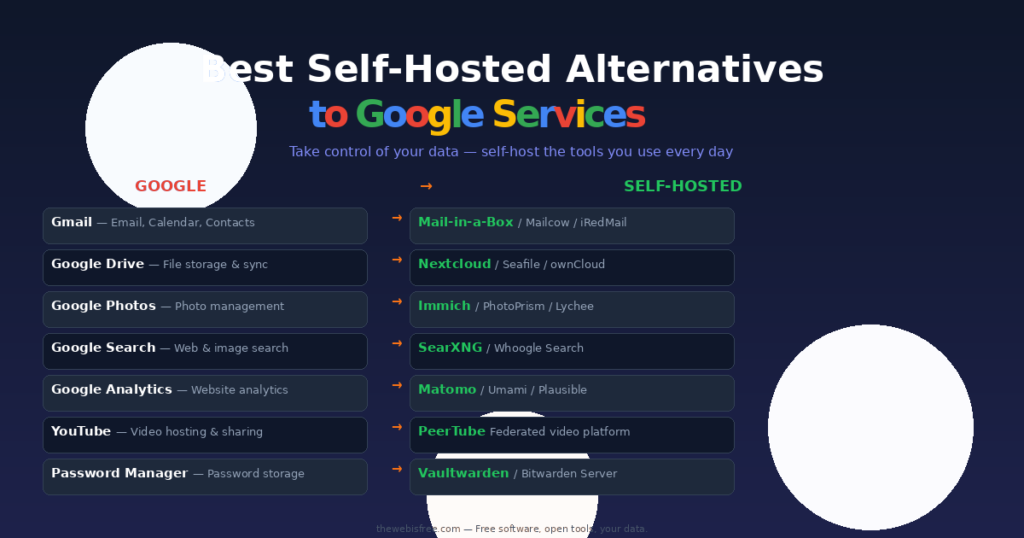
I have been using Google services for years. Gmail for email, Drive for files, Photos for pictures — it’s convenient, I’ll give them that. But the more I thought about it, the more I realised how much I was giving away. My data on their servers, their algorithms scanning my content, and the constant worry about what happens when they decide to kill a service (RIP Google Reader — I’m still not over it).
So I started self-hosting. One service at a time. And honestly, it has been liberating. Here’s my complete guide to replacing every major Google service with something you can run on your own server.
Gmail → Mail-in-a-Box / Mailcow
Self-hosting email is the hardest replacement on this list — and the most rewarding. Running your own mail server means you own your inbox, your contacts, your calendar. No scanning. No ads. No “smart” features that are really just data mining.
Mail-in-a-Box is the easiest way to get started. One setup script on a fresh Ubuntu server gives you a complete mail server: SMTP, IMAP, webmail (Roundcube), spam filtering, DNS automation, and even XMPP chat. It handles SSL certificates automatically, it sets up SPF, DKIM, and DMARC for deliverability, and it gives you a clean admin dashboard.
Mailcow is the more flexible option — it runs in Docker, supports more customisation, and has a more modern web interface (SOGo for mail, calendar, and contacts). It’s what I run now after starting with Mail-in-a-Box and wanting more control.
Both get your email delivered reliably. Neither scans your inbox for advertising data. That alone is worth the setup effort.
Set up Mail-in-a-Box — View Mailcow in our directory
Google Drive → Nextcloud
Nextcloud is the self-hosted productivity platform that replaces Google Drive and more. File sync and sharing, of course — you get desktop and mobile clients that work exactly like Dropbox or Drive. But it also does so much more.
With Nextcloud you get built-in file versioning, sharing with password protection and expiration dates, federated sharing with other Nextcloud instances, audio/video calls via Talk, and a marketplace with hundreds of apps. It’s what I use for everything from document storage to podcast hosting.
Seafile is an alternative if you want faster file sync — it uses block-level transfer which makes syncing large repositories much quicker. Its interface is simpler than Nextcloud’s, which some people prefer.
I use Nextcloud as my primary file storage and am perfectly happy with it. Version 30+ is incredibly polished.
Download Nextcloud — View in our directory
Download Seafile — View in our directory
Google Docs / Sheets → Nextcloud Office + CryptPad
Google Docs is great for collaboration, but you don’t need Google to edit documents online. Nextcloud Office integrates Collabora Online or ONLYOFFICE directly into Nextcloud — you create, edit, and collaborate on documents, spreadsheets, and presentations right in your browser, all from your own server.
Collabora Online is based on LibreOffice and handles complex documents (tracked changes, tables of contents, comments) as well as Microsoft Office does. ONLYOFFICE has better Microsoft Office compatibility — even macro-heavy Excel sheets render correctly. I use Collabora for most things and ONLYOFFICE when I need to open a complex .docx without any formatting issues.
CryptPad is a different approach — it’s an end-to-end encrypted collaboration suite. Documents, spreadsheets, kanban boards, whiteboards, code snippets — all encrypted so even the server operator can’t read them. It’s overkill for day-to-day notes, but essential when you’re working on something sensitive.
Learn about Collabora Online — View ONLYOFFICE in our directory
Set up CryptPad
Google Photos → Immich
Immich is the self-hosted photo manager I’ve been waiting for. It’s a direct Google Photos replacement — automatic backup from your phone, AI-powered search (object recognition, face detection, scene classification), timeline view with map integration, shared albums, and even a memories feature that shows you what you took on this day in previous years.
The mobile app is excellent — background backup works reliably on both iOS and Android. The web interface is fast and beautiful. And the machine learning features (powered by a local model, not the cloud) are genuinely impressive. I imported over 40,000 photos from Google Takeout and Immich handled them without a hiccup.
PhotoPrism is the alternative if you want something simpler. It has excellent organisation by date, location, and labels, plus powerful search. Its interface is more focused on browsing and curating than Immich’s phone-backup-first approach.
Immich is my recommendation for anyone leaving Google Photos. It’s the closest you’ll get to the same experience without the surveillance.
Download Immich — View in our directory
Download PhotoPrism — View in our directory
Google Search → SearXNG
SearXNG is a privacy-respecting metasearch engine you can run on your own server. It aggregates results from dozens of search engines (Google, Bing, DuckDuckGo, Qwant, and specialised ones for images, news, files, science) without sending your IP address, search history, or browser fingerprint to any of them.
You get the search quality of Google without Google tracking every query. SearXNG supports categories (general, images, videos, news, files, maps), lets you select which engines to query, and can be themed to look however you like. I use it as my default search in every browser.
Whoogle is a lighter alternative — it proxies Google search results and strips all tracking and JavaScript. Faster to set up (one Docker command), but less feature-rich than SearXNG.
Google Maps → OpenStreetMap Tools
You cannot self-host Google Maps — it’s a proprietary service with an enormous data set. But you can self-host the OpenStreetMap ecosystem, which for most use cases is just as good.
OpenStreetMap is the Wikipedia of maps — built by a community of millions of contributors. The data quality in urban areas is excellent, and routing engines like OSRM (Open Source Routing Machine) give you turn-by-turn directions. You can host your own tile server with tools like TileServer GL or use Nominatim for geocoding (turning addresses into coordinates and vice versa).
For day-to-day navigation, I use OSMAnd on my phone (it works offline with full-voice navigation) and a self-hosted tile server on my home network. It’s not as polished as Google Maps, but it respects your privacy and works completely offline.
Learn about self-hosting OSM tools
YouTube → PeerTube
PeerTube is a decentralised video platform that you can self-host. Unlike YouTube, PeerTube is federated — anyone can run a server (an “instance”), and instances communicate with each other. Your users, your rules, your content, your bandwidth.
PeerTube supports transcoding in multiple resolutions, live streaming with chat, comments, playlists, channel management, and ActivityPub federation (so PeerTube videos appear in Mastodon and other fediverse platforms). Hardware encoding support (if your server has a GPU) makes transcoding affordable for even a modest home server.
I’ve been running a small PeerTube instance alongside this site for a few months. The federation model means my videos are discoverable beyond my server while the content stays under my control.
Set up PeerTube — View in our directory
Google Analytics → Matomo / Umami
Matomo (formerly Piwik) is the most complete Google Analytics alternative. It gives you all the same reports — real-time visitors, page views, referrers, goals, funnels, heatmaps, session recordings — but all data stays on your server. No data sampling, no “hit our limits and pay more”, no Google owning your analytics data.
Matomo is more resource-intensive than Google Analytics (you need a MySQL database running), but the level of detail is unmatched. For my main site I use Matomo and it gives me better data than GA ever did.
Umami is the lightweight alternative — a simple Node.js app with a SQLite backend that gives you the essentials (page views, referrers, countries, device types, events) without the complexity of Matomo. It’s what I use for smaller sites where I just want to know “is anyone reading this?”.
Both are GDPR-compliant out of the box — no cookie banners needed because you’re not sending data to Google.
Download Matomo — View in our directory
Download Umami
Google Password Manager → Vaultwarden
Vaultwarden (formerly bitwarden_rs) is a lightweight, self-hosted implementation of the Bitwarden password manager server. It gives you the full Bitwarden experience — encrypted vault, browser extensions, mobile apps, passkey support, and sharing — without paying Bitwarden’s monthly subscription or storing your passwords on their servers.
Vaultwarden is written in Rust, uses almost no resources (it runs happily on a Raspberry Pi with 256MB RAM), and is compatible with every Bitwarden client. I have it running in Docker and my whole family uses it. The emergency access feature and the ability to create organisations for shared vaults make it a proper LastPass/Bitwarden replacement.
If you don’t mind a hosted solution, the official Bitwarden cloud offering is also excellent and open source — but Vaultwarden gives you the extra control.
Set up Vaultwarden
Download Bitwarden — View in our directory
Google Keep → Joplin / Trillium Notes
Joplin is the note-taking app that replaces Google Keep and much more. It supports Markdown, tagging, notebooks, to-do lists with checkboxes, and synchronisation via Nextcloud, Dropbox, OneDrive, or WebDAV. It has desktop apps for Windows/Mac/Linux and mobile apps for iOS/Android, all with offline support.
Joplin’s web clipper is excellent for saving articles, and its end-to-end encryption option means even the sync target can’t read your notes.
Trilium Notes is the alternative if you want a more powerful knowledge base — it supports linking between notes, scripting, relation maps, and a hierarchical structure that handles thousands of notes gracefully.
For quick notes (the Google Keep use case), Joplin with the Nextcloud sync backend works perfectly. I use it for everything from shopping lists to article drafts.
Download Joplin — View in our directory
Download Trilium Notes
Google Calendar & Contacts → Nextcloud + Baikal
Google Calendar and Google Contacts use open standards — CalDAV and CardDAV — which means any standards-compliant server can replace them. Nextcloud includes Calendar and Contacts apps out of the box, syncing with every major desktop (Thunderbird, Outlook) and mobile (iOS Calendar, DAVx⁵ on Android) client via CalDAV/CardDAV.
Baikal is a simpler option if you want just Calendar and Contacts without the rest of Nextcloud. It’s a lightweight PHP app that serves CalDAV and CardDAV from a SQLite database. Set it up in five minutes and point your devices at it.
Either way, you get fully synced calendars and contacts across all your devices — invitations, recurring events, shared calendars, the works. I’ve been using Nextcloud Calendar for years and it hasn’t missed a single appointment.
Download Nextcloud — View in our directory
Set up Baikal
Which Self-Hosted Alternative Should You Start With?
- First-timer? Start with Nextcloud — it replaces Google Drive, Docs, Calendar, and Contacts in one install.
- Photos are your priority? Immich is the one. Install it today, point your phone at it, and never think about Google Photos again.
- Privacy is your main concern? SearXNG and Vaultwarden are the quick wins — a few minutes to set up, years of privacy gain.
- Going fully independent? Mail-in-a-Box is the biggest commitment but also the biggest payoff. Own your email, own your identity.
- Want to dip your toe in? Joplin + Nextcloud gives you notes and file sync without touching your email. Gentle start to self-hosting.
I didn’t switch everything overnight. I started with Nextcloud for files, added Immich for photos, then Vaultwarden for passwords, then Matomo for analytics. Each service I migrated freed me from another piece of the Google ecosystem. A year later, my Google account is mostly dormant — and I haven’t missed it once.
If you’re running a home server or a cheap VPS, every single tool on this list will run on it. Start with one. See how it feels to own your own data again. Then do another.
Happy self-hosting!