Cronicle
- Platform
- Linux macOS
- Licence
- MIT Open source
- Website
- cronicle.net/
- Source code
- github.com/jhuckaby/Cronicle
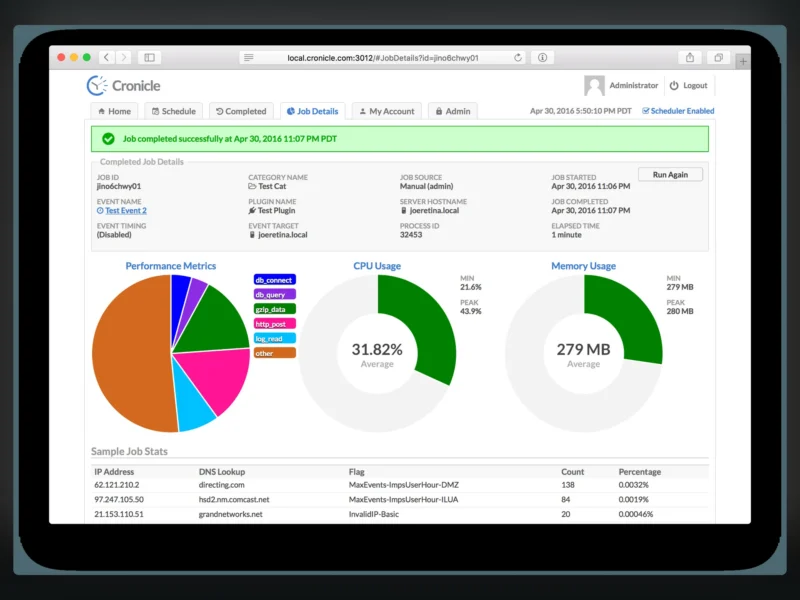
Cronicle is a self-hosted task scheduler and job runner with a web front end — a distributed replacement for cron. Instead of a crontab on every machine, you define events in a browser UI, point them at shell commands or plugins, and let a primary server dispatch the work to as many worker servers as you need. Every run streams its log live, and each job keeps its own CPU and memory history. It is written in Node.js and released under the MIT licence.
What it does
- Real cron replacement — events on cron-style or interval schedules, scheduled in multiple timezones, with optional queueing so a long running job is not started twice, plus a manual “run now” for any event.
- Multi-server scheduling — install Cronicle on each machine, let the servers discover each other, and group them into server groups that events can target. A backup server takes over scheduling automatically if the primary dies.
- Plugins in any language — a plugin is simply an executable that talks JSON to Cronicle over stdin and stdout, so a job can be a shell script, a Python script, a Node.js module or anything else that can be executed. The project ships Shell, Python, Node.js, PHP and Perl plugins to start from.
- Live visibility — watch job output as it is written rather than tailing files afterwards, follow the schedule’s upcoming run list, and read historical performance graphs per job.
- Notifications and integration — completion and failure webhooks for external systems (chat, e-mail, anything with an HTTP endpoint), a REST API for triggering events from other applications, and API keys for machine callers.
- Accounts and grouping — user accounts with bcrypt-hashed passwords and per-user privileges, and categories that group events and can colour-code them in the schedule.
How it is put together
The vocabulary is worth knowing before you install it. A server group is a set of machines that events can target; each server is the primary (keeps time and assigns jobs), a backup (promoted if the primary fails) or a worker (idle until given work). An event is a schedule entry pointing at a plugin and a target; a job is one running instance of an event. Everything — events, categories, plugins, users, API keys, server groups — can be exported and imported through the built-in command line tool.
Deployment and requirements
Cronicle runs on Linux and macOS and is installed with the project’s own installer, which fetches a release tarball and can install Node.js for you; there is no distribution package and no officially maintained container image, so the supported path is the installer on each server you want in the cluster. It keeps its data in local files under its install directory rather than in an external database, which makes a single-server install very light but means backup is a directory copy. The web UI listens on port 3012 by default. Windows is not a supported host.
Where it stands in 2026
Cronicle still works and is still maintained, but the author has moved new development to xyOps, a successor built by the same person that carries the scheduling and plugin model forward into visual workflows, server monitoring, alerting and incident response. Cronicle itself is now in maintenance mode — bug fixes and security patches rather than new features — and there is a documented migration path: export the Cronicle data, import it into xyOps, and pause Cronicle’s scheduler before switching over. Choose Cronicle when you want a small, stable, well-understood cron replacement that you can run today; choose xyOps when you want the newer platform the author is actively building. Do not run both schedulers against the same jobs at once.
Alternatives
- CTFreak — a comparable self-hosted task scheduler, proprietary and freemium, with remote execution over SSH and WinRM and a free tier capped at eight tasks.
- Apache Airflow — heavier workflow orchestration for Python-defined data pipelines, a better fit when jobs have dependencies and are really a DAG.
- Kestra — declarative YAML workflow orchestration, open source, with a broader feature set but a steeper setup than Cronicle.
- Healthchecks — not a scheduler but the natural companion: it watches the jobs you already schedule and tells you when one does not check in.