SparkyBudget
- Platform
- Web Docker
- Licence
- AGPL-3.0 Open source
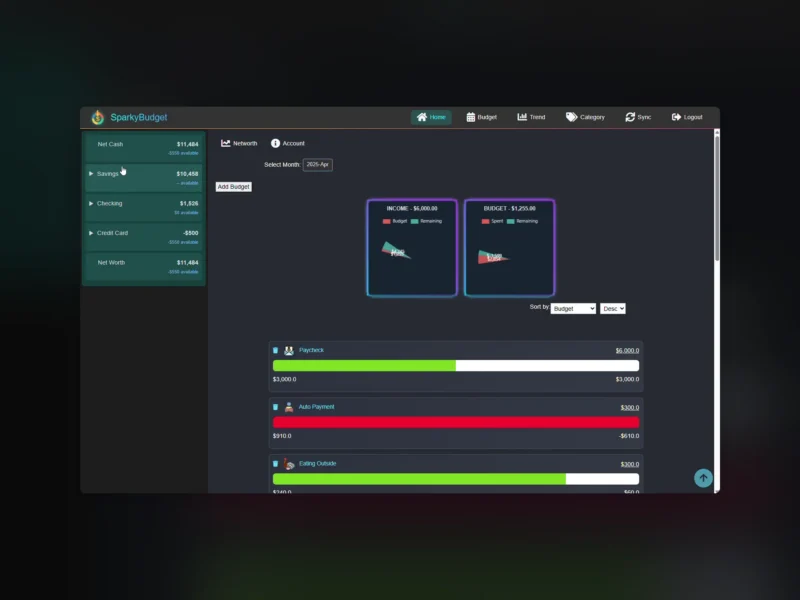
SparkyBudget is a single-user budgeting application for people who want their monthly spending in one dark-themed dashboard without an account at a budgeting service. Accounts, recurring budgets and every transaction live in a SQLite file on your own machine, and the whole thing is one Flask container: docker compose up, open port 5050, log in.
Accounts and balances
The app is organised around the accounts you actually have — checking and savings accounts, credit cards, loans — with the balance of each and a summary view that puts them side by side. A balance is not a number typed in by hand: it is derived from the transactions recorded against the account, so a corrected transaction corrects the balance with it.
Budgets, categories and subcategories
Spending is budgeted by month against categories, each carrying its own icon from a bundled set, and a category can be split into subcategories for the finer distinction. The budget view shows what was budgeted, what has been spent and what is left per category with a progress bar, and a recurring template carries the month’s plan forward so the next period starts from last month’s numbers instead of an empty sheet. Categories, subcategories and their icons are managed from inside the app rather than in a config file.
Transactions and imports
Transactions can be entered by hand or pulled from a bank through SimpleFIN Bridge: a token goes into the environment file, the scheduler processes the returned accounts, and the access URL is stored so later runs reuse it — the token itself can only be redeemed once, which is why removing that stored URL is part of resetting the connection. Beyond the bank sync, a file importer reads transaction files with pandas, detects the date format inside the data and loads the rows against accounts and categories, which covers institutions the bridge does not reach and statements exported from elsewhere.
Trends and history
A historical-trend page plots spending over time so the shape of a category is visible, and a scheduled job writes a daily balance-history record for each account — that is what makes a balance-over-time view possible instead of only today’s figure. A monthly job rolls the budget template into the new month. Both jobs run inside the container on their own schedule, so nothing has to be triggered by hand.
Running it
The published image is codewithcj/sparkybudget on Docker Hub and the compose file is a single service published on port 5050 with the project directory mounted into the container; the database, the log and the SimpleFIN token file all live in that directory, so a backup is a copy of the folder. Configuration is environment variables: SPARKY_USER, SPARKY_PASS, FLASK_SECRET_KEY, SIMPLEFIN_TOKEN, TZ and LOG_LEVEL, with secure-session and internal-HTTPS switches for a reverse-proxy setup. Setting SPARKY_DEMO=Yes generates demo accounts and transactions on first start, the quickest way to look around before importing real data, and an Unraid template is included in the repository.
What it does not do
It is a spending budgeter, not a portfolio tracker: there are no investments, the net-worth figure is the sum of the accounts you enter rather than a market-priced total, and nothing is shared between users — one login, one database of your own money. Amounts are formatted in dollars throughout, so a household in another currency reads its own figures through a dollar sign. Bank sync depends on SimpleFIN Bridge, a third-party service with its own token, so the sync is optional; everything else works from manual entry and file imports.
Alternatives
- Firefly III — much larger double-entry personal finance manager, with the reporting depth that comes with it
- Actual Budget — envelope budgeting with a local-first sync model and multi-device apps