Thrifty
- Platform
- Web Docker Self-hosted
- Licence
- BSD-2-Clause Open source
- Website
- github.com/tiehfood/thrifty
- Source code
- github.com/tiehfood/thrifty
Overview
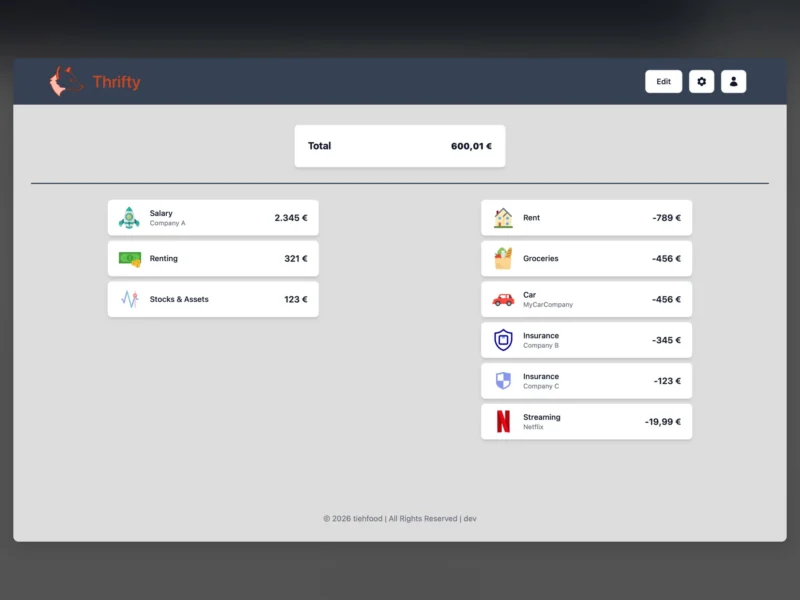
Thrifty is a self-hosted web application for tracking monthly income and expenses. It deliberately keeps the model simple: each recurring or one-off payment is a single entry with a name, an amount, a period and an optional group, and the dashboard sums them into what is coming in, what is going out and what is left for the month.
It is a two-part stack — a Go API and a SvelteKit front end — shipped as Docker images with SQLite as the only datastore, so the whole app runs from one compose file on a home server or a small VPS without an external database.
Features
- Add, edit and delete income and expense entries
- Two side-by-side rows for income and expenses that collapse into one column on narrow screens
- Payment periods other than monthly (weekly, bi-monthly, semi-annual and more) with the monthly equivalent calculated automatically
- Groups such as streaming or insurance that fold several entries into a single line on the dashboard
- SVG icons per entry, uploaded once in the settings and reused afterwards
- Configurable currency symbol through an ISO 4217 code and a choice of number formats
- Simple multi-user support, so several people can keep separate lists on one install
- REST API with interactive Swagger documentation at
/swagger/index.html
Setup
The published images run with the project’s own compose file: docker compose up -d and the interface answers on port 9090. Data lives in a SQLite database inside a Docker volume, and the compose file can be pointed at a host directory instead if you want the file visible for backups. The currency is set with CURRENCY_ISO on the UI container, and both amd64 and arm64 images are built, so a Raspberry Pi is fine.
Two container-level quirks are worth knowing before the first start: both the API and the UI listen internally on port 8080, so the UI needs LOCAL_API_PORT (or the API needs PORT) when you want to change the published port, and the app itself has no login screen — the built-in users are a way to separate lists, not an authentication layer. Put it behind a reverse proxy with its own access control if it is reachable from outside your network.
Who it is for
People who want a rough picture of their monthly cash flow rather than a full double-entry accounting package or a bank-syncing budget app. Thrifty does not import statements, does not connect to a bank and does not track individual purchases — entries are typed in by hand, which means the data never leaves the machine it runs on. If you want per-transaction budgeting or receipt scanning, a heavier tool like Firefly III or Actual Budget is a better fit.
The project is intentionally small: a first application by its author, BSD-2-Clause licensed, with roughly a hundred stars on GitHub and a steady trickle of releases.