Coder
- Platform
- Linux Docker Web
- Licence
- AGPL-3.0 Open source
- Website
- coder.com
- Source code
- github.com/coder/coder
Overview
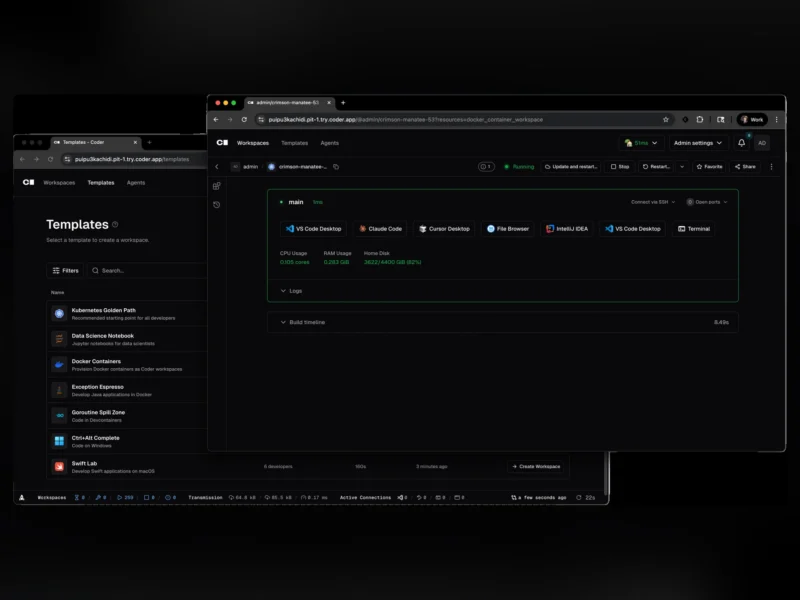
Coder is a free, self-hosted platform for cloud development environments. Instead of every developer hand-building a laptop or a pet VM, workspaces are declared as Terraform templates and provisioned on demand – an EC2 instance, a Kubernetes pod, a Docker container, whatever the template says – then reached through a secure tunnel, with idle ones shut down automatically to stop burning money.
Each workspace comes with the IDE the developer already uses: VS Code in the browser or on the desktop, JetBrains Gateway, Jupyter, or plain SSH. Administrators get a real control plane – users and groups, single sign-on, role-based access, audit logs, quotas and a CLI/API for automation. The server is a single Go binary with a PostgreSQL database, and the project also ships Coder Agents, a native AI coding agent whose loop runs in the control plane on your own infrastructure rather than in the workspace.
What it does
- Workspaces from Terraform templates – infrastructure is described once as a template (Terraform or OpenTofu) and every workspace is provisioned from it, so environments are reproducible instead of snowflakes.
- Any target, one control plane – templates can provision EC2 VMs, Kubernetes pods, Docker containers or bare-metal hosts, mixed freely in the same deployment.
- Secure connectivity without a VPN – workspaces connect out through a WireGuard tunnel, so they need no inbound ports or public addresses, and workspace proxies can be placed in each region or network.
- Cost control – workspaces, and the containers or instances behind them, shut down when idle and restart on demand.
- Editor agnostic – VS Code (desktop or browser), JetBrains Gateway and other JetBrains IDEs, Jupyter notebooks, or SSH and the CLI; the workspace keeps its files and dependencies between sessions.
- Administration built in – user and group management, SSO through OIDC or OAuth providers, role-based access control, audit logging, quotas per user or group, and a REST API plus Terraform provider for everything the dashboard does.
- Coder Agents and AI Gateway – delegate coding work to an AI agent that runs its loop in the control plane, with any model (Anthropic, OpenAI, Google, Bedrock or self-hosted), no model credentials inside workspaces, and centralised spend tracking and audit.
- Devcontainer support – templates can build on a
devcontainer.json, so a project’s existing container definition becomes the workspace image.
Deployment and requirements
Install the server with the install script – curl -fsSL https://coder.com/install.sh | sh – then run coder server; with no flags it uses a built-in database and a temporary *.try.coder.app URL so you can evaluate it in minutes. For anything real, point it at PostgreSQL 13 or newer and an external access URL: coder server --postgres-url <url> --access-url <url>. Packages and binaries are published for Linux, macOS and Windows, and a container image is available for Kubernetes. Provisioning targets need credentials for whatever they touch – a Kubernetes cluster, a cloud account, or a Docker socket – so the workspace host is usually a dedicated VM or cluster rather than a laptop.
Licence and paid tiers
Open source, AGPL-3.0. The platform is free to self-host with no user limit on the open-source edition; the vendor sells Premium tiers aimed at large organisations, which add vendor-supported features and support contracts. Nothing in the deployment above requires a paid licence.
Who it is for
Platform and DevOps teams who are tired of provisioning laptops and long-lived VMs, companies with contractors or distributed developers who need a working environment in minutes, and teams who want AI coding agents running against their own infrastructure and models instead of a vendor cloud. It expects someone comfortable with Terraform and Kubernetes, Docker or a cloud account – this is infrastructure, not a desktop app.