Qt
- Platform
- Linux Windows macOS Android iOS
- Licence
- LGPL-3.0 (also GPL-2.0, GPL-3.0; commercial licence available) Open source
- Website
- qt.io/
- Source code
- github.com/qt/qtbase
Overview
Qt is a free and open-source framework for writing an application once and running it on a desktop, a phone or a piece of embedded hardware. Haavard Nord and Eirik Chambe-Eng began it in 1991 while working on an ultrasound imaging application that had to run on Unix, Windows and the classic Mac OS; the first public release followed in 1995. What has kept the project relevant for three decades is the split between a C++ core and a declarative UI layer: the heavy logic stays in compiled code, while the interface can be described in QML and iterated without a rebuild.
Qt is developed by the Qt Group, a publicly listed Finnish company, together with the Qt Project under open-source governance. The KDE Free Qt Foundation agreement sits underneath that arrangement: if no free version were released for twelve months, the code would fall back to a BSD-style licence. The current line is Qt 6.12.0, published on 30 September 2026 and designated a Long Term Support release. Qt 6.8 LTS remains supported until October 2029, and Qt 6.11, from March 2026, is still in its standard support window.
Key Features
- Qt Widgets — the classic desktop control set: menus, dock widgets, table and tree views, item models and layout managers that produce a native-looking window on Windows, macOS and Linux.
- Qt Quick and QML — a declarative UI language with JavaScript expressions, bound properties and a GPU-accelerated scene graph, aimed at touch interfaces, animation and fluid layouts.
- Qt Core — signals and slots for object communication, an event loop, implicit sharing containers, threads, timers, JSON and XML handling, a plugin system and a property system the rest of the framework builds on.
- Batteries-included modules — Qt Network, Qt SQL with drivers for PostgreSQL, MySQL and SQLite, Qt Multimedia, Qt WebEngine (Chromium-based), Qt Bluetooth, Qt Serial Port, Qt 3D, Qt Charts, Qt Quick 3D, Qt MQTT and Qt HTTP Server.
- Design and translation tooling — Qt Designer for form layouts, Qt Linguist for translating strings, and
mocanduicfor the meta-object compiler and UI compiler that turn those files into C++. - CMake-first builds — Qt 6 is configured with CMake and requires C++17; the older qmake build system is still shipped for existing projects.
- Language bindings — Qt for Python, shipped as PySide6 and versioned in step with the framework (6.12.0 at the time of writing), exposes the same API to Python. PyQt6 from Riverbank covers the same ground under a different licence.
- Beyond the desktop — Qt for WebAssembly compiles applications to run in a browser, and Boot to Qt provides pre-built images for embedded boards and industrial hardware.
Widgets or QML — Choosing a UI Layer
Almost every first Qt decision is which of the two UI layers to use. Widgets suit document-centric desktop software: dense forms, keyboard navigation, resizable panes, platform-native menus and dialogs. QML suits anything that has to animate, adapt to a phone-sized screen or be driven by a designer rather than a C++ developer. The two can be mixed in one application, and Qt provides interop layers in both directions, but a codebase that drifts between them without a plan becomes hard to reason about. As a rule of thumb, business and engineering tools start with Widgets, consumer and embedded touch interfaces start with QML.
Open Source Licensing in Practice
Most of Qt is available under the GNU Lesser General Public License version 3, or the GPL version 3 if you prefer. LGPL use means dynamically linking against the Qt libraries, shipping the licence text, telling users where to get the Qt source, and letting them replace the library with their own build — workable for closed-source commercial applications, but a compliance step that belongs in the build process rather than in a release-week panic.
A set of add-on modules is licensed under the GPL version 3 only, which makes them unsuitable for a proprietary product unless you buy a commercial licence. That list currently covers Qt Canvas Painter, Qt CoAP, Qt Graphs, Qt GRPC, Qt HTTP Server, Qt Lottie Animation, Qt MQTT, Qt Network Authorization, Qt Qml Compiler, Qt Quick 3D, Qt Quick 3D Physics, Qt Quick Timeline, Qt Virtual Keyboard and Qt Wayland Compositor. Qt’s own tools, including Qt Creator and Qt Designer, are GPL version 3 with the Qt GPL exception, so applications built with them are not forced under the GPL. Commercial licences cover all modules, remove the LGPL relinking obligations, and add support and LTS access for older branches.
Use Cases
- Desktop applications — KDE Plasma and most KDE applications, VLC media player, OBS Studio, Telegram Desktop and Autodesk Maya are all built on Qt.
- Engineering and science — FreeCAD, QGIS and the Qt back end of Matplotlib put a Qt interface on heavy computation.
- Embedded and industrial — in-car infotainment, medical device front panels, point-of-sale terminals and industrial HMI screens, where a fixed hardware target and a long support window matter more than a web stack.
- Mobile — Sailfish OS and Plasma Mobile use Qt as their application platform, and Qt for Android and iOS ship as first-class targets.
Getting Started
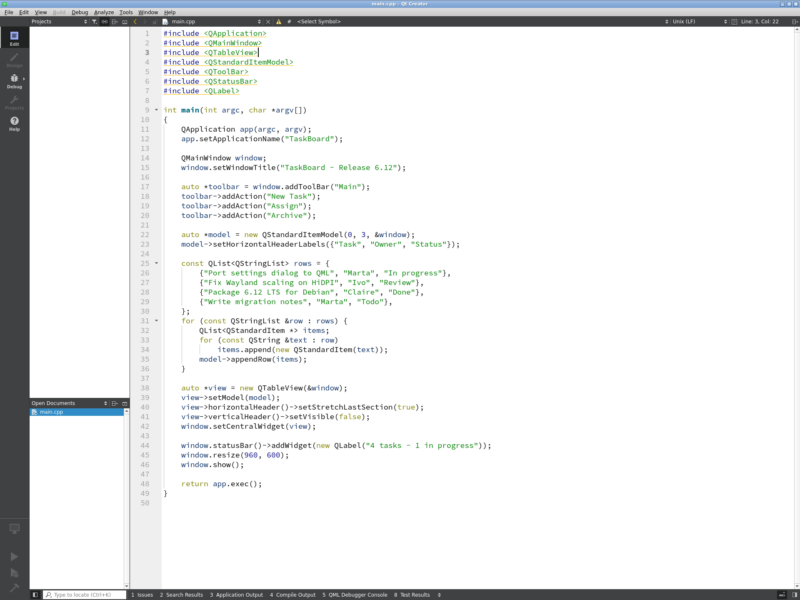
The usual route is the Qt Online Installer, which installs a specific Qt version, the matching compiler kit and Qt Creator in one pass. On Debian and Ubuntu the packaged route is quicker for a first look: sudo apt install qt6-base-dev qt6-declarative-dev gives you the libraries, CMake configuration and qmake, and sudo apt install qtcreator adds the IDE. A minimal CMake project looks like this:
cmake_minimum_required(VERSION 3.16)
project(hello LANGUAGES CXX)
set(CMAKE_CXX_STANDARD 17)
find_package(Qt6 REQUIRED COMPONENTS Widgets)
qt_standard_project_setup()
qt_add_executable(hello main.cpp)
target_link_libraries(hello PRIVATE Qt6::Widgets)
Build it with cmake -B build && cmake --build build, then run the binary. For Python, pip install PySide6 is enough to open a window from a script in a dozen lines, which makes it the fastest way to try the framework before committing to a C++ toolchain.
What Changed in 6.12
Qt 6.12 is an LTS release, so it is the branch to target for anything with a multi-year support horizon. Qt 6.11 introduced four technology-preview modules — Qt Canvas Painter for accelerated 2D painting, Qt OpenAPI for generating HTTP clients from OpenAPI descriptions, Qt TaskTree for declarative asynchronous workflows, and Qt Labs StyleKit for shared styling of Qt Quick Controls — plus Qt Core improvements such as weakly incrementable dates and range models over C++20 views. Two practical notes for anyone planning an upgrade: Qt 6.12 is the last release to support Windows 10, and the embedded targets Qt for QNX, INTEGRITY and VxWorks are only supported in LTS releases. Qt for HarmonyOS also appears among the supported mobile targets in this version.
How It Compares
GTK is the other long-established C toolkit for Linux desktops; it is a closer fit if your application is part of the GNOME stack, while Qt reaches Windows, macOS, Android and embedded targets from one codebase with more consistency. Electron and Tauri put a web interface in a native shell: fast to build for web developers, but heavier in memory and less native in feel. wxWidgets wraps native platform controls directly and stays smaller than Qt, at the cost of a thinner abstraction and fewer batteries. Flutter and Avalonia offer modern cross-platform UI with their own rendering and languages, but neither carries Qt’s industrial and embedded track record or its two-decade library ecosystem.
Learn and Get Help
The documentation at doc.qt.io is versioned, searchable and unusually complete, with an example project for nearly every class. The Qt Forum and the Qt Discord community answer day-to-day questions, bugs go to the public Jira at bugreports.qt.io, and Qt Academy hosts free courses for the framework and Qt Creator. The source itself is browsable at code.qt.io, with a read-only mirror on GitHub; KDE’s repositories are worth reading too, since they are the largest body of production Qt code in the open.