Django
- Platform
- Linux Windows macOS
- Licence
- BSD-3-Clause Open source
- Website
- djangoproject.com/
- Source code
- github.com/django/django
Overview
Django is a free, open-source web framework for Python built around one idea: a working web application should be quick to start and hard to get wrong. It was written in 2003 by Adrian Holovaty and Simon Willison at the Lawrence Journal-World newspaper, where a story could go live the same afternoon it was assigned, and it has been developed in the open ever since under the Django Software Foundation. The framework ships with the parts most projects end up assembling by hand — an object-relational mapper, database migrations, authentication, sessions, forms, templates, caching, internationalisation and a generated admin interface — so a new project begins with a data model and a page rather than a folder of wiring. Django 6.1 is the current release series and needs Python 3.12 or newer; the code is BSD 3-Clause licensed.
Key Features
- Batteries included — ORM, migrations, auth and permissions, sessions, forms, templates, caching, i18n, email, feeds and a full admin come in the core package, with no framework shopping required.
- Models and migrations — tables are Python classes, and
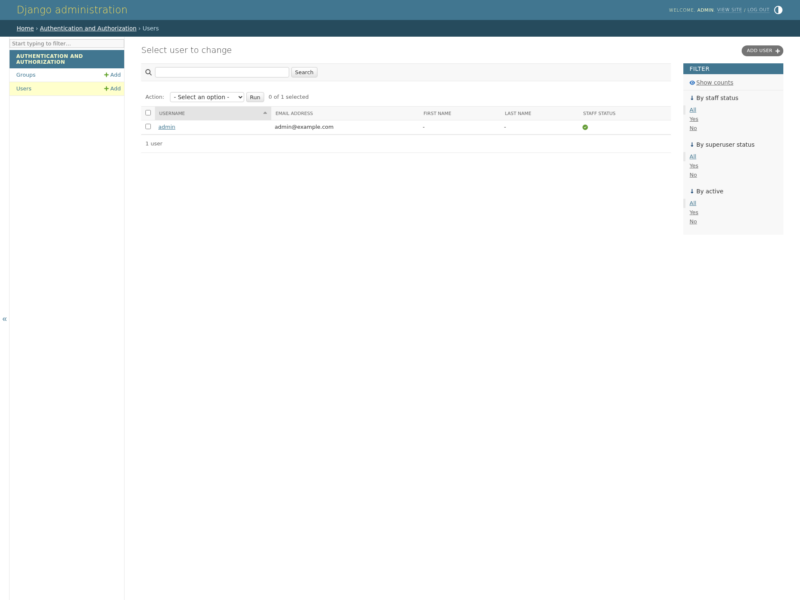
makemigrations/migrategenerate and apply schema changes in version-controlled steps. - Automatic admin — register a model and Django produces a working CRUD back office with search, filters and history, which covers most internal tooling before any front-end is written.
- URL dispatcher and views — readable named routes mapped to function-based or class-based views, with reusable mixins for the common list/detail/edit patterns.
- Forms and validation — declarative form classes handle rendering, cleaning and error messages, with CSRF protection wired in by default.
- Security defaults — protection against SQL injection, cross-site scripting, cross-site request forgery and clickjacking, plus ready-made settings for HTTPS, HSTS and secure cookies.
- Async support — ASGI servers, async views, async middleware and async ORM queries sit alongside the classic synchronous stack.
- Database freedom — first-class support for PostgreSQL, MySQL/MariaDB, SQLite and Oracle, switchable through one settings entry.
- Internationalisation — translation catalogues, locale-aware formatting and time-zone handling are part of the core, not an add-on.
Why Use Django?
Django is opinionated in the way a good colleague is: it has a convention for each of the decisions that sink a young codebase, and it applies them consistently. That makes it unusually fast to reach a usable application, and unusually easy for a team to read each other’s work — settings, models, URLs and views live in the same shape in every Django project. The payoff is not only speed but durability: Django has kept a long, documented deprecation policy across two decades of releases, so a project written years ago still runs, and the security team issues coordinated fixes for the whole supported range. Around the core sits a mature ecosystem — Django REST Framework for APIs, Wagtail and django CMS for content, Django Channels for WebSockets, and thousands of reusable apps — plus the extensive official documentation and tutorial that take a beginner from models to a deployed app.
Use Cases
- Content sites, newsrooms and publishing platforms with editorial workflows.
- SaaS products and subscription applications that need accounts, billing hooks and admin.
- REST and GraphQL APIs, typically through Django REST Framework.
- Internal tools, dashboards and back-office systems generated from models.
- Data-driven applications that combine a relational schema with scheduled jobs.
- E-commerce, booking and marketplace sites with complex permission rules.
- Learning server-side Python with a framework that already answers the structural questions.
Getting Started
Django installs from PyPI with pip install django, ideally inside a virtual environment. django-admin startproject mysite lays out the project, python manage.py migrate creates the initial database tables, and python manage.py runserver serves the welcome page at 127.0.0.1:8000. From there the official tutorial builds a working polling application step by step — models, the admin, views and templates — and the documentation covers deployment, testing and every built-in contrib app in depth. Related reading in this directory: Python, the language Django is written in.