Reaparr
- Platform
- Docker Linux Windows macOS
- Licence
- GPL-3.0 Open source
- Website
- reaparr.rocks
- Source code
- github.com/Reaparr/Reaparr
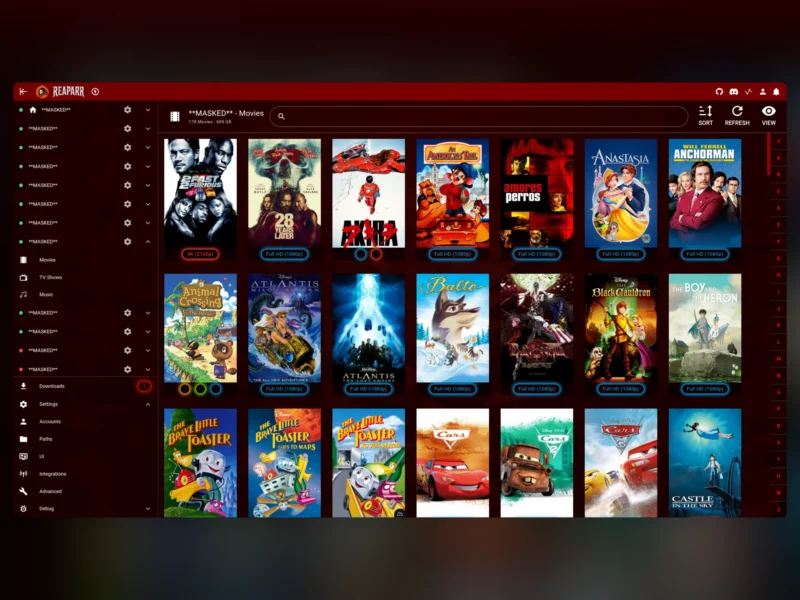
Reaparr is a self-hosted downloader for Plex. It connects to the Plex servers you already have access to, lets you browse their full libraries in a poster grid or a table, and copies the movies and TV episodes you pick into your own Plex server — no torrents, no Usenet indexers, no separate queue manager. It runs as a single Docker container with a web interface, and a setup wizard walks you through connecting a Plex account and a destination folder in a few minutes.
The point is that a shared Plex library is readable but not portable: you can stream from someone else’s server, but you cannot organise it alongside your own media, and you have no say over where the files live. Reaparr closes that gap by acting as a download manager between the two servers. It indexes what the source libraries contain, queues the items you select, downloads them in parallel with resumable transfers, and files them into whatever folder structure you choose so your own Plex library picks them up cleanly.
Key Features
- Library browsing in poster or table view — the whole catalogue of a source server is browsable as a rich poster grid or a compact, sortable table, and you can switch between the two without losing your place.
- Filter and sort by any attribute — slice a library by genre, year, resolution, country and more, so a 5,000-title server becomes navigable instead of overwhelming.
- Per-item destination folders — every download can be pointed at its own path, which is what lets movies, anime and TV land in the folder layout your Plex libraries already expect.
- Multi-threaded parallel downloads — several downloads run at once and the queue keeps moving; transfers recover automatically from interruptions instead of restarting from zero.
- Multi-account and multi-server support — connect more than one Plex account and pull from every server those accounts can reach, all from one interface.
- Sonarr and Radarr integration — Reaparr presents itself as both an indexer and a download client, so Radarr and Sonarr can add titles to their own queue and Reaparr picks the request up, downloads it and reports back.
- Setup wizard — accounts, paths, integrations and advanced options are configured through a guided first-run flow rather than a config file.
- Fully localised interface — English, French, German, Polish and more, with every screen and dialog translated.
- Runs on anything Docker runs on — x86 or ARM, on a desktop, home server, NAS, Unraid or Synology.
Why Use Reaparr
Most tools that touch a Plex library assume you own the server. Reaparr assumes the opposite: that the content you want is spread across servers other people run, and that you want a curated copy of it in yours. That single assumption changes the design — there is a cataloguing step before there is a download step, downloads are chosen item by item rather than as a bulk mirror, and the destination path is a per-item decision because your library probably separates films from series and from animation.
It also slots into an existing automation stack instead of competing with it. If you already run Sonarr and Radarr, Reaparr becomes the source they were missing: you keep your quality profiles, renaming rules and calendar notifications, and swap out the indexer-plus-torrent-client chain for a direct transfer from a server you already trust. Pair it with Prowlarr if you still want traditional indexers alongside it, or with Rangarr if you want searches across the *arr instances staggered so indexers are not hammered.
Common Use Cases
- Bringing a shared library home — copy selected films and series from a friend’s or family member’s Plex server into your own so they survive on your storage, at your quality, under your folder rules.
- Consolidating several servers — one search across every account and server you have access to instead of logging in to each one in turn.
- Automating acquisition through Radarr and Sonarr — point the *arr apps at Reaparr as an indexer and download client, and let your existing wanted-list drive the downloads.
- Filling gaps in a curated collection — filter a source library by decade, genre or resolution and pull only the titles your collection is missing.
- NAS and home-server deployments — run it next to Plex on Unraid or Synology and let downloads land directly on the array, with no desktop machine involved.
Requirements and Installation
You need a Plex account with access to at least one Plex server, and Docker on the machine that will run Reaparr. Two images are published: reaparr/reaparr:latest for the stable release and reaparr/reaparr:dev for the development branch. The documentation covers Docker Compose, Unraid, Synology, Windows and macOS installations, and the same container works on both x86-64 and ARM hosts.
The container needs a persistent volume for its database and configuration, a writable path for the downloads themselves, and a port for the web interface. From there the setup wizard handles the rest: sign in with Plex, choose the servers and libraries to index, set the default destination path, optionally hand Reaparr the address and API key of your Sonarr and Radarr instances, and start browsing. Media is written to your filesystem as ordinary files, so Plex picks them up the same way it would from any other downloader — the server is written in C# with a Vue and Nuxt web interface, and it updates its catalogue with a refresh from each source library.
Alternatives
- Sonarr and Radarr — the automation layer Reaparr feeds into; they manage what to look for, Reaparr supplies the media source.
- Prowlarr — indexer manager for the *arr stack if you are pulling from torrent and Usenet indexers rather than Plex servers.
- Tautulli — monitoring and statistics for the Plex server your downloads land on.
- Rangarr — staggers and pools searches across multiple *arr instances, useful when Reaparr is feeding several of them.