YAMLResume
- Platform
- Linux macOS Windows Docker
- Licence
- MIT Open source
- Website
- yamlresume.dev
- Source code
- github.com/yamlresume/yamlresume
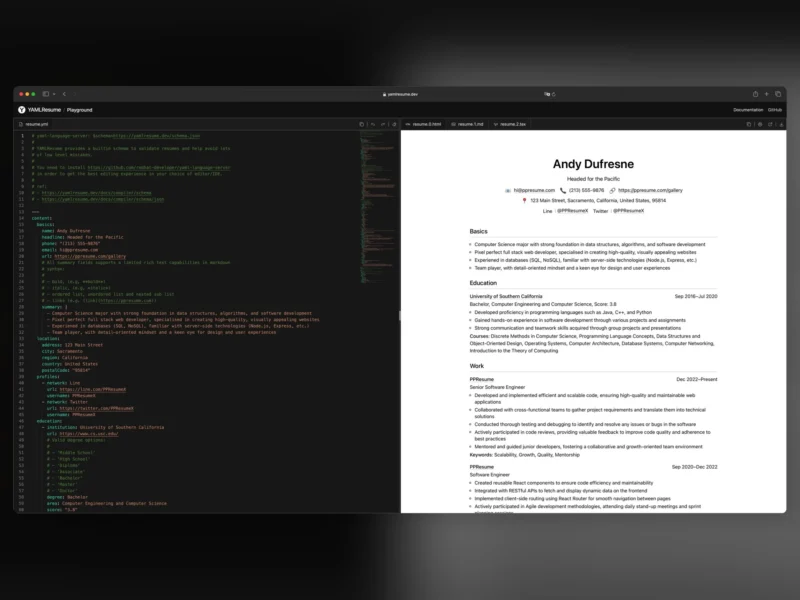
YAMLResume is an MIT-licensed command-line tool that treats a résumé the way a programmer treats code: the content lives in one plain-text resume.yml file, and a compiler parses, validates and typesets it into a finished document. It began life as the typesetting engine behind PPResume, a commercial LaTeX-based résumé builder, and was released openly so that users are not locked into a hosted service. One source file can produce a pixel-perfect PDF through LaTeX plus Markdown, responsive HTML and a Word DOCX, and because everything is text the résumé can sit in git next to the projects it describes.
Key Features
- One source, four outputs — a single
resume.ymlrenders PDF through XeLaTeX, Markdown, responsive HTML and DOCX; layouts are declared in the file itself, so several formats build in one pass. - A real compiler, not a form — Zod runtime validation and a published JSON Schema catch malformed entries before anything is typeset,
yamlresume validateprints clang-style diagnostics, and pointing the YAML header at the schema URL gives editors autocomplete and inline documentation. - Watch mode —
yamlresume devrebuilds on every save, with--no-pdfand--no-validateto keep the loop fast while drafting. - Templates — LaTeX moderncv-banking, moderncv-casual, moderncv-classic and jake; HTML calm and vscode; DOCX calm.
yamlresume templates listreports what is installed. - Layout control — rename and reorder sections, pick a template per output, and tune typography, paper size, line spacing and icon visibility without touching the content.
- Localisation — ten languages across twelve locale codes, selected with a
localeblock in the YAML. - AI-assisted drafting —
yamlresume ai generatebuilds a complete, schema-valid résumé from a job title and language, backed by OpenAI, DeepSeek, Kimi or a local Ollama model. - Straightforward distribution — npm, pnpm, yarn or bun with Node.js 22 or newer, Homebrew on macOS, or a Docker image that already ships the CLI with XeTeX and the recommended fonts.
How it works
The design follows a strict separation of concerns: content stays in YAML, structure and validation belong to the compiler, and presentation is delegated to pluggable layout engines for LaTeX, HTML, Markdown and DOCX. Building a résumé from scratch takes two Docker commands and no local LaTeX install:
docker run --rm -v $(pwd):/home/yamlresume yamlresume/yamlresume new my-resume.yml
docker run --rm -v $(pwd):/home/yamlresume yamlresume/yamlresume build my-resume.yml
That second command emits the .tex source, the PDF, a DOCX file, Markdown and HTML in a single run. yamlresume doctor checks the environment — Node version, typesetting engine, fonts — before the first build, which is the usual place a missing XeLaTeX or template dependency surfaces.
Ecosystem
- GitHub Action — rebuild and attach the PDF on every push, so the résumé in the repository is always the latest version.
- json2yamlresume — converts JSON Resume files into YAMLResume format, which makes migration from the older JSON standard a one-liner.
- @yamlresume/playground — an embeddable React editor that powers the official browser playground, for building a custom résumé editor on top of the same engine.
- @yamlresume/samples — curated starter résumés for common positions across twelve locales.
- create-yamlresume — scaffolds a project directory with the YAML file and layout configuration already in place.
Who it is for
Developers and technical writers who would rather diff their CV than drag boxes around a canvas, and who want one authoritative file that rebuilds the same document identically a year later. It is less appealing if you want a visual designer with live formatting handles, or if you are not comfortable installing Node.js or running a container — in that case a browser-based builder is the better fit.
Alternatives
- Reactive Resume — open source, self-hostable résumé builder with a visual editor, ATS checks and job application tracking
- Overleaf — collaborative LaTeX editor, if you would rather write the
.texby hand than generate it - Pandoc — general-purpose document converter for Markdown and LaTeX to PDF, DOCX and HTML