Receipt Wrangler
- Platform
- Web Docker Android iOS
- Licence
- AGPL-3.0 Open source
- Website
- receiptwrangler.io
- Source code
- github.com/Receipt-Wrangler/receipt-wrangler
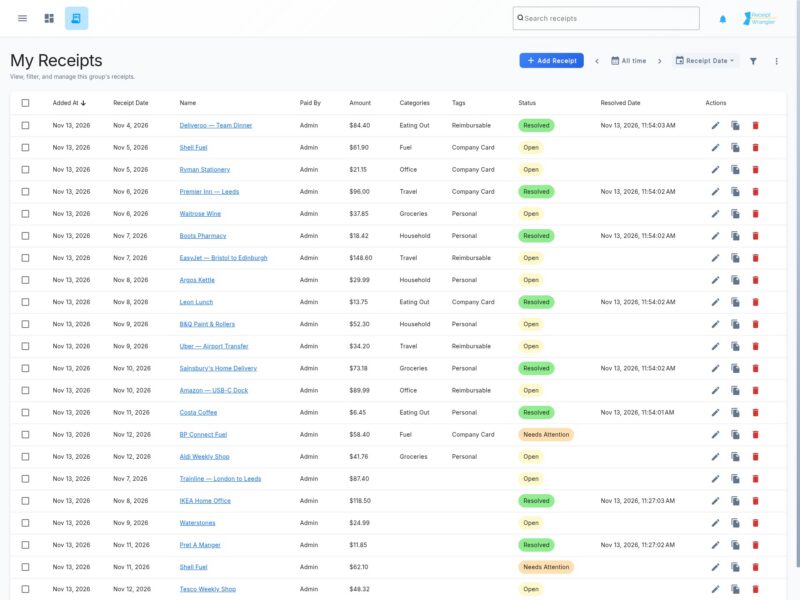
Receipt Wrangler is a self-hosted application for keeping track of receipts and working out who owes what, so the paperwork behind shared spending stays on your own server instead of in somebody else’s cloud. A receipt is photographed or uploaded, the text is read by OCR and, if you connect an AI provider, the fields are filled in for you; from there the receipt belongs to a group, can be split between the people in it, and appears on dashboards built from the widgets you choose. The project is a Go API with an Angular web interface bundled into the same container, plus a mobile app for Android and iOS, and it is published under the AGPL-3.0.
Getting a receipt into the app
Receipts can be entered by hand, uploaded as an image, or ingested from a mailbox. OCR runs locally: Tesseract is the default because it is quick, and EasyOCR can be selected instead when receipts are photographs with noise or skew, trading speed for accuracy. With an AI provider configured — OpenAI, Google Gemini, or any OpenAI-compatible endpoint such as a local Ollama instance — Quick Scan and Magic Fill turn the image into a populated receipt, accepting one image or many, plus single- and multi-page PDFs and HEIC photos alongside the usual image formats. Email integration uses an IMAP account configured as the system email; each image attachment is treated as a separate receipt, so a forwarded batch arrives as individual entries. Without an AI provider everything still works, with the fields entered manually.
Groups, splitting and permissions
Groups are the organising unit: a trip, a household, a shared flat. Only members of a group can see its receipts, members are added and removed by the group owner, and a receipt can be moved to another group while editing it. Each receipt records who paid, what it was for, the amount, the transaction date and its status, and is split among the group’s users so every person’s share is tracked and the balances reconcile. The “All” group is a view across every group you have access to, not a view of everyone’s receipts on the server. Categories, tags and custom fields let a group describe its receipts in its own terms.
Dashboards and reporting
A group can hold several dashboards, each a name and a set of widgets. The summary widget totals what you owe and what is owed to you within the group, and the filtered receipts widget stores its own filter, so a view of everything still unresolved is one widget rather than a search each time. Because dashboards belong to groups, the numbers follow the group you are currently in. Reporting sits alongside them: a report builder turns the receipts in one or more groups into a CSV, Excel or PDF file with the columns, grouping and time period you choose, saved templates generate the same report again later without rebuilding it, and a saved template can be pinned to a dashboard as a report widget.
Web interface, mobile app and API
The web interface is where receipts are reviewed, edited, split and their images viewed or downloaded, and where categories, tags, custom fields, roles and system settings are managed. The mobile app connects to your own server, shows your groups and their receipt lists, and scans receipts with the camera through a document scanner or from the gallery using quick scan. Both clients sit on top of the project’s HTTP API, documented at receiptwrangler.io, and API keys let scripts and integrations push receipts in without a browser.
Running it
Receipt Wrangler ships as one container that bundles the API and the web interface, with a database and Redis alongside it in the compose stack, and all traffic is pointed at that single container. Compose examples exist for SQLite, PostgreSQL, MySQL and MariaDB — SQLite is the quickest way to try it, but the documentation advises against it for long-term use. Redis is required, and the ENCRYPTION_KEY and SECRET_KEY environment variables must be set or the application will not start. An AI provider and an IMAP mailbox are optional additions on top of that, and a Synology walk-through covers running it on a NAS.