DumbAssets
- Platform
- Web Docker
- Licence
- GPL-3.0 Open source
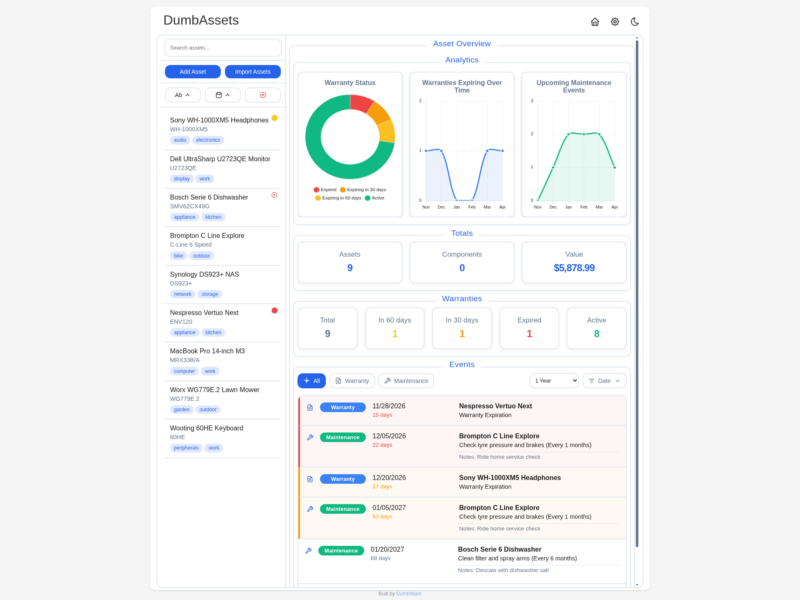
What DumbAssets is
DumbAssets is a self-hosted register of the physical things you own – the laptop, the dishwasher, the bicycle – with the warranty dates, receipts and maintenance schedule attached to each one. It is built by DumbWare.io, whose stated house style is the opposite of an enterprise asset management suite: one Node.js web application shipped as a single Docker image, with all of its state in JSON files on disk rather than a database.
The scope is a household, not a company. There is no depreciation model, no general ledger and no procurement workflow. What there is: a searchable list of assets, a tree of components and sub-components under each one, uploaded photos, receipts and manuals, warranty expiry dates, recurring maintenance reminders and a dashboard that shows what is about to run out.
The project is written in JavaScript and published on GitHub under the GNU GPL v3.0. It is part of the DumbWare.io family of deliberately small tools, sits at roughly 1,200 GitHub stars, and shipped its first release in June 2025, so it is a young project rather than a battle-worn one.
Assets, components and paperwork
Asset records. Every entry carries a name, manufacturer, model number, serial number, asset tag, description, purchase date and price, location and free-form tags. The serial and model fields are searchable, so finding the right record is a matter of typing the number off the label rather than remembering what you called it.
Components. Anything can be broken into sub-assets – the drives, memory and expansion cards inside a server, the accessories that came with a camera – and those components are organised hierarchically, with their own warranties and maintenance events.
Attachments. Photos, receipts and manuals are uploaded and stored next to the record, served from the same data directory as the JSON. That matters for resale and for warranty claims: the paperwork lives with the thing it belongs to instead of in a folder you cannot identify three years later.
Warranties, maintenance and notifications
Each asset tracks a warranty with an expiry date, or a lifetime flag for things that do not expire. The dashboard colours assets by warranty state and buckets them by how close they are to running out, which is the practical version of the question people actually ask: what is still covered, and what is about to stop being covered.
Maintenance events come in two shapes. A specific event is a single date – sharpen the mower blade before the season starts. A frequency event recurs – descale the coffee machine every three months – and the dashboard expands it into the upcoming occurrences rather than showing one stale reminder.
Notifications are delivered through Apprise, and the integration is built in rather than bolted on: you paste a Discord, ntfy, Telegram or other Apprise URL into the settings, with no separate Apprise container to run. Notifications link straight to the asset they are about, which sounds like a small thing until you are holding a phone in a kitchen trying to work out which machine needs descaling.
Interface and access control
The interface is a single-page dashboard with light and dark themes and a persistent choice between them, search across every field, tag filtering and the warranty, value and maintenance panels described above. It installs as a progressive web app, so it can be added to a phone home screen.
Access control is a PIN rather than a user system – four digits or more, compared in constant time, with session cookies, rate limiting and a lockout after repeated failures. There are no accounts, no roles and no password reset flow. That is the trade the project makes openly: a PIN is enough for a household tool on a private network, and it is not a substitute for real authentication if you expose it to the internet.
A read-only demo mode is available for anyone who wants to show the interface without letting a visitor edit it, and prices are formatted with any ISO 4217 currency code and locale you choose, so the value total reads correctly outside the United States.
Deployment and data
Deployment is one container: docker run -p 3000:3000 -v ./data:/app/data dumbwareio/dumbassets:latest, or the equivalent Compose service with a handful of environment variables for the site title, base URL, PIN, timezone, allowed origins and currency. Node.js 20 or newer is the only requirement for running it from source.
All state lives in the mounted data directory – asset and component JSON files, uploaded images and receipts, and a config file for notification settings. There is no database to back up and no migration to run; a backup is a copy of the directory, and moving to a new machine is copying it back. The flip side is that there is no multi-user concurrency control: this is a tool for one household writing to one directory.
There is no hosted or managed offering. The vendor runs a public demo instance, but your installation is the only installation, and updates, backups and exposure are yours to manage.
Where it fits
DumbAssets answers a different question from the finance apps in this directory. Firefly III and Actual Budget track money moving; DumbAssets tracks the things the money bought and what is still owed on them in warranty. Where an inventory of the contents of a home is the goal, HomeBox is the closest sibling and the more established option, with label printing and a longer feature list. For IT departments tracking equipment issued to people, Snipe-IT is the right shape of tool, with checkouts, licences and user assignment that a household register has no use for.
DumbAssets sits between them and deliberately stays small: a single container, a PIN, a JSON directory and a dashboard that tells you what expires next. If that is the whole of what you need, the simplicity is the feature; if you need multi-user access, audit trails or depreciation, it is the wrong tool and the three above are the honest alternatives.