PatchMon
- Platform
- Docker
- Licence
- AGPL-3.0 Open source
- Website
- patchmon.net
- Source code
- github.com/PatchMon/PatchMon
Overview
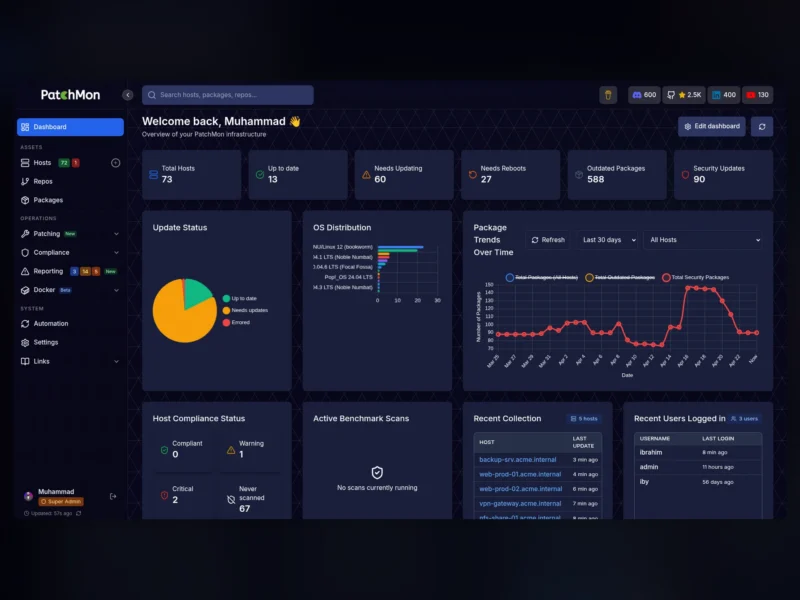
PatchMon is an open-source platform for managing Linux patching and server fleets from one web dashboard. A lightweight agent on each machine checks in over an outbound-only HTTPS and WebSocket connection — no inbound ports, SSH or VPN needed on the monitored hosts — and reports package health, compliance posture and system status to a central server that ships as a single Go binary with the React interface embedded.
Where a plain cron job stops at “run apt upgrade”, PatchMon is built around approval: a run can first be validated as a dry-run that previews the exact package transaction, then approved and executed inside a maintenance window, with the agent’s output streamed live to the browser and every action recorded against the person who approved it.
Key Features
Patch management
- Dry-run validation — preview the exact package transaction on a host before anything touches production; every run captures the full plan.
- Approve and execute — one click turns a validated dry-run into a real patch run, with a per-host audit trail of who approved what and when.
- Scheduled patching — patch policies choose immediate execution, a maintenance window or a delayed rollout: approve now, execute later.
- Live patch streaming — agent stdout and stderr streamed over WebSocket, with the ability to stop a run mid-flight.
- Selective patching — specific packages, security-only updates or a full upgrade, across apt, dnf, yum, apk, pacman and FreeBSD pkg.
- Patch history — a searchable record of every run with exit code, duration, packages touched, approver and host.
Inventory and visibility
- Per-user dashboard of drag-and-reorder cards showing fleet health, outdated packages, host status and recent patching activity.
- Host inventory with operating system, uptime, kernel, last check-in and group membership for every enrolled server.
- Package inventory across the whole fleet, filterable to outdated or vulnerable packages and to the hosts that need them.
- Repository tracking: every APT, YUM, DNF, APK and pacman repository configured on each host, in one place.
- Docker monitoring — containers, images, volumes and networks discovered automatically, with status pushed over WebSocket.
Security and compliance
- Compliance scanning with OpenSCAP CIS Benchmarks and Docker Bench for Security, with scores tracked over time and rule-level results plus remediation guidance.
- Alerting on host-down, pending server updates and agent updates, filterable by severity, type and status and assignable to team members.
- Outbound-only agents with IP allow-lists for enrolment tokens and rate limiting on every endpoint.
- Role-based access control with customisable roles and granular permissions, plus OIDC single sign-on against Authentik, Keycloak, Okta or any other provider — including automatic user provisioning, group-to-role mapping and SSO-only enforcement.
Access and integration
- Browser-based SSH terminal to any enrolled host, in direct mode or proxied through the agent so the SSH port is never exposed.
- An AI terminal assistant inside the SSH session for command suggestions and error diagnosis, backed by OpenRouter, Anthropic, OpenAI or Google Gemini.
- Custom branding (logo, favicon, colour theme, light or dark mode per user) and 33+ integrations including Proxmox LXC auto-enrolment, getHomepage and Ansible.
- REST API at
/api/v1with JWT authentication and interactive Swagger and OpenAPI documentation at/api-docs.
How It Works
The server is a Go binary built on sqlc and the chi router with a React and Vite frontend compiled into it, backed by PostgreSQL 17 and Redis 7 for queued work. Agents are separate Go binaries for Linux (amd64, 386, arm64, arm), FreeBSD (the same four architectures) and Windows (amd64, 386, arm64). Agents initiate all traffic — HTTPS for reports and configuration, WSS for live events such as patch streaming and Docker status — so whatever reverse proxy sits in front of the container has to pass WebSockets through.
Enrolment is copy-and-paste: add a host in the UI, take the generated one-line install command with its per-host API key, run it on the target server with root or sudo, and the agent registers itself. PatchMon is AGPL v3 licensed and free to self-host, with a managed cloud on a 14-day trial and a separate PRO support tier for vendor-backed SLAs.
Deployment and Requirements
The officially supported self-hosted route is Docker. An automated setup script downloads docker-compose.yml and env.example, generates all required secrets and prompts for the public URL and CORS_ORIGIN, after which docker compose up -d serves the interface on port 3000 by default; a manual compose deployment is documented as well. A one-command Proxmox LXC install is published through the Proxmox VE Helper-Scripts community catalogue. Minimum server specification is 2 vCPU, 2 GB of RAM and 15 GB of disk.
Use Cases
- Keeping a mixed Debian, RHEL and Alpine estate current without handing every operator SSH access to every box.
- Change-controlled patching: a validated dry-run, approved by a named person, executed inside a maintenance window with the transcript kept.
- CIS benchmark and Docker Bench reporting for hosts that need a recurring audit trail rather than a one-off scan.
- Fleet inventory questions — which package is installed where, which host is behind, which repository is configured.
- Small teams that want one dashboard instead of a subscription patch-management product.
Alternatives
- Ansible — run patch playbooks yourself: more flexible, but no approval workflow, inventory UI or audit trail.
- osquery — SQL-based visibility into installed packages and host state, without the patching.
- Lynis — a local hardening audit for a single host.
- OliveTin — expose shell commands as safe web buttons.
- Wazuh — a full SIEM and XDR platform with vulnerability detection built in.