oxker
- Platform
- Docker Linux macOS Windows
- Licence
- MIT Open source
- Website
- github.com/mrjackwills/oxker
- Source code
- github.com/mrjackwills/oxker
Overview
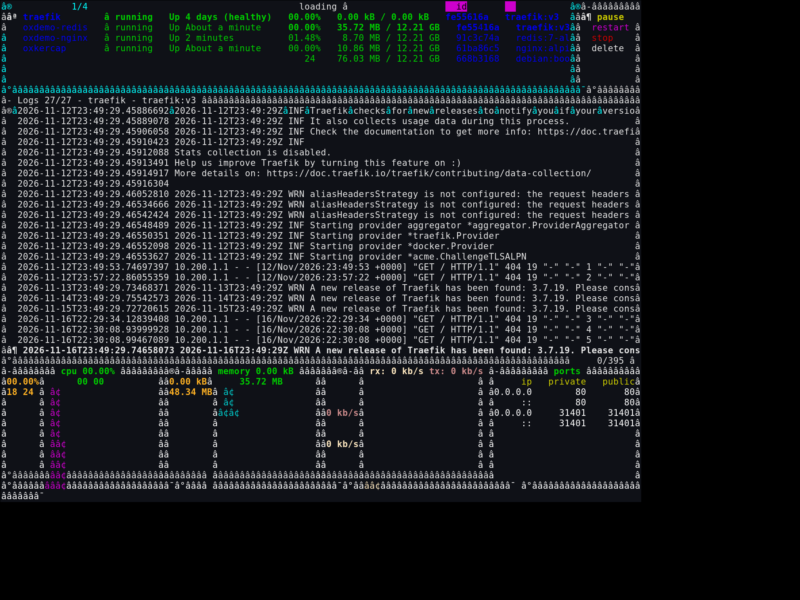
oxker is a terminal user interface for Docker. It renders the containers running on a host as a live, keyboard-driven dashboard, so you can see what is up, what is misbehaving and what it is doing right now without leaving the shell or opening a browser. It is written in Rust and built on ratatui for the drawing layer and Bollard for talking to the Docker API, which keeps it a single fast binary with no runtime service of its own.
What it shows
The main pane lists every container with its name, image, state and uptime, and the aggregation bars underneath track CPU, memory and network throughput across the whole host. Selecting a container opens its logs in a second panel with follow mode, timestamp stripping and a dedicated search mode, so hunting for one error line in a noisy service is a keystroke rather than a grep. An inspect mode exposes the container’s configuration, and an in-app help overlay lists every binding when you forget one.
What you can do from it
Containers are controlled in place: start, stop, restart and remove run against the selected row after a confirmation prompt, and exec drops you into a shell inside the container when the host supports it. Logs can be exported to disk with a single key for later reading or attachment to an incident note. Rows can be sorted by any column, filtered down to a name fragment, and the log panel can be resized or hidden depending on whether you are watching or acting.
Installation and requirements
It is distributed as a static binary for Linux and macOS on x86_64, aarch64 and 32-bit ARM, including prebuilt release archives and .deb packages, plus cargo install oxker, Homebrew on macOS, the AUR on Arch and a Nix flake. The project also publishes a container image, which is the shortest path on a Docker host: mount the Docker socket read-only and run the image, and the interface appears against the host’s own containers. A configuration file in TOML, JSON or JSONC persists the colour scheme, keymap and refresh interval, and command line flags override it for one-off runs, including a custom Docker hostname and timezone.
Where it fits
oxker suits small self-hosted boxes and remote servers reached over SSH, where a web dashboard would mean another listening port, another credential and another thing to keep patched. Running as a thin client over the Docker socket, it stays useful when the web UI is the thing that is down. On Windows terminals the exec shortcut is unavailable, and anything beyond viewing and basic lifecycle actions belongs to a fuller orchestrator.