NestJS
- Platform
- Linux macOS Windows
- Licence
- MIT Open source
- Website
- nestjs.com
- Source code
- github.com/nestjs/nest
Overview
NestJS is a free, open-source framework for building server-side applications in TypeScript on top of Node.js. Kamil Mysliwiec started the project in 2017 and still leads it; the code is MIT licensed and lives in the nestjs/nest repository. Where most Node libraries leave application structure to the developer, Nest ships an opinionated one: an application is a tree of modules, behaviour lives in providers that are handed to the classes that need them by dependency injection, and HTTP entry points are classes annotated with decorators. The design borrows heavily from Angular, which is why a Nest project reads the same way whether it is three files or three hundred.
The framework does not implement the HTTP layer itself. It runs on Express by default, can be switched to Fastify, and since the 12.3 release also ships an adapter for Node’s own node:http module. The 12.x line is current — @nestjs/core 12.4.2 and the CLI at 12.0.12 as of November 2026 — and it requires Node.js 20 or newer, with the CLI asking for 20.11.
Key Features
- Modules and dependency injection — every feature is a module that declares its controllers and providers. The container resolves the graph at boot, so a missing or circular dependency fails at startup rather than as a runtime surprise in production.
- Controllers and declarative routing —
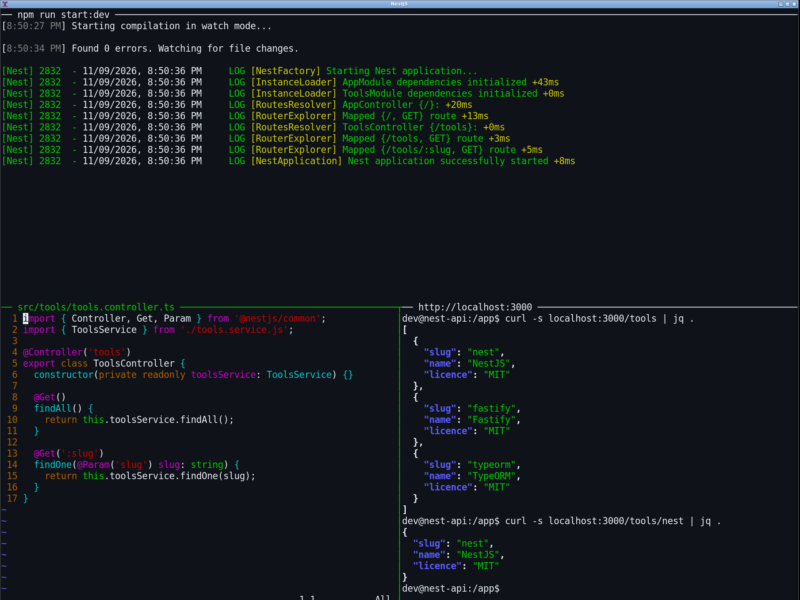
@Controller('tools')plus@Get(':slug')is a route; parameters, query strings and bodies are read with decorators instead of a hand-parsed request object. - One request pipeline, one place per concern — middleware, guards, interceptors, pipes and exception filters each own a stage of the lifecycle, so authentication, validation, logging and error shaping do not get sprinkled through handler code.
- Three interchangeable HTTP adapters — Express for ecosystem breadth, Fastify for throughput, or the native
node:httpadapter added in 12.3 for projects that want neither dependency. - The same code over other transports — microservice message handlers, WebSocket gateways and GraphQL resolvers are written with the same decorators and the same injected providers, so a service can be called over HTTP today and over Kafka or gRPC later without a rewrite.
- Generated OpenAPI —
@nestjs/swaggerturns the decorators already on the controllers into an OpenAPI document and a browsable UI, instead of a specification maintained by hand. - A real CLI —
nest new,nest generateandnest buildscaffold modules, controllers and services consistently;--minimalstarts from a single file for small services. - Testable by construction —
@nestjs/testingbuilds a module graph in isolation and lets a test swap any provider for a fake, which is the part most Node projects have to invent themselves.
How the Architecture Works
A request enters through the HTTP adapter and passes a fixed sequence: middleware first, then guards that decide whether the request may proceed, then interceptors on the way in, then pipes that validate and transform the arguments, then the controller method itself. Interceptors run again on the way out, and anything thrown along the path lands in an exception filter. Because every stage is a class the container knows about, the same guard or logging interceptor applies to every route in a module with one line of registration.
Providers are singletons by default and are injected by type, so a database client, a configuration object or an HTTP client is created once and shared. Modules also control visibility: a provider is only available to the modules that import the module exporting it, which keeps a large codebase from quietly turning into a pile of globals.
First-Party Packages
The core stays small and the maintainers publish the rest as separately versioned packages, so a project installs only what it uses. Among them: @nestjs/typeorm, @nestjs/drizzle, @nestjs/mongoose and @nestjs/sequelize for databases; @nestjs/config, @nestjs/cache-manager, @nestjs/throttler and @nestjs/terminus for configuration, caching, rate limiting and health checks; @nestjs/bullmq and @nestjs/schedule for queues and cron-style jobs; @nestjs/resilience, @nestjs/idempotency, @nestjs/outbox, @nestjs/locks and @nestjs/workflows for retries, exactly-once handling, long-running processes and transactional messaging.
The 12.x line also added packages aimed at application plumbing that used to mean assembling third-party modules by hand: @nestjs/authentication and @nestjs/authorization for sign-in, sessions, tokens, two-factor, API keys and permissions; @nestjs/mail, @nestjs/storage and @nestjs/i18n for email, file storage including S3, and translations; @nestjs/webhooks for sending and receiving them; and @nestjs/ai and @nestjs/mcp for language-model calls and Model Context Protocol servers.
Getting Started
Nothing has to be installed globally. The CLI scaffolds a project, installs its dependencies and prints the commands to run it:
npx @nestjs/cli new my-api
cd my-api
npm run start:dev
That produces a small module, a controller and a service, starts the app on port 3000 and rebuilds on save. For something smaller, nest new my-api --minimal writes a single file that can be run directly with npx tsx src/main.ts, without a build step. A complete API is a controller class, a module that declares it, and a bootstrap call to NestFactory.create() followed by app.listen().
Testing and Tooling
@nestjs/testing compiles a module the way the application would, then lets a test replace individual providers with mocks — which is why unit tests here do not need to touch a database or an HTTP port. End-to-end tests run against the real adapter through Supertest. Projects generated by the 12.x CLI ship with Vitest for both unit and e2e runs and with oxlint for linting, rather than the older Jest and ESLint defaults.
The documentation is also published as plain markdown, indexed at docs.nestjs.com/llms.txt, and a freshly generated project includes an AGENTS.md listing the first-party packages — an explicit acknowledgement that a lot of development is now done with coding agents whose training data predates those packages.
Project Health and Community
The repository carries roughly 77,000 stars and 8,700 forks on GitHub, with commits landing on the day this entry was written and a release cadence measured in days rather than quarters. Questions are handled on the project’s Discord rather than in the issue tracker, which is reserved for bug reports and feature requests, and the core team sells support, migration advice and reviews through enterprise.nestjs.com. NestJS Observe is the official hosted observability service for Nest applications, with a free tier of 300,000 events a month; it is optional and commercial, and the framework works without it.
Things to Consider
The structure that makes a large backend manageable is more ceremony than a five-route script needs — the single-file --minimal mode and the native node:http adapter exist precisely for that case. The framework is TypeScript-first: decorators and reflect-metadata are part of how it works, and although plain JavaScript is supported, the documentation and examples assume TypeScript. Node.js 20 or newer is required, which rules out older long-term-support hosts. Finally, Express remains the default adapter; teams that benchmark Fastify should switch deliberately, because plugins and middleware written for one adapter do not always carry across unchanged.
Alternatives
- FastAPI — Python framework built on type hints, with generated OpenAPI documentation and async handlers.
- Flask — minimal Python web framework that leaves structure and extension choices to the developer.
- Django — batteries-included Python framework with an ORM, admin and migrations out of the box.
- Node.js — the runtime NestJS runs on, for projects that only need the platform and its standard library.
- TypeScript — the language NestJS is written in and expects its applications to use.