MediaLyze
- Platform
- Docker Linux macOS Windows Web
- Licence
- AGPL-3.0 Open source
- Website
- medialyze.app
- Source code
- github.com/frederikemmer/MediaLyze
Overview
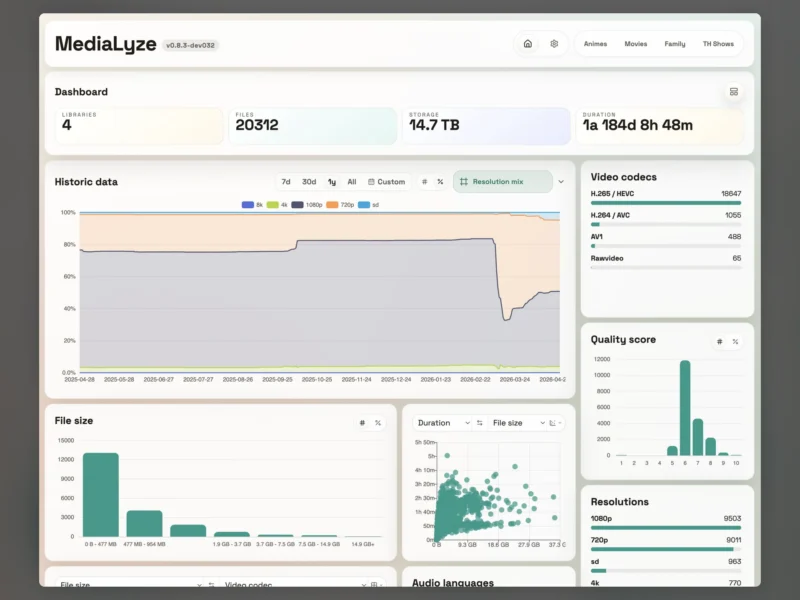
MediaLyze is a self-hosted analysis tool for large video, music and audiobook collections. Point it at your media folders and it walks every file with ffprobe, stores the technical metadata in SQLite and turns it into a dashboard you can actually read: how many files there are, how much space they take, and how the mix of resolutions, codecs, bitrates and audio languages has changed over time.
It is built by Frederik Emmer as a FastAPI backend with a React front end, shipped as a single Docker container (one image, one SQLite database, one UI) and also packaged as an Electron desktop app for Windows, macOS and Linux. There is no cloud account and no external metadata service in the loop — the collection stays on your disk and the analysis stays on your server. A transcoding module is in beta: it writes linked video variants into a separate output folder and leaves the originals untouched unless you explicitly confirm a replacement.
Key Features
- ffprobe-based technical analysis: every file is probed locally, so codec, resolution, bitrate, duration, stream and subtitle information is measured rather than guessed.
- Full and incremental scans: rescans compare
path,sizeandmtime, so a large library only re-analyses what actually changed. - Historical charts: the dashboard keeps a timeline of your metrics — resolution mix, codec distribution, quality score, file-size buckets and duration — with 7-day, 30-day, 1-year and custom ranges, which makes growth and drift visible instead of anecdotal.
- Quality scoring: normalised formats, streams, subtitles and scan jobs are distilled into a per-file quality score, useful for spotting the files that deserve a better release.
- Show and season awareness: series, seasons and bonus or extra content are recognised rather than treated as an undifferentiated pile of files.
- Glob-based ignore rules: patterns such as
*.nfoor*/Extras/*keep samples, artwork and junk out of the statistics. - Multiple libraries in one place: several media mounts are imported as separate libraries (for example films, family and TV shows) and can be compared side by side.
- Transcoding into linked variants (beta): hardware execution is required by default, output goes to a separate transcode folder, and the original file is only replaced after explicit confirmation.
- Hardware-encoder detection: probes the visible encoders and picks a working Intel Quick Sync, AMD VCN or NVIDIA path on Linux, native QSV/AMF on Windows and VideoToolbox on macOS, with a CPU-software mode only when explicitly chosen.
- Desktop builds: the Electron app runs the same stack locally, picks folders from the OS, and can point at SMB shares or Windows UNC paths — with watch mode limited to local paths and network paths falling back to scheduled scans.
- One container, no external database: compose file provided, config in a single mounted directory, plain HTTP on port 8080 for a reverse proxy to terminate.
Why Use MediaLyze
Most self-hosted media stacks can tell you what is in the library but not what the library actually consists of. MediaLyze answers the questions that come up when a collection grows: how much of it is still 720p, how many files are H.265 versus H.264, which titles score badly enough to be worth re-grabbing, and how fast the whole thing is growing. Because the numbers are measured with ffprobe from your own files and kept in your own database, they stay available offline and cannot change under you because a third-party service retired an API. It complements the *arr stack and a media server rather than replacing them — it is the measurement layer they do not provide.
Typical Uses
- Auditing a large film or TV library to see the real resolution and codec mix before buying more disks.
- Tracking storage growth and quality drift over months with the historical charts.
- Finding the files with a low quality score, then hunting a better release for exactly those.
- Planning a transcode run to standardise a library on H.265 and reclaim space, with originals kept until you confirm.
- Spotting oddities such as raw video, unusual codecs or untagged audio languages across tens of thousands of files.
- Running the desktop app against a NAS or SMB share when you would rather not deploy a container.
Getting Started
The container is the quickest path: ghcr.io/frederikemmer/medialyze:latest, published with a production docker-compose.yaml in the docker/ directory of the repository. Mount a config directory at /config, your media read-only at /media and a writable output directory at /transcode-output, then open http://localhost:8080 (set HOST_PORT to change it). The start-medialyze.sh and start-medialyze.ps1 launchers add gpus: all for NVIDIA and the /dev/dri device plus host group ids for Linux iGPUs only when the host actually has them. The service speaks plain HTTP, so put a reverse proxy in front for HTTPS. Desktop installers (.dmg, .AppImage, .exe) are on the releases page. Authentication is bring-your-own for now, so do not expose the port directly to the internet.
Licence
Free and open source, licensed under the GNU Affero General Public License v3.0 (AGPL-3.0). The full text is in the repository’s LICENSE file. As with any AGPL project, if you run a modified version as a network service for other people, you are expected to make the modified source available.