Jellystat
- Platform
- Web Docker Linux
- Licence
- MIT Open source
Overview
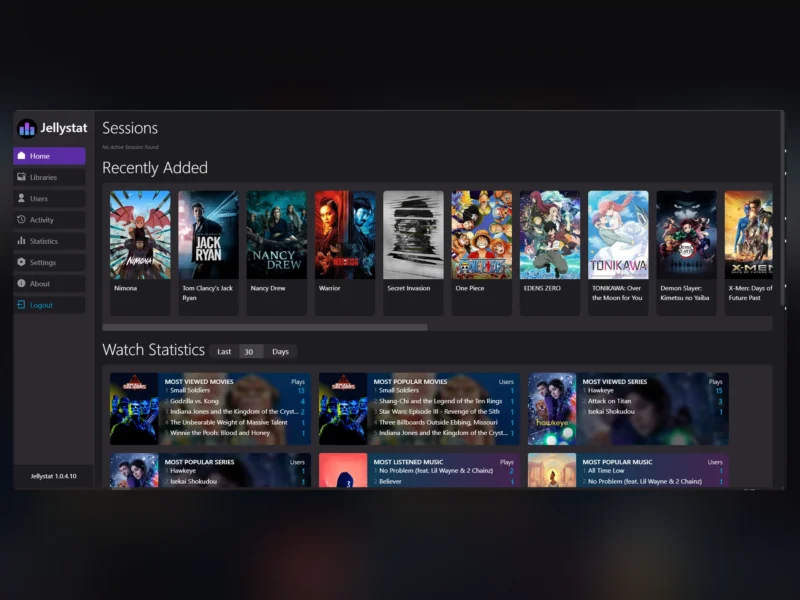
Jellystat is a self-hosted statistics and analytics dashboard for Jellyfin media servers. It reads your server’s watch data into a PostgreSQL database and turns it into a browsable picture of what your users actually watch: active sessions in real time, per-library and per-user watch statistics, most-viewed movies, series and music, and a full play history. It is an independent project written in Node.js with a React front end, released under the MIT licence.
Where Jellyfin itself tells you very little about viewing behaviour, Jellystat keeps its own record. That means historical statistics survive library rescans and can be compared over time instead of being recomputed from whatever is currently in the database.
Key Features
- Session monitoring and logging — see who is playing what right now, with the current session list on the dashboard and a log of past sessions.
- Library and user statistics — per-library and per-user breakdowns of watch activity, so shared-server admins can see who uses which collection.
- Watch history — a complete play history you can filter by user, library, media type and date range.
- Watch statistics — most viewed and most popular movies, series and music over a selectable window such as the last 30 days.
- Recently added shelf and activity feed — what landed on the server lately and what has been watched, at a glance.
- Auto-sync of library items — new media is picked up automatically so statistics stay current without manual maintenance.
- Backup and restore — export the collected data so a rebuild or migration does not cost you the history.
- Jellyfin Statistics Plugin integration — the companion plugin feeds richer client and playback detail into Jellystat.
- Emby support — pointing the
IS_EMBY_APIsetting at an Emby server makes the same dashboard work there.
Why Use Jellystat
Home media servers accumulate years of viewing history that the server UI itself barely surfaces. Jellystat answers the questions admins actually ask — which libraries nobody touches, which users are heavy viewers, what the household watched last month — and keeps those answers as persistent data rather than a transient log. It also usefully complements automation stacks: knowing what is genuinely watched is the input you need before letting cleanup or upgrade rules delete media.
Use Cases
- Shared family or household servers — see who watches what, and settle “is anyone using the kids’ films library?” with data.
- Media curation — identify unwatched content before a storage upgrade, or find the titles that justify keeping a library.
- Server health and troubleshooting — the active-session view shows transcoding clients in use at any moment, useful when diagnosing playback problems.
- Long-term record keeping — keep watch history independent of the Jellyfin database, with export for safekeeping.
Requirements and Installation
Jellystat runs as a Docker container (image cyfershepard/jellystat) and needs a PostgreSQL database of its own — the compose file typically pairs it with a postgres container. Required environment variables are the database connection (POSTGRES_USER, POSTGRES_PASSWORD, POSTGRES_IP, POSTGRES_PORT), a JWT_SECRET for session tokens and a TZ timezone. During first-run setup you point it at your Jellyfin server URL and API key. Optional settings cover SSL to Postgres, the minimum playback seconds counted, websocket session tracking, and MaxMind geolocation keys for IP-based maps. The project also builds from source with Node.js (npm install, then the client and server start scripts).
Note that the author has announced a ground-up rewrite and has paused regular updates while it is in progress; bug fixes for reproducible issues still land, and the existing release works as documented. Pin the image tag you have tested rather than tracking latest automatically.
Related: Jellyfin for the media server itself. If you run Plex instead, Tautulli fills the same statistics role there.